
 数据结构
数据结构 网络
网络 关系数据库管理系统
 操作系统
操作系统 Java
Java MS Excel
 iOS
iOS HTML
HTML CSS
CSS Android
 Python
 C 编程
C 编程 C++
C++ C#
C# MongoDB
 MySQL
MySQL Javascript
 PHP
PHP 物理学
物理学 化学
化学 生物学
生物学 数学
数学 英语
英语 经济学
经济学 心理学
心理学 社会学
社会学 服装设计
服装设计 法律学
法律学如何在 Selenium 2 中选择/获取下拉选项?
我们可以在 Selenium webdriver 中选择下拉选项。可以使用 **Select** 类来操作下拉菜单。在 HTML 中,**select** 标签用于表示下拉菜单,**option** 标签用于表示下拉菜单中的项目。
让我们研究一下下拉菜单的 HTML 结构。
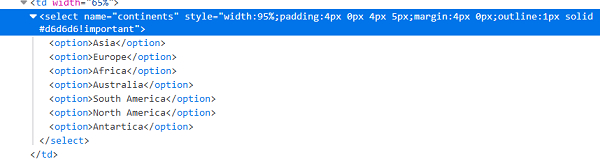
我们需要添加语句 - **import org.openqa.selenium.support.ui.Select** 来使用 Select 类的 方法。Select 类的 方法如下所示:
selectByIndex(n) - 根据下拉菜单中选项的索引选择一个选项。索引 n 作为参数传递给方法。索引从 0 开始。
语法:
Select s = Select (driver.findElement(By.name("select-dropdown")));
s.selectByIndex(0);
selectByValue(n) - 根据下拉菜单中选项的值选择一个选项。值 n 作为参数传递给方法。
语法:
Select s = Select (driver.findElement(By.name ("select-dropdown")));
s.selectByValue("value");
selectByVisibleText(n) - 根据下拉菜单中可见的文本选择一个选项。可见文本 n 作为参数传递给方法。
语法:
Select s = Select (driver.findElement(By.name ("select-dropdown")));
s.selectByValue("text");
示例
import org.openqa.selenium.By;
import org.openqa.selenium.WebDriver;
import org.openqa.selenium.WebElement;
import org.openqa.selenium.chrome.ChromeDriver;
import java.util.concurrent.TimeUnit;
import org.openqa.selenium.support.ui.Select
public class DropDownSelect{
   public static void main(String[] args) {
      System.setProperty("webdriver.chrome.driver",       "C:\Users\ghs6kor\Desktop\Java\chromedriver.exe");
      WebDriver driver = new ChromeDriver();
      driver.manage().timeouts().implicitlyWait(5, TimeUnit.SECONDS);
      String url = "https://tutorialspoint.com/selenium/selenium_automation_practice.htm";
      driver.get(url);
      // identify element
      WebElement m=driver
      .findElement(By.xpath("//*[@name='continents']"));
      //Select class for dropdown
      Select s = new Select(m);
      // select with text visible
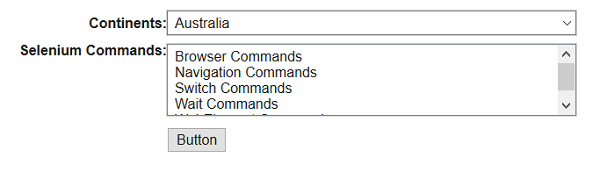
      s.selectByVisibleText("Australia");
      // select with index
      s.selectByIndex(2);
      driver.close();
   }
}
输出

更新时间: 2021年2月1日
828 次浏览

广告