
 数据结构
数据结构 网络
网络 关系数据库管理系统
 操作系统
操作系统 Java
Java MS Excel
 iOS
iOS HTML
HTML CSS
CSS Android
 Python
 C 语言编程
 C++
C++ C#
C# MongoDB
 MySQL
MySQL Javascript
 PHP
PHP 物理学
物理学 化学
化学 生物学
生物学 数学
数学 英语
英语 经济学
经济学 心理学
心理学 社会学
社会学 时尚研究
时尚研究 法律研究
法律研究如何在 Seaborn 图表中设置坐标轴标签和限制?
使用 Seaborn 创建图表将调整标签和坐标轴限制,使图表更易于理解。坐标轴标签是我们可以为 x 轴和 y 轴提供的名称,以便其他人理解图表显示的内容。我们可以通过更改坐标轴的限制来关注数据中重要的特定区域。Seaborn 包含用于设置坐标轴标签和限制的简单方法,使我们能够使图表更具信息量。在 Python 中,我们有一些内置函数,如 xlabel()、ylabel()、xlim() 和 ylim(),可用于在 Seaborn 图表中设置坐标轴标签和限制。
语法
以下语法在示例中使用:
xlabel()
ylabel()
xlabel() 和 ylabel() 是 Python 中的内置函数,用于设置 x 轴(水平)和 y 轴(垂直)上的文本。
xlim()
ylim()
xlim() 和 ylim() 是内置函数,分别用于设置 x 轴和 y 轴上的指定范围。
scatterplot()
scatterplot() 是 Python 中的内置方法,它根据数据集帮助设置图形的点图。
lineplot()
lineplot() 方法用于显示图表的区间。这是一种基本图表,主要用于机器学习数据集中。
barplot()
这是一种 Python 中的内置方法,将用于创建数据集的条形图。
histplot()
histplot() 根据数据集创建基于直方图的图表。
boxplot()
boxplot() 方法以标准化方式显示高级摘要,以根据数据集汇总数据。
算法
以下步骤为:
步骤 1 - 导入 seaborn 模块并获取对象引用为 sns
步骤 2 - 导入名为 matplotlib.pyplot 的模块并获取引用为 plt,这有助于设置 Seaborn 图表的坐标轴标签和限制。
步骤 3 - 使用随机数据创建两个列表,并分别将其存储在变量 x 和 y 中。
步骤 4 - 然后根据用户选择创建图表图形,例如 scatterplot()、lineplot()、boxplot() 和 histplot(),它们接受两个参数 - x(这将值存储为变量 x)和 y(这将值存储为变量 y)以及对象引用 sns。
步骤 5 - 接下来,使用内置方法 xlabel() 和 ylabel() 分别在水平(x 轴)和垂直轴(y 轴)上创建文本表示。
步骤 6 - 要设置图形的范围,它将使用内置方法 xlim() 用于水平轴,ylim() 用于垂直轴。
步骤 7 - 最后使用名为 show() 的方法,它将生成程序的输出。
示例 1
在以下示例中,我们将展示如何通过设置标签和限制来绘制散点图。众所周知,Seaborn 库可以方便地与 matplotlib 模块一起使用,它将根据给定的数据集生成图表。
# Scatter plot
import seaborn as sns
import matplotlib.pyplot as plt

# Generate some random data
x = [1, 2, 3, 4, 5]
y = [2, 4, 6, 8, 10]

# Create a scatter plot
sns.scatterplot(x=x, y=y)

# Set labels and limits
plt.xlabel('X-axis')
plt.ylabel('Y-axis')
plt.xlim(0, 6)
plt.ylim(0, 12)

# Show the plot
plt.show()
输出

示例 2
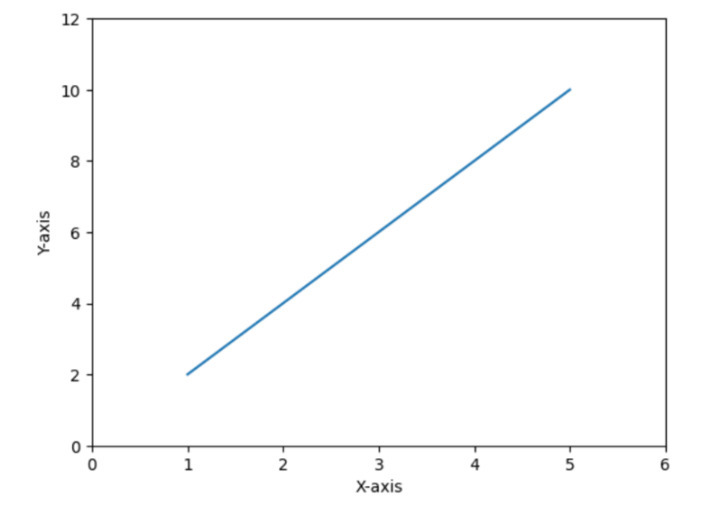
在以下示例中,我们将展示如何使用 Seaborn 图表设置标签和限制来绘制线形图。它还使用 matplotlib 子模块,即 pyplot,它有助于绘制图形并通过向其提供特定的内置方法来生成输出。
import seaborn as sns
import matplotlib.pyplot as plt

# Generate some random data
x = [1, 2, 3, 4, 5]
y = [2, 4, 6, 8, 10]

# Create a line plot
sns.lineplot(x=x, y=y)

# Set labels and limits
plt.xlabel('X-axis')
plt.ylabel('Y-axis')
plt.xlim(0, 6)
plt.ylim(0, 12)

# Show the plot
plt.show()
输出
示例 3
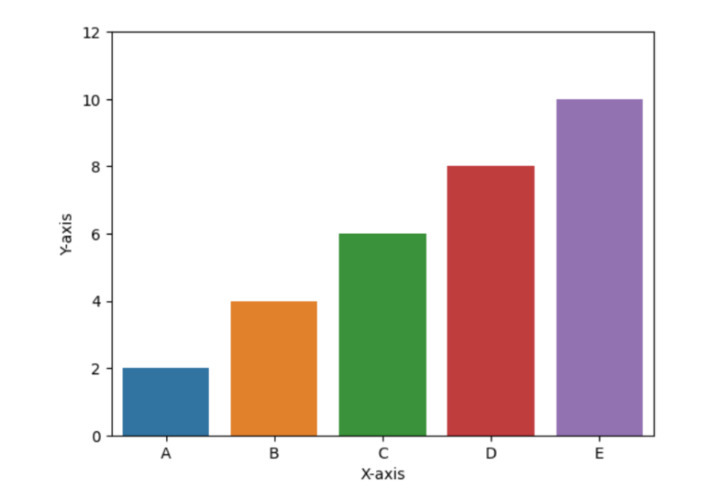
在以下示例中,我们将展示条形图barplots(),并且要设置标签和坐标轴,它必须使用以下方法:xlabel()、ylabel()、ylim()。接下来,使用 show() 方法获取结果。
# Bar plot
import seaborn as sns
import matplotlib.pyplot as plt

# Generate some random data
x = ['A', 'B', 'C', 'D', 'E']
y = [2, 4, 6, 8, 10]

# Create a bar plot
sns.barplot(x=x, y=y)

# Set labels and limits
plt.xlabel('X-axis')
plt.ylabel('Y-axis')
plt.ylim(0, 12)

# Show the plot
plt.show()
输出
示例 4
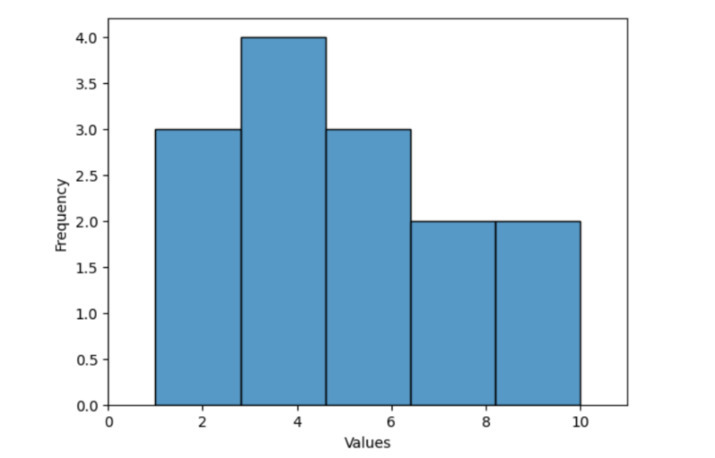
在以下示例中,我们将展示如何使用内置方法 histplot() 绘制直方图,该方法接受名为 data 的变量作为参数,该变量包含随机数据,并使用 xlabel() 和 ylabel() 等内置函数分别在水平和垂直轴上设置文本名称。然后使用 xlim() 和 ylim() 分别获取 x 轴和 y 轴上整数的范围限制。最后,它将使用 show() 方法获取程序的输出。
import seaborn as sns
import matplotlib.pyplot as plt

# Generate some random data
data = [1, 2, 3, 4, 5, 2, 3, 4, 5, 6, 7, 8, 9, 10]

# Create a histogram
sns.histplot(data)

# Set labels and limits
plt.xlabel('Values')
plt.ylabel('Frequency')
plt.xlim(0, 11)

# Show the plot
plt.show()
输出
示例 5
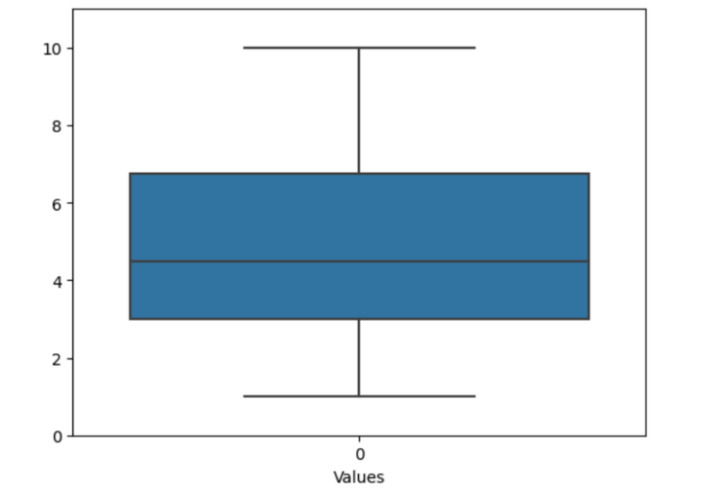
在以下示例中,我们将通过导入模块 seaborn 和 matplotlib.pyplot 开始程序,这有助于绘制图形图表。然后它使用列表中的随机数据来描绘虚假数据。接下来,使用名为 boxplot() 的方法以及对象引用 sns 创建箱线图。然后仅使用 ylim() [设置图形范围] 在垂直轴上设置限制,并仅使用 xlabel() [填写文本以在水平轴上显示某些内容] 在 x 轴上设置标签。最后,使用 show() 方法获取输出。
import seaborn as sns
import matplotlib.pyplot as plt

# Generate some random data
data = [1, 2, 3, 4, 5, 2, 3, 4, 5, 6, 7, 8, 9, 10]

# Create a box plot
sns.boxplot(data)

# Set labels and limits
plt.xlabel('Values')
plt.ylim(0, 11)

# Show the plot
plt.show()
输出
结论
我们讨论了绘制不同类型图形的各种方法,以及使用 xlim()、ylim()、xlabel() 和 ylabel() 等相同内置函数可以设置图形的名称和范围。Seaborn 图表通常用于分析各种数据可视化模式。

10K+ 次查看
