
 数据结构
数据结构 网络
网络 关系数据库管理系统
 操作系统
操作系统 Java
Java MS Excel
 iOS
iOS HTML
HTML CSS
CSS Android
 Python
 C 编程
C 编程 C++
C++ C#
C# MongoDB
 MySQL
MySQL Javascript
 PHP
PHP 物理
物理 化学
化学 生物
生物 数学
数学 英语
英语 经济学
经济学 心理学
心理学 社会学
社会学 服装设计
服装设计 法律研究
法律研究如何在 Angular 8 中使用指令?
指令在 Angular 8 中是可以在模板中为元素添加新行为的类。指令用于操作 DOM。我们可以使用指令来更改 DOM 元素的行为和外观。简单来说,我们可以使用 HTML 来使用指令。
使用指令,我们可以实现可重用性、可读性和可维护性。指令将在整个应用程序中提供高水平的可重用性。这将有助于大型应用程序,例如许多地方需要相同的功能。
指令有三种类型:
组件指令
属性指令
结构指令
我们还可以根据需要创建自定义指令。使用 @Directive 装饰器,我们将创建自定义指令。
让我们详细了解每种指令。
组件指令
组件指令是带有模板的指令。这些用于主类中。这包含有关如何在运行时处理和使用组件的详细信息。
结构指令
结构指令用于更改 DOM 元素的设计模式。使用这些指令,我们可以重新设计和重新装饰 DOM 元素。我们可以使用结构指令来操作和构建 DOM。内置指令例如 ngIf、ngFor 和 ngSwitch。
在代码中使用结构指令时,我们在其前面使用 * 符号。
Angular *ngIf 指令
ngIf 指令将根据布尔值(即 true 或 false)显示 DOM。它允许我们添加或删除 DOM 元素。
示例
在 app.component.html 文件中添加代码。例如:
<div>
   <hp>Structural Directives</p>
   <div *ngIf="true">
      <p>Text will be displayed</p>
   </div>
   <div *ngIf="false">
      <p>Text will be hidden</p>
   </div>
</div>
在app.component.ts文件中。无需编写,保持如下
import { Component } from "@angular/core";
@Component({
   selector: "app-root",
   templateUrl: "./app.component.html",
   styleUrls: ["./app.component.css"]
})
export class AppComponent {}
输出
Structural Directives
Text will be displayed
Angular *ngFor 指令
ngFor 指令用于对来自集合的每个项目重复 HTML 模板一次。
示例
在app.component.html文件中添加代码
<div>
   <p>Strutural Directives</p>
   <div *ngFor="let fruit of names">
      <p>{{ fruit }}</p>
   </div>
</div>
在app.component.ts文件中定义名称
import { Component } from "@angular/core";
@Component({
   selector: "app-root",
   templateUrl: "./app.component.html",
   styleUrls: ["./app.component.css"]
})
export class AppComponent {
   names = ["Banana", "Grapes", "Orange", "Mango", "Apple"];
}
输出
Strutural Directives
Banana
Grapes
Orange
Mango
Apple
示例
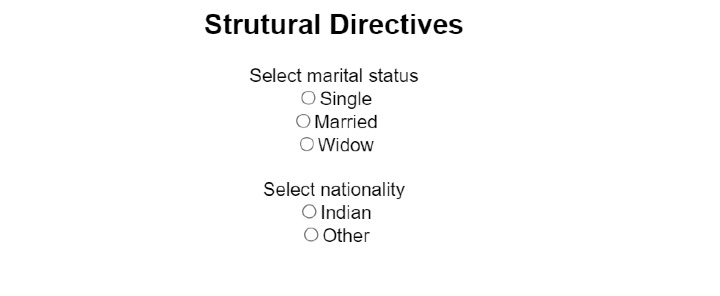
在app.component.html文件中添加代码。例如:
<div>
   <p>Strutural Directives</p>
   <label>Select marital status</label>
   <div *ngFor="let s of status">
      <input type="radio" [value]="s" id="{{s}}" />
      <label for="{{s}}">{{s}}</label>
   </div>
   <br />
   <label>Select nationality</label>
   <div *ngFor="let n of nationality">
      <input type="radio" [value]="n" id="{{n}}" />
      <label for="{{n}}">{{n}}</label>
   </div>
</div>
在app.component.ts文件中定义状态和国籍,例如
import { Component } from "@angular/core";
@Component({
   selector: "app-root",
   templateUrl: "./app.component.html",
   styleUrls: ["./app.component.css"]
})
export class AppComponent {
   status = ["Single", "Married", "Widow"];
   nationality = ["Indian", "Other"];
}
Angular ngSwitch 指令
ngSwitch 指令用于在 ngSwitch 内部的表达式定义的多个 case 之间显示。如果没有任何表达式匹配,它将显示默认值。
示例
在 app.component.html 中编写代码。例如:
<div>
   <p>Strutural Directives</p>
   <div [ngSwitch]="case">
      <div *ngSwitchCase="0">Display 0</div>
      <div *ngSwitchCase="1">Display 1</div>
      <div *ngSwitchCase="2">Display 2</div>
      <div *ngSwitchDefault>Display</div>
   </div>
</div>
在app.component.ts文件中定义 case 值,例如
import { Component } from "@angular/core";
@Component({
   selector: "app-root",
   templateUrl: "./app.component.html",
   styleUrls: ["./app.component.css"]
})
export class AppComponent {
   case = "1";
}
输出
Strutural Directives
Display 1
属性指令
属性指令用于更改 DOM 元素的外观和行为。例如,ngClass 和 ngStyle。
示例:ngClass 指令
ngClass 指令用于添加或删除 HTML 元素的类。
在app.component.html文件中
<div>
   <p>Attribute Directives</p>
   <p [ngClass]="'value > 10 ? showRed : showGreen'">{{ value }}</p>
</div>
在app.component.ts文件中,为 value 变量分配一些数字。例如:
import { Component } from "@angular/core";
@Component({
   selector: "app-root",
   templateUrl: "./app.component.html",
   styleUrls: ["./app.component.css"]
})
export class AppComponent {
   value: number = 8;
}
在app.component.css文件中,设置一些颜色以便于识别输出
.showRed{
   font-weight: bold;
   color: red;
}
.showGreen{
   font-weight: bold;
   color: green;
}
输出
Attribute Directives
8
如果我们给出的值大于 10,则输出将以红色显示。
示例:ngStyle 指令
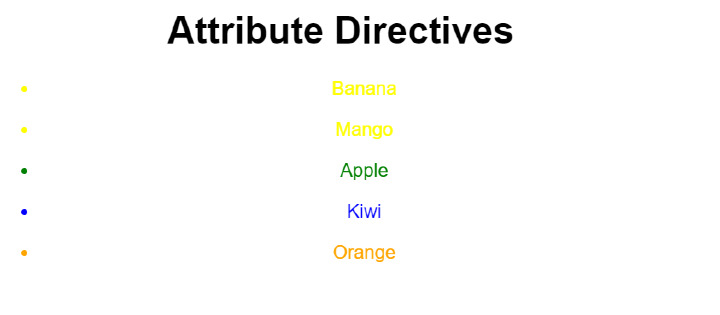
ngStyle 用于向 HTML 元素添加样式。我们可以使用 ngStyle 设置一个或多个样式属性。让我们看下面的例子。
在app.component.html文件中
<div>
   <h1>Attribute Directives</h1>
   <ul *ngFor="let fruit of fruits">
      <li [ngStyle]="{'color':setColor(fruit)}">{{fruit}}</li>
   </ul>
</div>
在app.component.ts文件中,在 export class 内定义 fruits 和 setColor()。例如:
import { Component } from "@angular/core";
@Component({
   selector: "app-root",
   templateUrl: "./app.component.html",
   styleUrls: ["./app.component.css"]
})
export class AppComponent {
   fruits = ["Banana", "Mango", "Apple", "Kiwi", "Orange"];
   setColor(color: string) {
      switch (color) {
         case "Banana":
         return "yellow";
         case "Mango":
         return "yellow";
         case "Apple":
         return "green";
         case "Orange":
         return "orange";
         case "kiwi":
         return "green";
         default:
         return "blue";
      }
   }
}
输出
我们也可以创建自己的自定义结构指令和属性指令。
在上面,我们检查了什么是指令以及如何在 Angular 代码中使用它们。指令用于更改 DOM 元素的行为和结构,并且 Angular 提供了一些内置指令。我们还可以创建自定义指令。

225 次查看
