
 数据结构
数据结构 网络
网络 RDBMS
RDBMS 操作系统
操作系统 Java
Java MS Excel
 iOS
iOS HTML
HTML CSS
CSS 安卓
安卓 Python
 C 编程
C 编程 C++
C++ C#
C# MongoDB
 MySQL
MySQL Javascript
 PHP
PHP 物理
物理 化学
化学 生物
生物 数学
数学 英语
英语 经济
经济 心理学
心理学 社会科学
社会科学 时尚研究
时尚研究 法律研究
法律研究HTML DOM BorderImage 属性
borderImage 属性用于设置或获取元素的边框图片。这是一个速记属性,因此我们可以一次操作 borderImageSource、borderImageSlice、borderImageWidth、borderImageOutset 和 borderImageRepeat 属性。
语法
以下是语法:
设置 borderImage 属性:
object.style.borderImage = "source slice width outset repeat|initial|inherit"
属性值
属性值如下:
| 序号 | 值和描述 |
|---|---|
| 1 | borderImageSource 指定要作为边框的图片路径。 |
| 2 | borderImageSlice 指定图样边界的向内偏移量。 |
| 3 | borderImageWidth 指定图样边框的宽度。 |
| 4 | borderImageOutset 指定图样边框区域超出边框框的量。 |
| 5 | borderImageRepeat 指定图样边框应该为圆角、重复或拉伸。 |
| 6 | initial 用于将此属性设置为初始值。 |
| 7 | inherit 继承父属性的值 |
示例
让我们看一个 borderImage 属性的示例:
<!DOCTYPE html>
<html>
<head>
<style>
   #PARA1 {
      border: 15px solid transparent;
      padding: 12px;
      border-image: url("https://tutorialspoint.com/images/blockchain.png") 20 stretch;
      width: 100px;
   }
</style>
<script>
   function changeBorderImage(){
      document.getElementById("PARA1").style.borderImage="url('https://tutorialspoint.com/im
      ages/mongodb.png') 20 round";
      document.getElementById("Sample").innerHTML="The border image is now changed";
   }
</script>
</head>
<body>
<h2>Learning is fun</h2>
<p id="PARA1">This is a sample paragraph. Here is another line</p>
<p>Change the above paragraph border image by clicking the below button</p>
<button onclick="changeBorderImage()">Change Border Image</button>
<p id="Sample"></p>
</body>
</html>
输出
这将产生以下输出:
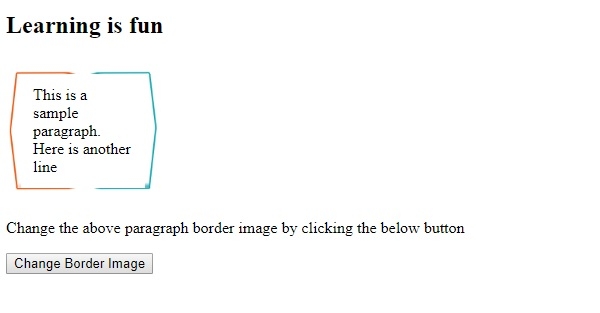
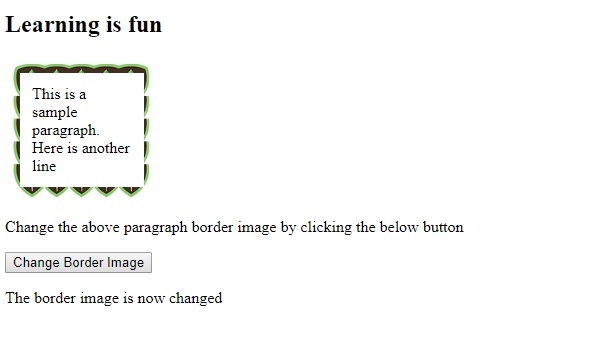
单击“折叠边框”按钮:

更新日期:2019 年 8 月 21 日
52 次浏览

广告