
 数据结构
数据结构 网络
网络 RDBMS
RDBMS 操作系统
操作系统 Java
Java MS Excel
 iOS
iOS HTML
HTML CSS
CSS Android
 Python
 C 编程
C 编程 C++
C++ C#
C# MongoDB
 MySQL
MySQL Javascript
 PHP
PHP 物理
物理 化学
化学 生物
生物 数学
数学 英语
英语 经济学
经济学 心理学
心理学 社会学
社会学 时尚
时尚 法律
法律HTML DOM Window parent 属性
HTML DOM Window parent 属性返回对子窗口父窗口的引用。
语法
以下是语法 −
返回父窗口引用
window.parent
实例
我们来看看 HTML DOM Window parent 属性的实例 −
<!DOCTYPE html>
<html>
<head>
<title>HTML DOM Window parent</title>
<style>
   * {
      padding: 2px;
      margin:5px;
   }
   form {
      width:70%;
      margin: 0 auto;
      text-align: center;
   }
   input[type="button"] {
      border-radius: 10px;
</style>
</head>
<body>
   <form>
      <fieldset>
         <legend>HTML-DOM-Window-parent</legend>
         <input id="urlSelect" type="url" placeholder="Type URL here..."><br>
         <input type="button" value="Go To" onclick="openWindow()">
         <input type="button" value="Close" onclick="closeWindow()">
         <input type="button" value="Restore" onclick="restoreWindow()">
         <div id="divDisplay"></div>
      </fieldset>
   </form>
   <script>
      var urlSelect = document.getElementById("urlSelect");
      var winSource;
      function openWindow() {
         browseWindow = window.open(urlSelect.value, "browseWindow", "width=400, height=200");
         winSource = urlSelect.value;
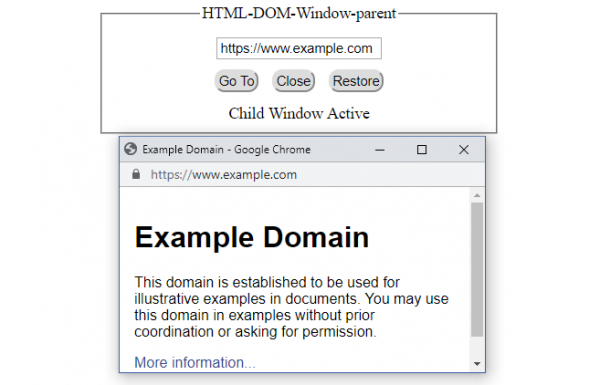
         parent.document.getElementById("divDisplay").textContent = "Child Window Active";
      }
      function closeWindow(){
         if(browseWindow){
            browseWindow.close();
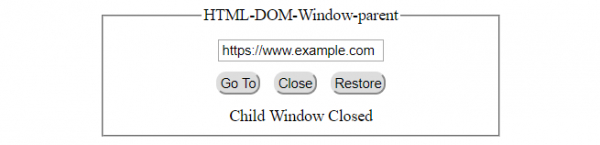
            parent.document.getElementById("divDisplay").textContent = "Child Window Closed";
         }
      }
      function restoreWindow(){
         if(browseWindow.closed){
            browseWindow = window.open(winSource, "browseWindow", "width=400, height=200");
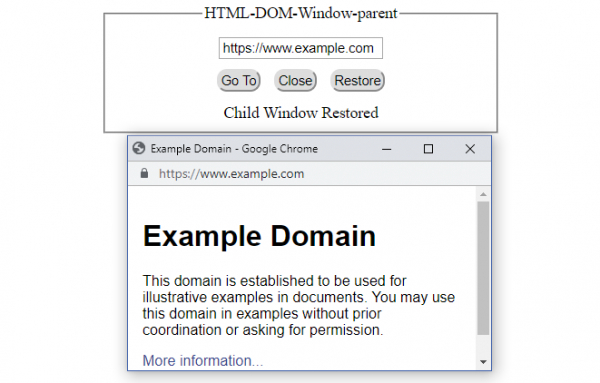
            parent.document.getElementById("divDisplay").textContent = "Child Window Restored";
         }
      }
   </script>
</body>
</html>
输出
如果 URL 栏设置了“打开”按钮,请单击 −
单击“关闭”按钮 −
单击“还原”按钮 −

更新于:2021 年 12 月 21 日
699 次浏览

广告