
 数据结构
数据结构 网络
网络 RDBMS
RDBMS 操作系统
操作系统 Java
Java MS Excel
 iOS
iOS HTML
HTML CSS
CSS Android
 Python
 C 编程
C 编程 C++
C++ C#
C# MongoDB
 MySQL
MySQL Javascript
 PHP
PHP 物理
物理 化学
化学 生物
生物 数学
数学 英语
英语 经济学
经济学 心理学
心理学 社会研究
社会研究 服装研究
服装研究 法律研究
法律研究HTML onwheel 事件属性
在 HTML 文档中的 HTML 元素上移动鼠标滚轮时,HTML onwheel 事件属性将触发。
语法
以下为语法 -
<tagname onwheel=”script”>Content</tagname>
让我们看一个 HTML onwheel 事件属性的示例 -
示例
<!DOCTYPE html>
<html>
<head>
<style>
   body {
      color: #000;
      height: 100vh;
      background: linear-gradient(62deg, #FBAB7E 0%, #F7CE68 100%) no-repeat;
      text-align: center;
      padding: 20px;
   }
   .wheel {
      border: 2px solid #fff;
      padding: 10px;
   }
</style>
</head>
<body>
<h1>HTML onwheel Event Attribute Demo</h1>
<p onwheel='wheelFn()' class='wheel'>This is a paragraph with some dummy content.
This is a paragraph with some dummy content. This is a paragraph with some dummy content.
This is a paragraph with some dummy content. This is a paragraph with some dummy content.
This is a paragraph with some dummy content. This is a paragraph with some dummy content.
This is a paragraph with some dummy content.</p>
<p>Move the wheel of the mouse up or down on above paragraph</p>
<script>
   function wheelFn() {
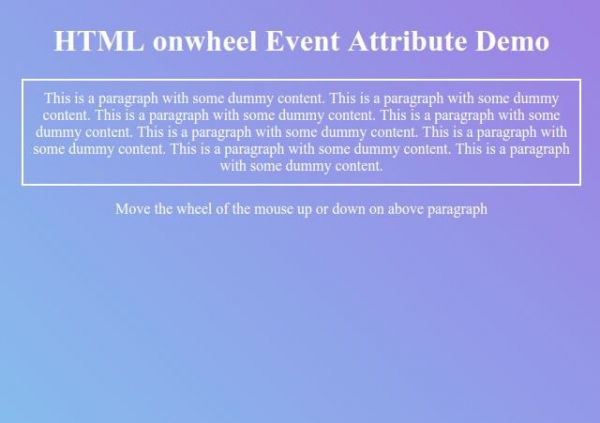
      document.body.style.background = "linear-gradient(45deg, #8BC6EC 0%, #9599E2 100%) no-repeat";
      document.body.style.color = "#fff";
   }
</script>
</body>
</html>
输出
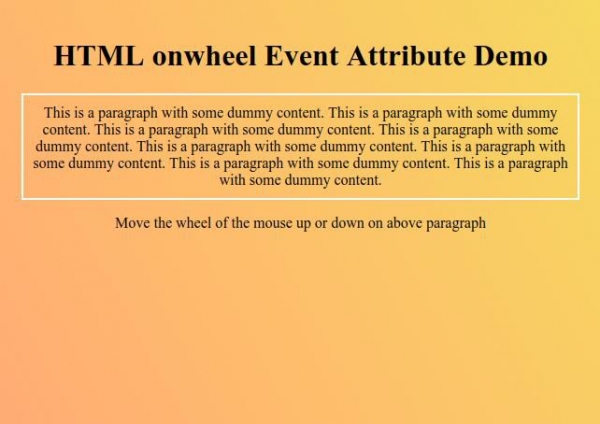
现在在段落元素上向上或向下移动鼠标滚轮,观察 onwheel 事件属性如何起作用。

更新于: 2019 年 9 月 26 日
77 次浏览

广告