
 数据结构
数据结构 网络
网络 RDBMS
RDBMS 操作系统
操作系统 Java
Java MS Excel
 iOS
iOS HTML
HTML CSS
CSS Android
 Python
 C 编程
C 编程 C++
C++ C#
C# MongoDB
 MySQL
MySQL Javascript
 PHP
PHP 物理
物理 化学
化学 生物
生物 数学
数学 英语
英语 经济学
经济学 心理学
心理学 社会学
社会学 时尚研究
时尚研究 法律研究
法律研究CSS 中的 if/else 条件
用户无法在 CSS 中直接使用 if/else 条件。对于 CSS 中的条件样式,我们必须使用 if/else 条件的替代方案。我们将了解三种在 CSS 中使用条件样式的不同替代方法。
在本文中,我们的任务是在 CSS 中实现 if/else 条件。由于 CSS 不支持 if/else 条件,我们将了解其替代方法。
在 CSS 中使用条件样式的方法
以下是我们在本文中将讨论的在 CSS 中使用条件样式的方法列表,包括分步说明和完整的示例代码。
使用 :checked 伪类选择器
为了在 CSS 中使用条件(if/else)样式,我们使用了 :checked 伪类选择器和一个普通兄弟 组合符。
- 我们使用了 input 标签和 type 属性创建了五个单选按钮,并使用 labels 为其添加标签。然后,我们创建了五个包含相应颜色信息的 div 元素,并将它们包装在类为 output 的 div 中。
- 我们使用了 #output>div 通过 display 属性最初隐藏所有 div 元素,并设置 div 元素文本的 font-size。
- 然后,我们使用 :checked 伪类选择器和普通 兄弟组合符 来显示与选中的单选按钮对应的颜色名称。
- 例如:当 id 为 orange 的单选按钮被选中时,#orange:checked ~ #output .orange 会定位 id 为 output 的 div 中类为 orange 的 div 元素。因此,当 id 为 orange 的单选按钮被选中时,它会显示类为 orange 的 div 元素。
- 然后,我们使用与颜色名称对应的类在选中单选按钮时更改文本 颜色。
示例
这是一个完整的示例代码,它实现了上述步骤,用于使用 :checked 伪类选择器和 普通兄弟组合符(~) 在 CSS 中进行条件样式。
<html>
<head>
    <style>
        #output>div {
            font-size: 20px;
            display: none;
        }
        #red:checked ~ #output .red,
        #green:checked ~ #output .green,
        #blue:checked ~ #output .blue,
        #yellow:checked ~ #output .yellow,
        #orange:checked ~ #output .orange {
            display: block;
        }
        .red {
            color: red;
        }
        .green {
            color: green;
        }
        .blue {
            color: blue;
        }
        .yellow {
            color: yellow;
        }
        .orange {
            color: orange;
        }
    </style>
</head>
<body>
    <h4>
        Check the radio buttons to get color name
    </h4>
    <input type="radio" name="color" id="red" value="red">
    <label for="red">Red</label>
    <input type="radio" name="color" id="green" value="green">
    <label for="green">Green</label>
    <input type="radio" name="color" id="blue" value="blue">
    <label for="blue">Blue</label>
    <input type="radio" name="color" id="yellow"
           value="yellow" checked>
    <label for="yellow">Yellow</label>
    <input type="radio" name="color" id="orange" value="orange">
    <label for="orange">Orange</label>
    <br><br>
    <div id="output">
        <div class="red">You have selected red color.</div>
        <div class="green">You have selected green color.</div>
        <div class="blue">You have selected blue color.</div>
        <div class="yellow">Yellow color is selected by default.</div>
        <div class="orange">You have selected orange color.</div>
    </div>
</body>
</html>
使用媒体查询
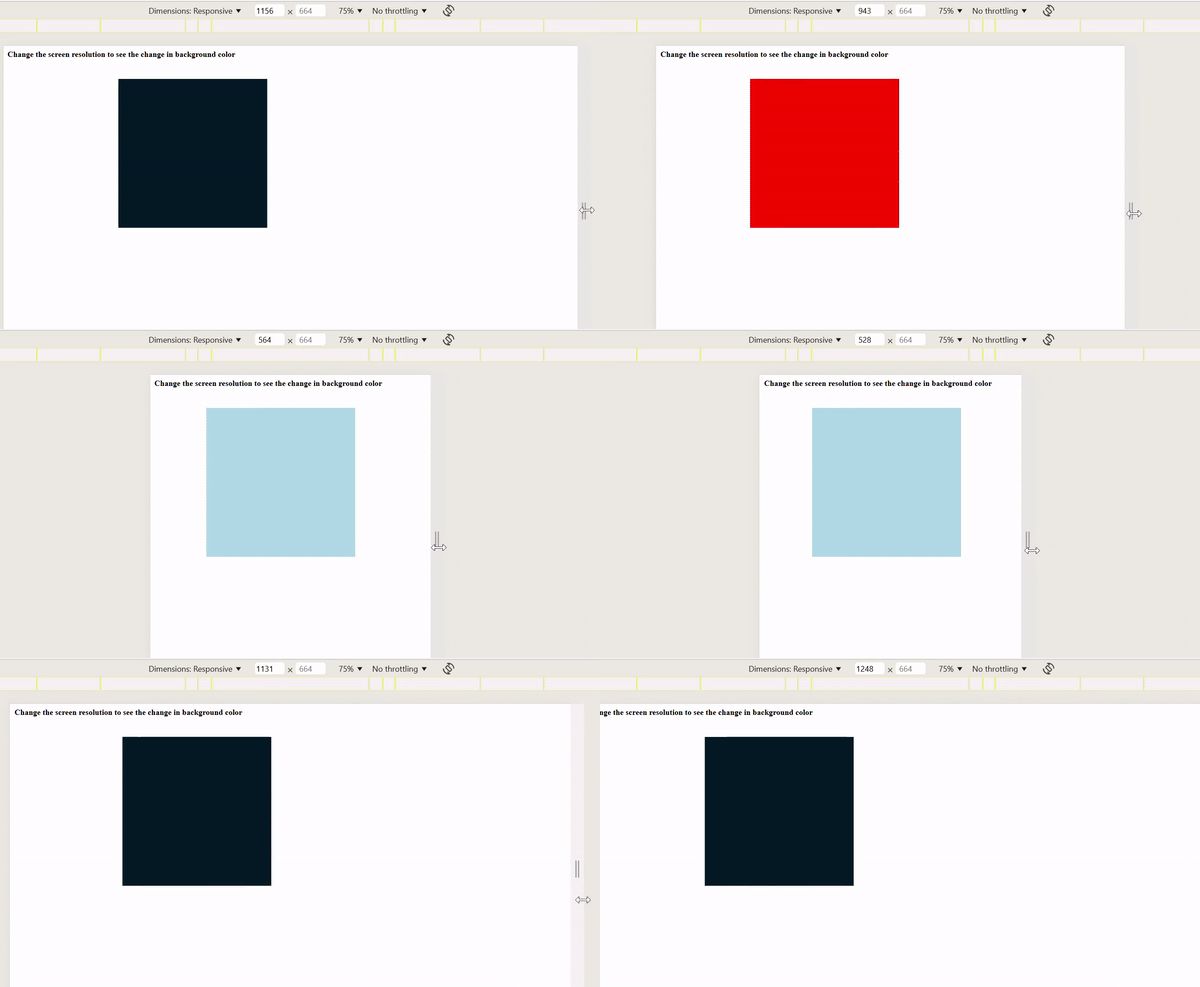
在这种使用 CSS 中条件(if/else)样式的方法中,我们使用了 媒体查询 来根据视口宽度更改 div 盒子的背景颜色。
- 我们使用了 div 创建了一个盒子,并使用 height 和 width、background-color 设置其尺寸,并使用 top、left 和 position 属性对其进行定位。
- 然后,我们使用 媒体查询 为不同的宽度值设置 div 盒子的不同颜色。例如,对于宽度为 600px 或更大的盒子颜色为绿色,对于 800px 或更大的盒子颜色为红色。
示例
这是一个完整的示例代码,它实现了上述步骤,用于使用 媒体查询 在 CSS 中进行条件样式。
<!DOCTYPE html>
<html lang="en">
<head>
    <meta name="viewport" content="width=device-width, initial-scale=1.0">
    <title>Document</title>
    <style>
        .container {
            height: 300px;
            width: 300px;
            background-color: lightblue;
            top: 10%;
            left: 20%;
            position: absolute;
        }

        @media (min-width: 600px) {
            .container {
                background-color: #04af2f;
            }
        }
        @media (min-width: 800px) {
            .container {
                background-color: red;
            }
        }
        @media (min-width: 1000px) {
            .container {
                background-color: #031926;
            }
        }
    </style>
</head>
<body>
    <strong>
        Chnage the screen resolution to see the
        change in background color
    </strong>
    <div class="container"></div>
</body>
</html>
输出
使用 :hover 伪类
在这种方法中,我们使用了 :hover 伪类在 CSS 中使用条件(if/else)样式。
- 我们使用了四个 div 创建了四个盒子,并在其中添加了一些文本。我们使用 div 作为元素选择器,通过设置 padding、border 和 div 元素的 background-color 来设置所有 div 元素的样式。
- 我们居中了文本,并使用 color 属性更改了文本颜色。
- 然后,我们使用 :hover 伪类在将鼠标悬停在 div 元素上时设置其背景颜色。
示例
这是一个完整的示例代码,它实现了上述步骤,用于使用 :hover 伪类在 CSS 中进行条件样式。
<!DOCTYPE html>
<html lang="en">
<head>
    <title>Document</title>
    <style>
        div {
            padding: 30px;
            text-align: center;
            background-color: lightblue;
            border: 1px solid white;
            color: white;
        }
        .color1:hover {
            background-color: #04af2f;
        }
        .color2:hover{
            background-color: #031926;
        }
        .color3:hover {
            background-color: #CDC1FF;
        }
        .color4:hover{
            background-color: #2E073F;
        }

    </style>
</head>
<body>
    <strong>
        Hover over boxes to see the change
        in background color
    </strong>
    <div class="color1">This is div 1</div>
    <div class="color2">This is div 2</div>
    <div class="color3">This is div 3</div>
    <div class="color4">This is div 4</div>
</body>
</html>
结论
在本文中,我们学习并了解了如何在 CSS 中使用 if/else 条件的替代方案。我们使用了三种在 CSS 中进行条件样式的方法,分别是:使用 :checked 伪类和 兄弟 组合符、使用 媒体查询 和使用 :hover 伪类。

更新时间: 2024年11月14日
4K+ 浏览量

广告