
 数据结构
数据结构 网络
网络 关系数据库管理系统 (RDBMS)
 操作系统
操作系统 Java
Java MS Excel
 iOS
iOS HTML
HTML CSS
CSS Android
 Python
 C语言编程
C语言编程 C++
C++ C#
C# MongoDB
 MySQL
MySQL Javascript
 PHP
PHP 物理学
物理学 化学
化学 生物学
生物学 数学
数学 英语
英语 经济学
经济学 心理学
心理学 社会研究
社会研究 服装研究
服装研究 法律研究
法律研究在OpenCV Python中实现Shi-Tomasi角点检测器
Shi-Tomasi 角点检测器是Harris角点检测器的改进算法。为了实现Shi-Tomasi角点检测器,OpenCV提供了一个函数`cv2.goodFeaturesToTrack()`。它检测图像中最强的N个角点。
步骤
要使用Shi-Tomasi角点检测器检测图像中的角点,您可以按照以下步骤操作:
导入所需的库OpenCV和NumPy。确保您已经安装了它们。
使用`cv2.imread()`方法读取输入图像。指定图像的完整路径。使用`cv2.cvtColor()`方法将输入图像转换为灰度图像。
在灰度图像上应用`cv2.goodFeaturesToTrack()`函数。将合适的角点数、质量等级和两个角点之间的欧几里得距离作为参数传递给该方法。此函数返回图像中作为浮点数的角点。将这些浮点角点转换为整数。
在输入图像上绘制角点,作为具有较小半径的填充圆。
显示带有检测到的角点的图像。
让我们看看使用Shi-Tomasi角点检测器检测图像中角点的示例。
输入图像
我们将在下面的示例中使用此图像作为输入文件。
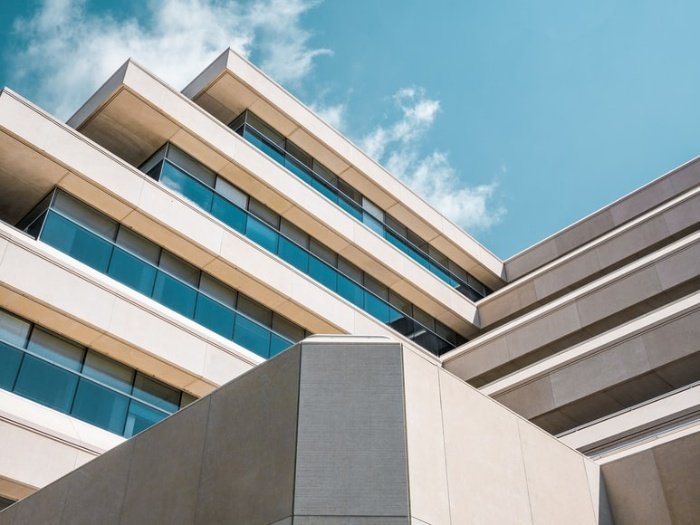
示例
在这个例子中,我们使用Shi-Tomasi角点检测器检测输入图像中的角点。
# import required libraries
import numpy as np
import cv2

# read the input image
img = cv2.imread('building.jpg')

# convert the image to grayscale
gray = cv2.cvtColor(img,cv2.COLOR_BGR2GRAY)

# apply Shi-Tomasi corner detector on gray image

# to detect 50 best corners
corners = cv2.goodFeaturesToTrack(gray,50,0.01,10)

# convert floating points to integers
corners = np.int0(corners)

# loop over all points and draw corner points as circles
for i in corners:
   x,y = i.ravel()
   cv2.circle(img,(x,y),3,(0,0,255),-1)
# Display image with corner points drawn on it
cv2.imshow("Corners", img)
cv2.waitKey(0)
cv2.destroyAllWindows()
输出
运行上述Python程序后,将生成以下输出窗口:

上述输出图像显示了使用Shi-Tomasi角点检测器检测到的角点。角点以红色显示。

更新于:2022年12月2日
908 次浏览

广告