
 数据结构
数据结构 网络
网络 RDBMS
RDBMS 操作系统
操作系统 Java
Java MS Excel
 iOS
iOS HTML
HTML CSS
CSS Android
 Python
 C 编程
C 编程 C++
C++ C#
C# MongoDB
 MySQL
MySQL Javascript
 PHP
PHP 物理
物理 化学
化学 生物
生物 数学
数学 英语
英语 经济
经济 心理学
心理学 社会研究
社会研究 时尚研究
时尚研究 法律研究
法律研究在分页中实施页面工厂
分页将内容分割到各页面之间,允许用户跳页或逐页浏览内容。你可以通过实例化 **javafx.scene.control.Pagination** 类来创建分页。
示例
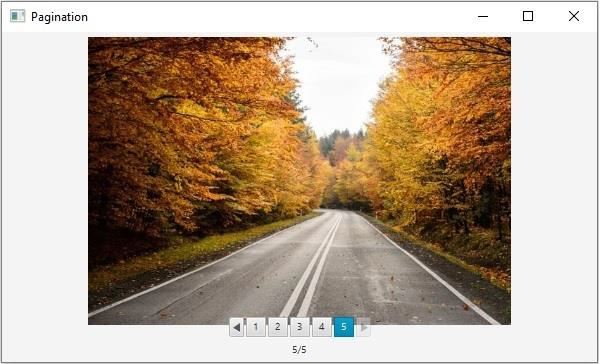
以下示例演示如何创建分页并向其中添加数据。
import java.io.FileInputStream;
import java.io.InputStream;
import javafx.application.Application;
import javafx.scene.Scene;
import javafx.scene.control.Pagination;
import javafx.scene.image.Image;
import javafx.scene.image.ImageView;
import javafx.scene.layout.AnchorPane;
import javafx.scene.paint.Color;
import javafx.stage.Stage;
public class PaginationAction extends Application {
   public ImageView pageContent(int pageIndex){
      try{
         //Creating the image view
         ImageView imageView = new ImageView();
         //Setting the image view parameters
         imageView.setFitWidth(590);
         imageView.setFitHeight(300);
         imageView.setPreserveRatio(true);
         String [] img = {"elephant.jpg", "cat.jpg", "boy.jpg", "car.jpg", "road.jpg"};
         for(int i = pageIndex; i<pageIndex+1; i++) {
            //creating the image object
            InputStream stream = new FileInputStream("D:\images\"+img[i]);
            Image image = new Image(stream);
            imageView.setImage(image);
         }
         return imageView;
      }catch (Exception e) {}
      return null;
   }
   public void start(Stage stage) {
      //Creating a pagination
      Pagination pagination = new Pagination();
      //Setting number of pages
      pagination.setPageCount(5);
      //Creating contents for various pages
      pagination.setPageFactory((Integer pageIndex) -> pageContent(pageIndex));
      //Creating an anchor pane to hold the pagination
      AnchorPane pane = new AnchorPane();
      AnchorPane.setTopAnchor(pagination, 5.0);
      AnchorPane.setRightAnchor(pagination, 5.0);
      AnchorPane.setBottomAnchor(pagination, 5.0);
      AnchorPane.setLeftAnchor(pagination, 5.0);
      pane.getChildren().addAll(pagination);
      //Setting the stage
      Scene scene = new Scene(pane, 595, 330, Color.BEIGE);
      stage.setTitle("Pagination");
      stage.setScene(scene);
      stage.show();
   }
   public static void main(String args[]){
      launch(args);
   }
}
输出

更新于:18-May-2020
259 次浏览

广告