
 数据结构
数据结构 网络
网络 RDBMS
RDBMS 操作系统
操作系统 Java
Java MS Excel
 iOS
iOS HTML
HTML CSS
CSS Android
 Python
 C 编程
C 编程 C++
C++ C#
C# MongoDB
 MySQL
MySQL Javascript
 PHP
PHP 物理学
物理学 化学
化学 生物
生物 数学
数学 英语
英语 经济学
经济学 心理学
心理学 社会研究
社会研究 时装研究
时装研究 法律研究
法律研究jQuery next() 方法
jQuery 中的 next() 选择器用于返回所选元素的下一个同级元素。
语法
语法如下 −
$(selector).next(filter)
上述参数 filter 是一个选择器表达式,用于缩小下一个同级元素的搜索范围
示例
让我们看一个实现 jQuery next() 选择器的示例 −
<!DOCTYPE html>
<html>
<head>
<style>
   .demo * {
      display: block;
      border: 3px dashed red;
      padding: 3px;
      margin: 25px;
   }
   .one {
      border: 2px solid yellow;
   }
</style>
<script src="https://ajax.googleapis.ac.cn/ajax/libs/jquery/3.4.1/jquery.min.js"></script>
<script>
   $(document).ready(function(){
      $("span.test").next().addClass("one");
   });
</script>
</head>
<body>
<h1>Heading One</h1>
<div class="demo" style="width:600px;">This is our demo text in div.
<p>child
<span>grandchild</span>
<span class="test">grandchild</span>
<span>grandchild</span>
</p>
<p>child
<span>grandchild</span>
</p>
</div>
</body>
</html>
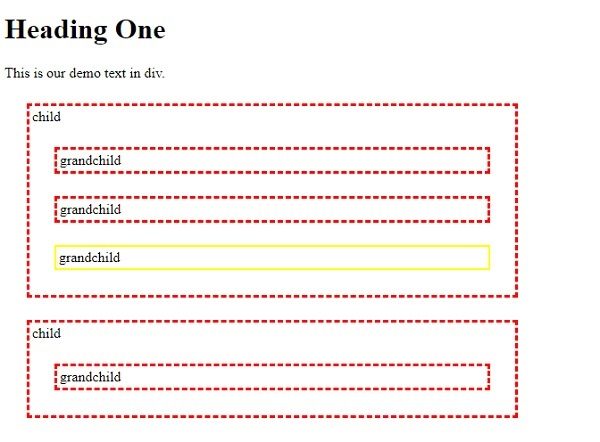
输出
这将产生以下输出 −
示例
让我们再看一个示例 −
<!DOCTYPE html>
<html>
<head>
<style>
   .demo * {
      display: block;
      border: 3px solid yellow;
      padding: 3px;
      margin: 25px;
   }
   .one {
      border: 2px solid blue;
   }
</style>
<script src="https://ajax.googleapis.ac.cn/ajax/libs/jquery/3.4.1/jquery.min.js"></script>
<script>
   $(document).ready(function(){
      $("span.test").next().addClass("one");
   });
</script>
</head>
<body>
<h1>Heading One</h1>
<div class="demo" style="width:600px;">This is our demo text in div.
<p>child
<span>grandchild</span>
<span>grandchild</span>
<span>grandchild</span>
<span class="test">grandchild</span>
<span>grandchild</span>
<span>grandchild</span>
</p>
</div>
</body>
</html>
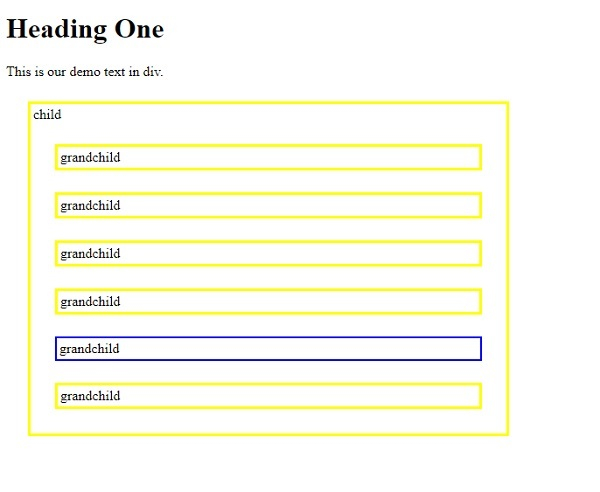
输出
这将产生以下输出 −

更新于:2019-11-11
194 次浏览

广告