
- jQuery 教程
- jQuery - 首页
- jQuery - 路线图
- jQuery - 概述
- jQuery - 基础
- jQuery - 语法
- jQuery - 选择器
- jQuery - 事件
- jQuery - 属性
- jQuery - AJAX
- jQuery DOM 操作
- jQuery - DOM
- jQuery - 添加元素
- jQuery - 删除元素
- jQuery - 替换元素
- jQuery CSS 操作
- jQuery - CSS 类
- jQuery - 尺寸
- jQuery - CSS 属性
- jQuery 效果
- jQuery - 效果
- jQuery - 动画
- jQuery - 链式调用
- jQuery - 回调函数
- jQuery 遍历
- jQuery - 遍历
- jQuery - 遍历祖先节点
- jQuery - 遍历子孙节点
- jQuery UI
- jQuery - 交互
- jQuery - 小部件
- jQuery - 主题
- jQuery 参考
- jQuery - 选择器
- jQuery - 事件
- jQuery - 效果
- jQuery - HTML/CSS
- jQuery - 遍历
- jQuery - 杂项
- jQuery - 属性
- jQuery - 实用工具
- jQuery 插件
- jQuery - 插件
- jQuery - PagePiling.js
- jQuery - Flickerplate.js
- jQuery - Multiscroll.js
- jQuery - Slidebar.js
- jQuery - Rowgrid.js
- jQuery - Alertify.js
- jQuery - Progressbar.js
- jQuery - Slideshow.js
- jQuery - Drawsvg.js
- jQuery - Tagsort.js
- jQuery - LogosDistort.js
- jQuery - Filer.js
- jQuery - Whatsnearby.js
- jQuery - Checkout.js
- jQuery - Blockrain.js
- jQuery - Producttour.js
- jQuery - Megadropdown.js
- jQuery - Weather.js
- jQuery 有用资源
- jQuery - 问答
- jQuery - 快速指南
- jQuery - 有用资源
- jQuery - 讨论
jQuery 事件 delegate() 方法
jQuery 事件delegate() 方法用于将一个或多个事件处理程序附加到指定元素的子元素,并指定一个函数在事件发生时运行(执行)。
此外,此方法将事件处理委托给一个父元素,该父元素侦听其子元素(由选择器指定)上的事件。
jQuery 3.0 版中的 delegate() 方法已弃用,因此请使用 on() 方法代替 delegate() 方法。
语法
以下是 jQuery 事件delegate() 方法的语法:
$(selector).delegate(childSelector, event, data, function)
参数
此方法接受四个参数,分别命名为“childSelector”、“event”、“data”和“function”,如下所述:
- childSelector - 将触发元素的子元素的选择器。
- event - 一个或多个事件类型,例如:“click”或“keyup”。
- data - 可选数据,用于传递事件处理程序。
- function - 事件触发时要运行(执行)的函数。
返回值
此方法不返回值,但它将一个或多个事件处理程序附加到选定的元素。
示例 1
以下程序演示了 jQuery 事件delegate() 方法的用法:
<html>
    <head>
        <script type = "text/javascript" src = "https://tutorialspoint.com/jquery/jquery-3.6.0.js">
      </script>
      <style>
        .demo{
            background-color: aqua;
            width: 250px;
            color: white;
        }
        p{
            width: 250px;
        }
      </style>
    </head>
<body>
    <div class="demo">
        <p>Click me! to change background color</p>
    </div>
    <p>Tutorialspoint</p>
    <script>
        $('div').delegate('p', 'click', function(){
            $('p').css("background-color", "red");
        });
    </script>
</body>
</html>
输出
上述程序显示了两条消息,当用户单击第一条(父)消息时,两条消息(父和子)的背景颜色将变为红色:

当用户单击显示的消息(父)时:

示例 2
以下是 jQuery 事件delegate() 方法的另一个示例。在这里,我们使用此方法与 table 元素一起,在用户单击时切换 table 内 td 元素的类:
<html>
    <head>
        <script type = "text/javascript" src = "https://tutorialspoint.com/jquery/jquery-3.6.0.js">
      </script>
      <style>
        .demo{
            background-color: gray;
            color: white;
            text-align: center;
        }
      </style>
    </head>
<body>
    <p>Click on the table data (td) element to toggle class.</p>
    <table>
        <tr>
            <th>Name</th>
            <th>Email</th>
        </tr>
        <tr>
            <td>Rahul Verma</td>
            <td>rahul123@gmail.com</td>
        </tr>
    </table>
    <script>
        $('table').delegate('td', 'click', function(){
            $(this).toggleClass('demo');
        });
    </script>
</body>
</html>
输出
执行上述程序后,它将显示一个包含一些表格数据的表格,当用户单击表格数据元素时,它将在“demo”类之间切换:
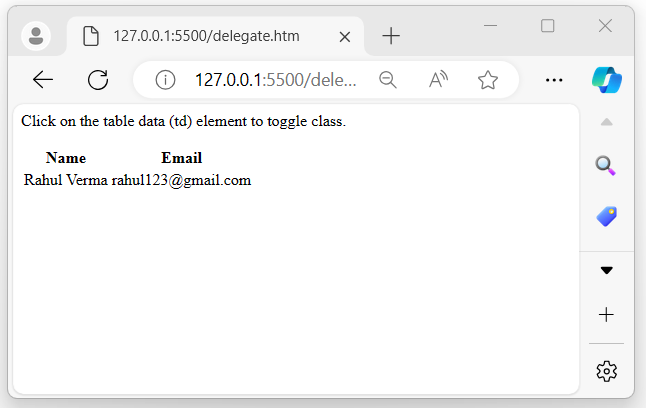
当用户单击显示的表格数据时,背景将更改:

示例 3
使用多个事件
正如我们所讨论的,jQuery 事件delegate() 方法可以通过在同一字符串中以空格分隔的列表形式指定它们来处理多个事件:
<html>
    <head>
        <script type = "text/javascript" src = "https://tutorialspoint.com/jquery/jquery-3.6.0.js">
      </script>
      <style>
        .demo{
            background-color: aquamarine;
            width: 200px;
        }
      </style>
    </head>
<body>
    <p>Click, mouseover, or mouseout on the below element to toggle the class.</p>
    <div>
        <p>Hello World</p>
    </div>
    <script>
        $('div').delegate('p', 'click mouseover mouseout', function(){
            $(this).toggleClass('demo');
        });
    </script>
</body>
</html>
输出
上述程序在用户执行列出的事件(例如:单击、鼠标悬停或鼠标移出操作)时显示一条消息。在这些操作期间,将向触发事件的元素添加 .demo 类,并在事件不再活动时将其删除:

jquery_ref_events.htm
广告