
- 语言特性
- Less - 嵌套规则
- Less - 嵌套指令和冒泡
- Less - 运算
- Less - 转义
- Less - 函数
- Less - 命名空间和访问器
- Less - 范围
- Less - 注释
- Less - 导入
- Less - 变量
- Less - 扩展
- Less - 混合
- Less - 参数化混合
- Less - 函数形式的混合
- Less - 将规则集传递给混合
- Less - 导入指令
- Less - 导入选项
- Less - 混合守卫
- Less - CSS 守卫
- Less - 循环
- Less - 合并
- Less - 父级选择器
- 函数
- Less - 杂项函数
- Less - 字符串函数
- Less - 列表函数
- Less - 数学函数
- Less - 类型函数
- Less - 颜色定义函数
- Less - 颜色通道函数
- Less - 颜色运算
- Less - 颜色混合函数
- 用法
- Less - 命令行用法
- 在浏览器中使用 Less
- Less - 浏览器支持
- Less - 插件
- Less - 程序化用法
- Less - 在线编译器
- Less - 图形用户界面
- Less - 编辑器和插件
- Less - 第三方编译器
- Less - 框架
- Less 实用资源
- Less - 速查指南
- Less - 实用资源
- Less - 讨论
更少 - 组合爆炸
描述
& 可以获得用逗号分隔的列表中的选择器的所有可能排列。
示例
以下示例演示了在 LESS 文件中使用 & 获得选择器的所有可能排列:-
<html>
   <head>
      <link rel = "stylesheet" href = "style.css" type = "text/css" />
      <title>Combinatorial Explosion</title>
   </head>

   <body>
      <p>This is first paragraph.</p>
      <p>This is second paragraph which is adjecent to first paragraph ( i.e. p + p ). This will be highlighted.</p>
      <div>
         This div is adjecent to second paragraph ( i.e. p + div ). This will be highlighted.
      </div>

      <p>This is third paragraph adjecent to div ( i.e. p + div ). This will be highlighted.</p>
      <i>This is italic. This will not be highlighted since there is no (p + i) in CSS</i>
      <div>This is second div</div>
      <div>This is div adjecent to second div ( i.e. div + div ). This will be highlighted</div>
   </body>
</html>
接下来,创建 style.less 文件。
style.less
p, div {
   color : red;
   font-family:Lucida Console;
   & + & {
      color : green;
      background-color: yellow;
      font-family: "Comic Sans MS";
   }
}
你可以使用以下命令将 style.less 编译到 style.css:-
lessc style.less style.css
执行以上命令;它将自动创建 style.css 文件,其中包含以下代码:-
style.css
p,
div {
   color: red;
   font-family: Lucida Console;
}

p + p,
p + div,
div + p,
div + div {
   color: green;
   background-color: yellow;
   font-family: "Comic Sans MS";
}
输出
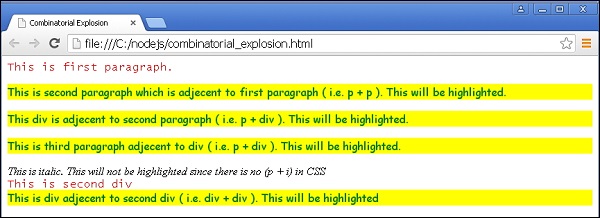
按照以下步骤了解以上代码如何工作:-
将以上 html 代码保存在 combinatorial_explosion.html 文件中。
在浏览器中打开此 HTML 文件,将显示以下输出。
less_parent_selectors.htm
广告