
- 语言特性
- LESS - 嵌套规则
- LESS - 嵌套指令和冒泡
- LESS - 运算
- LESS - 转义
- LESS - 函数
- LESS - 命名空间和访问器
- LESS - 作用域
- LESS - 注释
- LESS - 导入
- LESS - 变量
- LESS - 扩展
- LESS - Mixin
- LESS - 参数化Mixin
- LESS - Mixin作为函数
- LESS - 向Mixin传递规则集
- LESS - 导入指令
- LESS - 导入选项
- LESS - Mixin 保护
- LESS - CSS 保护
- LESS - 循环
- LESS - 合并
- LESS - 父选择器
- 函数
- LESS - 杂项函数
- LESS - 字符串函数
- LESS - 列表函数
- LESS - 数学函数
- LESS - 类型函数
- LESS - 颜色定义函数
- LESS - 颜色通道函数
- LESS - 颜色运算
- LESS - 颜色混合函数
- 使用
- LESS - 命令行使用
- 在浏览器中使用LESS
- LESS - 浏览器支持
- LESS - 插件
- LESS - 程序化使用
- LESS - 在线编译器
- LESS - 图形用户界面
- LESS - 编辑器和插件
- LESS - 第三方编译器
- LESS - 框架
- LESS 有用资源
- LESS - 快速指南
- LESS - 有用资源
- LESS - 讨论
LESS - 变量插值属性
描述
变量可以通过属性引用。
示例
以下示例演示了在 LESS 文件中使用变量通过属性引用的方法:
<html>
   <head>
      <link rel = "stylesheet" href = "style.css" type = "text/css" />
      <title>LESS Variables Interpolation Properties</title>
   </head>

   <body>
      <div class = "myclass">
         <h2>Welcome to Tutorialspoint</h2>
         <p>LESS is a CSS pre-processor that enables customizable,
         manageable and reusable style sheet for web site.</p>
      </div>
   </body>
</html>
现在创建文件style.less。
style.less
@my-property: color;
.myclass {
   background-@{my-property}: #81F7D8;
}
您可以使用以下命令将style.less编译为style.css:
lessc style.less style.css
执行上述命令;它将自动创建包含以下代码的style.css文件:
style.css
.myclass {
   background-color: #81F7D8;
}
输出
请按照以下步骤查看上述代码的工作方式:
将上述HTML代码保存到less_variables_interpolation_properties.html文件中。
在浏览器中打开此HTML文件,将显示以下输出。
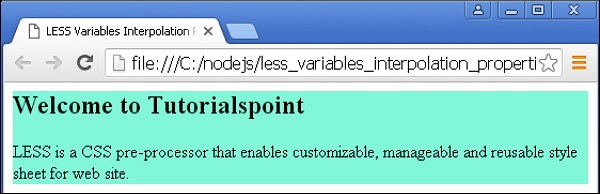
less_variables.htm
广告