- Lucene 教程
- Lucene - 首页
- Lucene - 概述
- Lucene - 环境搭建
- Lucene - 第一个应用程序
- Lucene - 索引类
- Lucene - 搜索类
- Lucene - 索引过程
- Lucene - 索引操作
- Lucene - 搜索操作
- Lucene - 查询编程
- Lucene - 分析
- Lucene - 排序
- Lucene 有用资源
- Lucene - 快速指南
- Lucene - 有用资源
- Lucene - 讨论
Lucene - 更新文档操作
更新文档是索引过程中另一个重要的操作。当已索引的内容被更新且索引失效时,可以使用此操作。此操作也称为重新索引。
我们将包含字段的文档更新到IndexWriter,其中IndexWriter用于更新索引。
现在,我们将向您展示一个分步方法,并帮助您理解如何使用基本示例更新文档。
将文档更新到索引
按照以下步骤将文档更新到索引:
步骤 1 - 创建一个方法,从更新的文本文件更新 Lucene 文档。
private void updateDocument(File file) throws IOException {
   Document document = new Document();

   //update indexes for file contents
   writer.updateDocument(new Term
      (LuceneConstants.CONTENTS,
      new FileReader(file)),document);
   writer.close();
}
创建 IndexWriter
按照以下步骤创建 IndexWriter:
步骤 1 - IndexWriter 类作为核心组件,在索引过程中创建/更新索引。
步骤 2 - 创建 IndexWriter 对象。
步骤 3 - 创建一个 Lucene 目录,该目录应指向要存储索引的位置。
步骤 4 - 使用索引目录、具有版本信息和其他必需/可选参数的标准分析器初始化创建的 IndexWriter 对象。
private IndexWriter writer;

public Indexer(String indexDirectoryPath) throws IOException {
   //this directory will contain the indexes
   Directory indexDirectory =
      FSDirectory.open(new File(indexDirectoryPath));

   //create the indexer
   writer = new IndexWriter(indexDirectory,
      new StandardAnalyzer(Version.LUCENE_36),true,
      IndexWriter.MaxFieldLength.UNLIMITED);
}
更新文档并开始重新索引过程
以下是更新文档的两种方法。
updateDocument(Term, Document) - 删除包含该术语的文档,并使用默认分析器(在创建索引写入器时指定)添加文档。
updateDocument(Term, Document, Analyzer) - 删除包含该术语的文档,并使用提供的分析器添加文档。
private void indexFile(File file) throws IOException {
   System.out.println("Updating index for "+file.getCanonicalPath());
   updateDocument(file);
}
示例应用程序
为了测试索引过程,让我们创建一个 Lucene 应用程序测试。
| 步骤 | 描述 |
|---|---|
| 1 | 创建一个名为LuceneFirstApplication的项目,放在packagecom.tutorialspoint.lucene下,如Lucene - 第一个应用程序章节中所述。您也可以使用EJB - 第一个应用程序章节中创建的项目,以便理解索引过程。 |
| 2 | 创建LuceneConstants.java,TextFileFilter.java和Indexer.java,如Lucene - 第一个应用程序章节中所述。保持其余文件不变。 |
| 3 | 如下所述创建LuceneTester.java。 |
| 4 | 清理并构建应用程序,以确保业务逻辑按要求工作。 |
LuceneConstants.java
此类用于提供可在示例应用程序中使用的各种常量。
package com.tutorialspoint.lucene;

public class LuceneConstants {
   public static final String CONTENTS = "contents";
   public static final String FILE_NAME = "filename";
   public static final String FILE_PATH = "filepath";
   public static final int MAX_SEARCH = 10;
}
TextFileFilter.java
此类用作.txt文件过滤器。
package com.tutorialspoint.lucene;

import java.io.File;
import java.io.FileFilter;

public class TextFileFilter implements FileFilter {

   @Override
   public boolean accept(File pathname) {
      return pathname.getName().toLowerCase().endsWith(".txt");
   }
}
Indexer.java
此类用于索引原始数据,以便我们可以使用 Lucene 库对其进行搜索。
package com.tutorialspoint.lucene;

import java.io.File;
import java.io.FileFilter;
import java.io.FileReader;
import java.io.IOException;

import org.apache.lucene.analysis.standard.StandardAnalyzer;
import org.apache.lucene.document.Document;
import org.apache.lucene.document.Field;
import org.apache.lucene.index.CorruptIndexException;
import org.apache.lucene.index.IndexWriter;
import org.apache.lucene.store.Directory;
import org.apache.lucene.store.FSDirectory;
import org.apache.lucene.util.Version;

public class Indexer {

   private IndexWriter writer;

   public Indexer(String indexDirectoryPath) throws IOException {
      //this directory will contain the indexes
      Directory indexDirectory =
         FSDirectory.open(new File(indexDirectoryPath));

      //create the indexer
      writer = new IndexWriter(indexDirectory,
         new StandardAnalyzer(Version.LUCENE_36),true,
         IndexWriter.MaxFieldLength.UNLIMITED);
   }

   public void close() throws CorruptIndexException, IOException {
      writer.close();
   }

   private void updateDocument(File file) throws IOException {
      Document document = new Document();

      //update indexes for file contents
      writer.updateDocument(
         new Term(LuceneConstants.FILE_NAME,
         file.getName()),document);
      writer.close();
   }

   private void indexFile(File file) throws IOException {
      System.out.println("Updating index: "+file.getCanonicalPath());
      updateDocument(file);
   }

   public int createIndex(String dataDirPath, FileFilter filter)
      throws IOException {
      //get all files in the data directory
      File[] files = new File(dataDirPath).listFiles();

      for (File file : files) {
         if(!file.isDirectory()
            && !file.isHidden()
            && file.exists()
            && file.canRead()
            && filter.accept(file)
         ){
            indexFile(file);
         }
      }
      return writer.numDocs();
   }
}
LuceneTester.java
此类用于测试 Lucene 库的索引能力。
package com.tutorialspoint.lucene;

import java.io.IOException;

public class LuceneTester {

   String indexDir = "E:\\Lucene\\Index";
   String dataDir = "E:\\Lucene\\Data";
   Indexer indexer;

   public static void main(String[] args) {
      LuceneTester tester;
      try {
         tester = new LuceneTester();
         tester.createIndex();
      } catch (IOException e) {
         e.printStackTrace();
      }
   }

   private void createIndex() throws IOException {
      indexer = new Indexer(indexDir);
      int numIndexed;
      long startTime = System.currentTimeMillis();
      numIndexed = indexer.createIndex(dataDir, new TextFileFilter());
      long endTime = System.currentTimeMillis();
      indexer.close();
   }
}
数据和索引目录创建
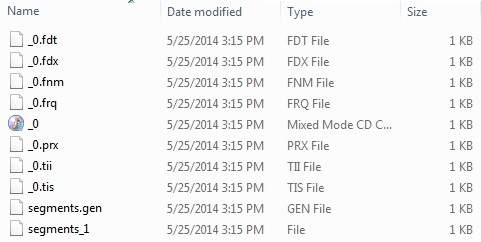
在这里,我们使用了从 record1.txt 到 record10.txt 的 10 个文本文件,其中包含学生姓名和其他详细信息,并将它们放在 E:\Lucene\Data 目录中。 测试数据。应创建索引目录路径为E:\Lucene\Index。运行此程序后,您可以在该文件夹中看到创建的索引文件列表。
运行程序
完成源代码、原始数据、数据目录和索引目录的创建后,您可以继续编译和运行程序。为此,请保持LuceneTester.Java文件选项卡处于活动状态,并使用 Eclipse IDE 中提供的“运行”选项,或使用Ctrl + F11编译和运行LuceneTester应用程序。如果您的应用程序成功运行,它将在 Eclipse IDE 的控制台中打印以下消息:
Updating index for E:\Lucene\Data\record1.txt
Updating index for E:\Lucene\Data\record10.txt
Updating index for E:\Lucene\Data\record2.txt
Updating index for E:\Lucene\Data\record3.txt
Updating index for E:\Lucene\Data\record4.txt
Updating index for E:\Lucene\Data\record5.txt
Updating index for E:\Lucene\Data\record6.txt
Updating index for E:\Lucene\Data\record7.txt
Updating index for E:\Lucene\Data\record8.txt
Updating index for E:\Lucene\Data\record9.txt
10 File indexed, time taken: 109 ms
成功运行上述程序后,您的索引目录中将包含以下内容: