
- Polymer 教程
- Polymer - 主页
- Polymer - 概述
- Polymer - 安装
- Polymer - 元素
- Polymer - 自定义元素
- Polymer - Shadow DOM 和样式
- Polymer - 事件
- Polymer - 数据系统
- Polymer 备用资源
- Polymer - 快速指南
- Polymer - 备用资源
- Polymer - 讨论
Polymer - Gold Email 输入
<gold-email-input> 元素是一个简单的文本字段,特别适合电子邮件地址,以 Material Design 设计。
语法
<gold-email-input></gold-email-input>
此元素有一个可选标签,默认情况下为“email”,如下所示 −
<gold-email-input label = "Your email address"></gold-email-input>
验证
要手动验证,可以使用 validate() 方法,如果有效则返回 true,否则如果无效则返回 false。使用 auto-validate 和 required 属性导致自动验证输入。
样式
要设置此元素的样式,请参阅 Polymer.PaperInputContainer 自定义属性的列表。
示例
要使用 gold-email-input 元素,请导航到命令提示符中的项目文件夹,并使用以下命令。
bower install PolymerElements/gold-email-input --save
上述命令将把 gold-email-input 元素安装在 bower_components 文件夹中。接下来,使用以下命令在 index.html 中导入 gold-email-input 文件。
<link rel = "import" href = "/bower_components/gold-email-input/gold-email-input.html">
以下程序演示了 gold-email-input 元素的使用。
<!DOCTYPE html>
<html>
   <head>
      <title>Gold email Input</title>
      <meta charset = "utf-8">
      <script src = "bower_components/webcomponentsjs/webcomponents-lite.min.js"></script>
      <link rel = "import" href = "bower_components/polymer/polymer.html">
      <link rel = "import" href = "bower_components/gold-email-input/gold-email-input.html">
   </head>

   <body>
      <h3>Pre-validated email</h3>
      <gold-email-input
         value = "example@email.com"
         auto-validate
         style = "width:35%; display:inline-block;">
      </gold-email-input><br/>

      <h3>Displayes error message</h3>
      <gold-email-input
         label = "Enter an email address"
         auto-validate
         error-message = "Please enter a valid email"
         style = "width:35%; display:inline-block;">
      </gold-email-input>
   </body>
</html>
输出
要运行该应用程序,请导航到项目目录并运行以下命令。
polymer serve
现在打开浏览器并导航到 http://127.0.0.1:8081/。以下是输出。
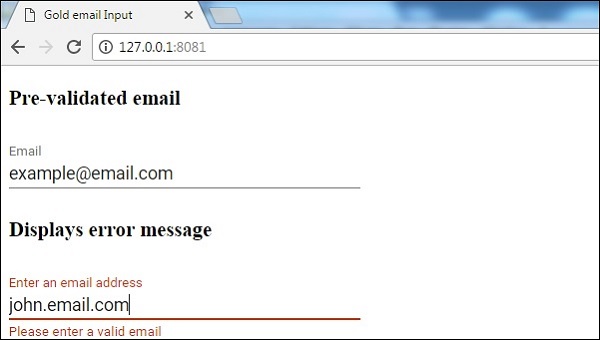
polymer_elements.htm
广告