
- Polymer 教程
- Polymer - 首页
- Polymer - 概览
- Polymer - 安装
- Polymer - 元素
- Polymer - 自定义元素
- Polymer - 阴影 DOM 和样式
- Polymer - 事件
- Polymer - 数据系统
- Polymer 有用资源
- Polymer - 快速指南
- Polymer - 有用资源
- Polymer - 讨论
Polymer - 纸质卡片
纸质卡片是带有独特相关数据的简单材料设计形式的纸张。要获取目录中的纸质卡片,您应当在命令提示符中使用以下命令。
bower install --save PolymerElements/paper-card
示例
以下示例指定在 Polymer.js 中使用纸质卡片元素。创建 index.html 文件,并在其中添加以下代码 −
<!doctype html>
<html>
   <head>
      <link rel = 'import' href = 'my-app.html'>
   </head>

   <body>
      <h2>Paper-Card Example</h2>
      <my-app></my-app>
   </body>
</html>
现在,打开 my-app.html 文件,并在其中包含以下代码。
<link rel = 'import' href = 'bower_components/polymer/polymer.html'>
<link rel = "import" href = "bower_components/paper-button/paper-button.html">
<link rel = "import" href = "bower_components/paper-styles/paper-styles.html">
<link rel = "import" href = "bower_components/paper-card/paper-card.html">
<link rel = "import" href = "bower_components/iron-icons/iron-icons.html">
<link rel = "import" href = "bower_components/iron-icons/communication-icons.html">

<dom-module id = 'my-app'>
   <template>

      <style is = "custom-style">
         body {
            display: flex;
            align-items: center;
            justify-content: center;
         }

         paper-card {
            max-width: 500px;
         }

         .cafe-header { @apply(--paper-font-headline); }
         .cafe-light { color: var(--paper-grey-600); }
         .cafe-location {
            float: right;
            font-size: 15px;
            vertical-align: middle;
         }

         .cafe-reserve { color: var(--google-blue-500); }
         iron-icon.star {
            --iron-icon-width: 16px;
            --iron-icon-height: 16px;
            color: var(--paper-amber-500);
         }
      </style>

      <paper-card >
         <div class = "card-content">
            <div class = "cafe-header">TutorialsPoint</div>
            <div class = "cafe-rating">
               <iron-icon class = "star" icon = "star"></iron-icon>
               <iron-icon class = "star" icon = "star"></iron-icon>
               <iron-icon class = "star" icon = "star"></iron-icon>
               <iron-icon class = "star" icon = "star"></iron-icon>
               <iron-icon class = "star" icon = "star"></iron-icon>
            </div>

            <p>Free Tutorials</p>
            <p class = "cafe-light">Enjoy theory and lab at the same time, right here
               online. An online Lab for IT Professionals</p>
         </div>
      </paper-card>
   </template>

   <script>
      Polymer ({
         is: 'my-app',
         ready: function() {
            this.async(function() {
            });
         }
      });
   </script>
<dom-module>
输出
要运行该应用程序,请导航至创建的项目目录,然后运行以下命令。
polymer serve
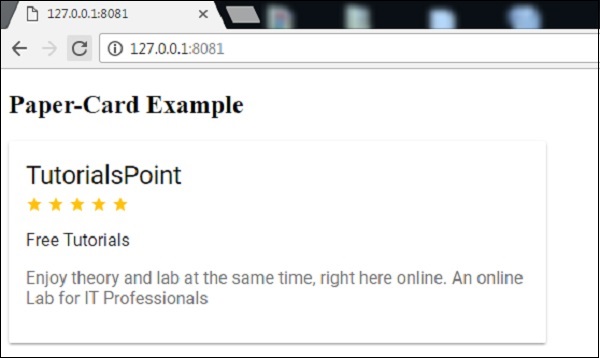
现在,打开浏览器并导航至 http://127.0.0.1:8081/。以下内容将为输出。
polymer_elements.htm
广告