
 数据结构
数据结构 网络
网络 RDBMS
RDBMS 操作系统
操作系统 Java
Java MS Excel
 iOS
iOS HTML
HTML CSS
CSS Android
 Python
 C 编程
C 编程 C++
C++ C#
C# MongoDB
 MySQL
MySQL Javascript
 PHP
PHP 物理
物理 化学
化学 生物
生物 数学
数学 英语
英语 经济学
经济学 心理学
心理学 社会学
社会学 服装设计
服装设计 法律
法律Python - 在 PyGame 窗口中显示文本
Pygame 是一个针对 Python 的多媒体库,用于制作游戏和多媒体应用。在本文中,我们将介绍如何使用 pygame 模块在屏幕上获取自定义字体和文字,同时考虑到其高度、宽度和在 pygame 窗口中的位置。
在下面的程序中,我们初始化 pygame 模块,然后为图像定义模式和标题。接下来,我们添加字体文本并定义字体坐标。screen.blit 函数绘制屏幕,而 while 循环不断监听游戏结束是否已单击。
示例
import pygame
import sys
# Initialize pygame
pygame.init()
#scren dimension
sur_obj=pygame.display.set_mode((300,200))
# Screen caption
pygame.display.set_caption("Text in Pygame")
font_color=(0,150,250)
font_obj=pygame.font.Font("C:\Windows\Fonts\segoeprb.ttf",25)
# Render the objects
text_obj=font_obj.render("Welcome to Pygame",True,font_color)
while True:
   sur_obj.fill((255,255,255))
   sur_obj.blit(text_obj,(22,0))
   for eve in pygame.event.get():
      if eve.type==pygame.QUIT:
         pygame.quit()
         sys.exit()
   pygame.display.update()
输出
运行以上代码,我们得到以下结果:
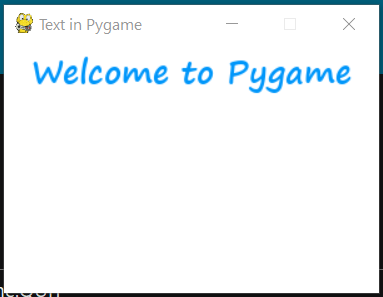

更新日期: 2021-01-25
740 次浏览

广告