
- Python PostgreSQL 教程
- Python PostgreSQL - 首页
- Python PostgreSQL - 简介
- Python PostgreSQL - 数据库连接
- Python PostgreSQL - 创建数据库
- Python PostgreSQL - 创建表
- Python PostgreSQL - 插入数据
- Python PostgreSQL - 查询数据
- Python PostgreSQL - WHERE 子句
- Python PostgreSQL - ORDER BY 子句
- Python PostgreSQL - 更新表
- Python PostgreSQL - 删除数据
- Python PostgreSQL - 删除表
- Python PostgreSQL - LIMIT 子句
- Python PostgreSQL - JOIN 子句
- Python PostgreSQL - 游标对象
- Python PostgreSQL 有用资源
- Python PostgreSQL 快速指南
- Python PostgreSQL - 有用资源
- Python PostgreSQL - 讨论
Python PostgreSQL 快速指南
Python PostgreSQL - 简介
PostgreSQL 是一个功能强大的开源对象关系数据库系统。它拥有超过 15 年的活跃开发阶段,并且拥有经过验证的架构,使其赢得了可靠性、数据完整性和正确性的良好声誉。
要使用 Python 与 PostgreSQL 通信,您需要安装 psycopg,这是一个为 Python 编程提供的适配器,当前版本为 psycog2。
psycopg2 的编写目标是体积小、速度快且稳定。它可以通过 PIP(Python 的包管理器)获得。
使用 PIP 安装 Psycog2
首先,确保 Python 和 PIP 已正确安装在您的系统中,并且 PIP 已更新到最新版本。
要升级 PIP,请打开命令提示符并执行以下命令:
C:\Users\Tutorialspoint>python -m pip install --upgrade pip
Collecting pip
   Using cached
https://files.pythonhosted.org/packages/8d/07/f7d7ced2f97ca3098c16565efbe6b15fafcba53e8d9bdb431e09140514b0/pip-19.2.2-py2.py3-none-any.whl
Installing collected packages: pip
   Found existing installation: pip 19.0.3
      Uninstalling pip-19.0.3:
         Successfully uninstalled pip-19.0.3
Successfully installed pip-19.2.2
然后,以管理员身份打开命令提示符并执行 pip install psycopg2-binary 命令,如下所示:
C:\WINDOWS\system32>pip install psycopg2-binary
Collecting psycopg2-binary
   Using cached
https://files.pythonhosted.org/packages/80/79/d0d13ce4c2f1addf4786f4a2ded802c2df66ddf3c1b1a982ed8d4cb9fc6d/psycopg2_binary-2.8.3-cp37-cp37m-win32.whl
Installing collected packages: psycopg2-binary
Successfully installed psycopg2-binary-2.8.3
验证
要验证安装,请创建一个包含以下行的 Python 脚本示例。
import mysql.connector
如果安装成功,当您执行它时,您不应该得到任何错误:
D:\Python_PostgreSQL>import psycopg2
D:\Python_PostgreSQL>
Python PostgreSQL - 数据库连接
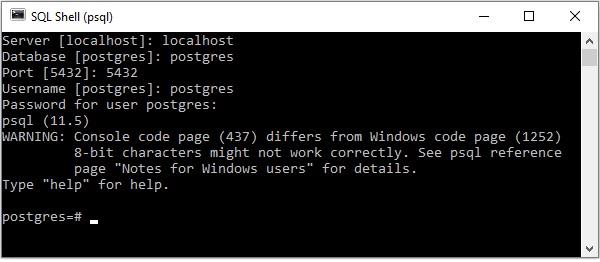
PostgreSQL 提供了自己的 shell 来执行查询。要建立与 PostgreSQL 数据库的连接,请确保您已在系统中正确安装它。打开 PostgreSQL shell 提示符并传递服务器、数据库、用户名和密码等详细信息。如果您提供的所有详细信息都正确,则会与 PostgreSQL 数据库建立连接。
传递详细信息时,您可以使用 shell 建议的默认服务器、数据库、端口和用户名。
使用 Python 建立连接
psycopg2 的 connection 类表示/处理连接的实例。您可以使用 connect() 函数创建新的连接。它接受基本的连接参数,例如 dbname、user、password、host、port,并返回一个连接对象。使用此函数,您可以建立与 PostgreSQL 的连接。
示例
以下 Python 代码演示了如何连接到现有数据库。如果数据库不存在,则会创建它,最后返回一个数据库对象。PostgreSQL 的默认数据库名称为 postrgre。因此,我们将其作为数据库名称提供。
import psycopg2
#establishing the connection
conn = psycopg2.connect(
   database="postgres", user='postgres', password='password',
   host='127.0.0.1', port= '5432'
)

#Creating a cursor object using the cursor() method
cursor = conn.cursor()

#Executing an MYSQL function using the execute() method
cursor.execute("select version()")

#Fetch a single row using fetchone() method.
data = cursor.fetchone()
print("Connection established to: ",data)

#Closing the connection
conn.close()
Connection established to: (
   'PostgreSQL 11.5, compiled by Visual C++ build 1914, 64-bit',
)
输出
Connection established to: (
   'PostgreSQL 11.5, compiled by Visual C++ build 1914, 64-bit',
)
Python PostgreSQL - 创建数据库
您可以使用 CREATE DATABASE 语句在 PostgreSQL 中创建数据库。您可以在 PostgreSQL shell 提示符下执行此语句,并在命令后指定要创建的数据库的名称。
语法
以下是 CREATE DATABASE 语句的语法。
CREATE DATABASE dbname;
示例
以下语句在 PostgreSQL 中创建一个名为 testdb 的数据库。
postgres=# CREATE DATABASE testdb;
CREATE DATABASE
您可以使用 \l 命令列出 PostgreSQL 中的数据库。如果您验证数据库列表,您可以找到如下所示的新创建的数据库:
postgres=# \l
                                                List of databases
   Name    | Owner    | Encoding |        Collate             |     Ctype   |
-----------+----------+----------+----------------------------+-------------+
mydb       | postgres | UTF8     | English_United States.1252 | ........... |
postgres   | postgres | UTF8     | English_United States.1252 | ........... |
template0  | postgres | UTF8     | English_United States.1252 | ........... |
template1  | postgres | UTF8     | English_United States.1252 | ........... |
testdb     | postgres | UTF8     | English_United States.1252 | ........... |
(5 rows)
您还可以使用 createdb 命令(SQL 语句 CREATE DATABASE 的包装器)从命令提示符在 PostgreSQL 中创建数据库。
C:\Program Files\PostgreSQL\11\bin> createdb -h localhost -p 5432 -U postgres sampledb
Password:
使用 Python 创建数据库
psycopg2 的 cursor 类提供了各种方法来执行各种 PostgreSQL 命令、获取记录和复制数据。您可以使用 Connection 类的 cursor() 方法创建游标对象。
此类的 execute() 方法接受 PostgreSQL 查询作为参数并执行它。
因此,要在 PostgreSQL 中创建数据库,请使用此方法执行 CREATE DATABASE 查询。
示例
以下 Python 示例在 PostgreSQL 数据库中创建一个名为 mydb 的数据库。
import psycopg2

#establishing the connection

conn = psycopg2.connect(
   database="postgres", user='postgres', password='password',
   host='127.0.0.1', port= '5432'
)
conn.autocommit = True

#Creating a cursor object using the cursor() method
cursor = conn.cursor()

#Preparing query to create a database
sql = '''CREATE database mydb''';

#Creating a database
cursor.execute(sql)
print("Database created successfully........")

#Closing the connection
conn.close()
输出
Database created successfully........
Python PostgreSQL - 创建表
您可以使用 CREATE TABLE 语句在 PostgreSQL 数据库中创建一个新表。在执行此操作时,您需要指定表名、列名及其数据类型。
语法
以下是 PostgreSQL 中 CREATE TABLE 语句的语法。
CREATE TABLE table_name(
   column1 datatype,
   column2 datatype,
   column3 datatype,
   .....
   columnN datatype,
);
示例
以下示例在 PostgreSQL 中创建一个名为 CRICKETERS 的表。
postgres=# CREATE TABLE CRICKETERS (
   First_Name VARCHAR(255),
   Last_Name VARCHAR(255),
   Age INT,
   Place_Of_Birth VARCHAR(255),
   Country VARCHAR(255));
CREATE TABLE
postgres=#
您可以使用 \dt 命令获取 PostgreSQL 数据库中表的列表。创建表后,如果您验证表列表,您可以在其中观察到新创建的表,如下所示:
postgres=# \dt
         List of relations
Schema  | Name       | Type  | Owner
--------+------------+-------+----------
public  | cricketers | table | postgres
(1 row)
postgres=#
同样,您可以使用 \d 获取已创建表的描述,如下所示:
postgres=# \d cricketers
                        Table "public.cricketers"
Column          | Type                   | Collation | Nullable | Default
----------------+------------------------+-----------+----------+---------
first_name      | character varying(255) |           |          |
last_name       | character varying(255) |           |          |
age             | integer                |           |          |
place_of_birth  | character varying(255) |           |          |
country         | character varying(255) |           |          |

postgres=#
使用 Python 创建表
要使用 python 创建表,您需要使用 pyscopg2 的 Cursor 的 execute() 方法执行 CREATE TABLE 语句。
示例
以下 Python 示例创建一个名为 employee 的表。
import psycopg2

#Establishing the connection

conn = psycopg2.connect(
   database="mydb", user='postgres', password='password', host='127.0.0.1', port= '5432'
)

#Creating a cursor object using the cursor() method
cursor = conn.cursor()

#Doping EMPLOYEE table if already exists.
cursor.execute("DROP TABLE IF EXISTS EMPLOYEE")

#Creating table as per requirement
sql ='''CREATE TABLE EMPLOYEE(
   FIRST_NAME CHAR(20) NOT NULL,
   LAST_NAME CHAR(20),
   AGE INT,
   SEX CHAR(1),
   INCOME FLOAT)'''
cursor.execute(sql)
print("Table created successfully........")

#Closing the connection
conn.close()
输出
Table created successfully........
Python PostgreSQL - 插入数据
您可以使用 INSERT INTO 语句将记录插入 PostgreSQL 中的现有表中。在执行此操作时,您需要指定表名以及其中列的值。
语法
以下是 INSERT 语句的推荐语法:
INSERT INTO TABLE_NAME (column1, column2, column3,...columnN)
VALUES (value1, value2, value3,...valueN);
其中,column1、column2、column3... 是表的列名,value1、value2、value3... 是您需要插入表中的值。
示例
假设我们使用 CREATE TABLE 语句创建了一个名为 CRICKETERS 的表,如下所示:
postgres=# CREATE TABLE CRICKETERS (
   First_Name VARCHAR(255),
   Last_Name VARCHAR(255),
   Age INT,
   Place_Of_Birth VARCHAR(255),
   Country VARCHAR(255)
);
CREATE TABLE
postgres=#
以下 PostgreSQL 语句在上面创建的表中插入一行:
postgres=# insert into CRICKETERS
   (First_Name, Last_Name, Age, Place_Of_Birth, Country) values
   ('Shikhar', 'Dhawan', 33, 'Delhi', 'India');
INSERT 0 1
postgres=#
在使用 INSERT INTO 语句插入记录时,如果您跳过任何列名,则会插入记录,并在您跳过的列处留下空位。
postgres=# insert into CRICKETERS
   (First_Name, Last_Name, Country) values('Jonathan', 'Trott', 'SouthAfrica');
INSERT 0 1
如果传递的值的顺序与表中各自列名的顺序相同,您也可以在不指定列名的情况下将记录插入表中。
postgres=# insert into CRICKETERS values('Kumara', 'Sangakkara', 41, 'Matale', 'Srilanka');
INSERT 0 1
postgres=# insert into CRICKETERS values('Virat', 'Kohli', 30, 'Delhi', 'India');
INSERT 0 1
postgres=# insert into CRICKETERS values('Rohit', 'Sharma', 32, 'Nagpur', 'India');
INSERT 0 1
postgres=#
将记录插入表后,您可以使用 SELECT 语句验证其内容,如下所示:
postgres=# SELECT * from CRICKETERS;
 first_name | last_name  | age | place_of_birth | country
------------+------------+-----+----------------+-------------
Shikhar     | Dhawan     | 33  | Delhi          | India
Jonathan    | Trott      |     |                | SouthAfrica
Kumara      | Sangakkara | 41  | Matale         | Srilanka
Virat       | Kohli      | 30  | Delhi          | India
Rohit       | Sharma     | 32  | Nagpur         | India
(5 rows)
使用 Python 插入数据
psycopg2 的 cursor 类提供了一个名为 execute() 的方法。此方法接受查询作为参数并执行它。
因此,要使用 python 在 PostgreSQL 中将数据插入表中:
导入 psycopg2 包。
使用 connect() 方法创建一个连接对象,将用户名、密码、主机(可选,默认为 localhost)和数据库(可选)作为参数传递给它。
通过将 false 作为值设置为 autocommit 属性来关闭自动提交模式。
psycopg2 库的 Connection 类的 cursor() 方法返回一个游标对象。使用此方法创建一个游标对象。
然后,通过将其作为参数传递给 execute() 方法来执行 INSERT 语句。
示例
以下 Python 程序在 PostgreSQL 数据库中创建一个名为 EMPLOYEE 的表,并使用 execute() 方法将记录插入其中:
import psycopg2

#Establishing the connection
conn = psycopg2.connect(
   database="mydb", user='postgres', password='password', host='127.0.0.1', port= '5432'
)

#Setting auto commit false
conn.autocommit = True

#Creating a cursor object using the cursor() method
cursor = conn.cursor()

# Preparing SQL queries to INSERT a record into the database.
cursor.execute('''INSERT INTO EMPLOYEE(FIRST_NAME, LAST_NAME, AGE, SEX, INCOME)
   VALUES ('Ramya', 'Rama priya', 27, 'F', 9000)''')
cursor.execute('''INSERT INTO EMPLOYEE(FIRST_NAME, LAST_NAME, AGE, SEX, INCOME)
   VALUES ('Vinay', 'Battacharya', 20, 'M', 6000)''')
cursor.execute('''INSERT INTO EMPLOYEE(FIRST_NAME, LAST_NAME, AGE, SEX, INCOME)
   VALUES ('Sharukh', 'Sheik', 25, 'M', 8300)''')
cursor.execute('''INSERT INTO EMPLOYEE(FIRST_NAME, LAST_NAME, AGE, SEX, INCOME)
   VALUES ('Sarmista', 'Sharma', 26, 'F', 10000)''')
cursor.execute('''INSERT INTO EMPLOYEE(FIRST_NAME, LAST_NAME, AGE, SEX, INCOME)
   VALUES ('Tripthi', 'Mishra', 24, 'F', 6000)''')

# Commit your changes in the database
conn.commit()

print("Records inserted........")

# Closing the connection
conn.close()
输出
Records inserted........
Python PostgreSQL - 查询数据
您可以使用 SELECT 语句检索 PostgreSQL 中现有表的内容。在此语句中,您需要指定表名,它会以表格格式返回其内容,这称为结果集。
语法
以下是 PostgreSQL 中 SELECT 语句的语法:
SELECT column1, column2, columnN FROM table_name;
示例
假设我们使用以下查询创建了一个名为 CRICKETERS 的表:
postgres=# CREATE TABLE CRICKETERS (
   First_Name VARCHAR(255), Last_Name VARCHAR(255), Age int,
   Place_Of_Birth VARCHAR(255), Country VARCHAR(255)
);

CREATE TABLE

postgres=#
如果我们使用 INSERT 语句在其中插入了 5 条记录,如下所示:
postgres=# insert into CRICKETERS values('Shikhar', 'Dhawan', 33, 'Delhi', 'India');
INSERT 0 1
postgres=# insert into CRICKETERS values('Jonathan', 'Trott', 38, 'CapeTown', 'SouthAfrica');
INSERT 0 1
postgres=# insert into CRICKETERS values('Kumara', 'Sangakkara', 41, 'Matale', 'Srilanka');
INSERT 0 1
postgres=# insert into CRICKETERS values('Virat', 'Kohli', 30, 'Delhi', 'India');
INSERT 0 1
postgres=# insert into CRICKETERS values('Rohit', 'Sharma', 32, 'Nagpur', 'India');
INSERT 0 1
以下 SELECT 查询从 CRICKETERS 表中检索 FIRST_NAME、LAST_NAME 和 COUNTRY 列的值。
postgres=# SELECT FIRST_NAME, LAST_NAME, COUNTRY FROM CRICKETERS;
 first_name | last_name  | country
------------+------------+-------------
Shikhar     | Dhawan     | India
Jonathan    | Trott      | SouthAfrica
Kumara      | Sangakkara | Srilanka
Virat       | Kohli      | India
Rohit       | Sharma     | India
(5 rows)
如果要检索每个记录的所有列,则需要将列名替换为“\*”,如下所示:
postgres=# SELECT * FROM CRICKETERS;
first_name  | last_name  | age | place_of_birth | country
------------+------------+-----+----------------+-------------
Shikhar     | Dhawan     | 33  | Delhi          | India
Jonathan    | Trott      | 38  | CapeTown       | SouthAfrica
Kumara      | Sangakkara | 41  | Matale         | Srilanka
Virat       | Kohli      | 30  | Delhi          | India
Rohit       | Sharma     | 32  | Nagpur         | India
(5 rows)

postgres=#
使用 Python 检索数据
在任何数据库上执行读取操作意味着从数据库中获取一些有用的信息。您可以使用 psycopg2 提供的 fetch() 方法从 PostgreSQL 中获取数据。
Cursor 类提供了三个方法,即 fetchall()、fetchmany() 和 fetchone(),其中:
fetchall() 方法检索查询结果集中的所有行,并将其作为元组列表返回。(如果我们在检索几行后执行此操作,它将返回其余行)。
fetchone() 方法获取查询结果中的下一行,并将其作为元组返回。
注意 - 结果集是在使用游标对象查询表时返回的对象。
示例
以下 Python 程序连接到 PostgreSQL 的名为 mydb 的数据库,并从名为 EMPLOYEE 的表中检索所有记录。
import psycopg2

#establishing the connection
conn = psycopg2.connect(
   database="mydb", user='postgres', password='password', host='127.0.0.1', port= '5432'
)

#Setting auto commit false
conn.autocommit = True

#Creating a cursor object using the cursor() method
cursor = conn.cursor()

#Retrieving data
cursor.execute('''SELECT * from EMPLOYEE''')

#Fetching 1st row from the table
result = cursor.fetchone();
print(result)

#Fetching 1st row from the table
result = cursor.fetchall();
print(result)

#Commit your changes in the database
conn.commit()

#Closing the connection
conn.close()
输出
('Ramya', 'Rama priya', 27, 'F', 9000.0)
[
   ('Vinay', 'Battacharya', 20, 'M', 6000.0),
   ('Sharukh', 'Sheik', 25, 'M', 8300.0),
   ('Sarmista', 'Sharma', 26, 'F', 10000.0),
   ('Tripthi', 'Mishra', 24, 'F', 6000.0)
]
Python PostgreSQL - WHERE 子句
在执行 SELECT、UPDATE 或 DELETE 操作时,您可以使用 WHERE 子句指定条件来过滤记录。操作将对满足给定条件的记录执行。
语法
以下是 PostgreSQL 中 WHERE 子句的语法:
SELECT column1, column2, columnN
FROM table_name
WHERE [search_condition]
您可以使用比较运算符或逻辑运算符指定 search_condition。例如 >、<、=、LIKE、NOT 等。以下示例将使此概念更加清晰。
示例
假设我们使用以下查询创建了一个名为 CRICKETERS 的表:
postgres=# CREATE TABLE CRICKETERS (
   First_Name VARCHAR(255), Last_Name VARCHAR(255), Age int,
   Place_Of_Birth VARCHAR(255), Country VARCHAR(255)
);
CREATE TABLE
postgres=#
如果我们使用 INSERT 语句在其中插入了 5 条记录,如下所示:
postgres=# insert into CRICKETERS values('Shikhar', 'Dhawan', 33, 'Delhi', 'India');
INSERT 0 1
postgres=# insert into CRICKETERS values('Jonathan', 'Trott', 38, 'CapeTown', 'SouthAfrica');
INSERT 0 1
postgres=# insert into CRICKETERS values('Kumara', 'Sangakkara', 41, 'Matale', 'Srilanka');
INSERT 0 1
postgres=# insert into CRICKETERS values('Virat', 'Kohli', 30, 'Delhi', 'India');
INSERT 0 1
postgres=# insert into CRICKETERS values('Rohit', 'Sharma', 32, 'Nagpur', 'India');
INSERT 0 1
以下 SELECT 语句检索年龄大于 35 的记录:
postgres=# SELECT * FROM CRICKETERS WHERE AGE > 35;
 first_name | last_name  | age | place_of_birth | country
------------+------------+-----+----------------+-------------
Jonathan    | Trott      | 38  | CapeTown       | SouthAfrica
Kumara      | Sangakkara | 41  | Matale         | Srilanka
(2 rows)

postgres=#
使用 Python 的 WHERE 子句
要使用 python 程序从表中获取特定记录,请执行带有 WHERE 子句的 SELECT 语句,并将其作为参数传递给 execute() 方法。
示例
以下 python 示例演示了使用 python 的 WHERE 命令。
import psycopg2
#establishing the connection
conn = psycopg2.connect(
   database="mydb", user='postgres', password='password', host='127.0.0.1', port= '5432'
)

#Setting auto commit false
conn.autocommit = True

#Creating a cursor object using the cursor() method
cursor = conn.cursor()

#Doping EMPLOYEE table if already exists.
cursor.execute("DROP TABLE IF EXISTS EMPLOYEE")
sql = '''CREATE TABLE EMPLOYEE(
   FIRST_NAME CHAR(20) NOT NULL,
   LAST_NAME CHAR(20),
   AGE INT,
   SEX CHAR(1),
   INCOME FLOAT)'''
cursor.execute(sql)

#Populating the table
insert_stmt = "INSERT INTO EMPLOYEE
   (FIRST_NAME, LAST_NAME, AGE, SEX, INCOME) VALUES (%s, %s, %s, %s, %s)"
data = [('Krishna', 'Sharma', 19, 'M', 2000), ('Raj', 'Kandukuri', 20, 'M', 7000),
   ('Ramya', 'Ramapriya', 25, 'M', 5000),('Mac', 'Mohan', 26, 'M', 2000)]
cursor.executemany(insert_stmt, data)

#Retrieving specific records using the where clause
cursor.execute("SELECT * from EMPLOYEE WHERE AGE <23")
print(cursor.fetchall())

#Commit your changes in the database
conn.commit()

#Closing the connection
conn.close()
输出
[('Krishna', 'Sharma', 19, 'M', 2000.0), ('Raj', 'Kandukuri', 20, 'M', 7000.0)]
Python PostgreSQL - ORDER BY 子句
通常,如果您尝试从表中检索数据,您将按插入它们的相同顺序获取记录。
在检索表的记录时,可以使用 ORDER BY 子句根据所需的列对结果记录进行升序或降序排序。
语法
以下是 PostgreSQL 中 ORDER BY 子句的语法。
SELECT column-list
FROM table_name
[WHERE condition]
[ORDER BY column1, column2, .. columnN] [ASC | DESC];
示例
假设我们使用以下查询创建了一个名为 CRICKETERS 的表:
postgres=# CREATE TABLE CRICKETERS (
   First_Name VARCHAR(255), Last_Name VARCHAR(255), Age int,
   Place_Of_Birth VARCHAR(255), Country VARCHAR(255)
);
CREATE TABLE
postgres=#
如果我们使用 INSERT 语句在其中插入了 5 条记录,如下所示:
postgres=# insert into CRICKETERS values('Shikhar', 'Dhawan', 33, 'Delhi', 'India');
INSERT 0 1
postgres=# insert into CRICKETERS values('Jonathan', 'Trott', 38, 'CapeTown', 'SouthAfrica');
INSERT 0 1
postgres=# insert into CRICKETERS values('Kumara', 'Sangakkara', 41, 'Matale', 'Srilanka');
INSERT 0 1
postgres=# insert into CRICKETERS values('Virat', 'Kohli', 30, 'Delhi', 'India');
INSERT 0 1
postgres=# insert into CRICKETERS values('Rohit', 'Sharma', 32, 'Nagpur', 'India');
INSERT 0 1
以下 SELECT 语句按年龄的升序检索 CRICKETERS 表的行:
postgres=# SELECT * FROM CRICKETERS ORDER BY AGE;
 first_name | last_name  | age | place_of_birth | country
------------+------------+-----+----------------+-------------
Virat       | Kohli      | 30  | Delhi          | India
Rohit       | Sharma     | 32  | Nagpur         | India
Shikhar     | Dhawan     | 33  | Delhi          | India
Jonathan    | Trott      | 38  | CapeTown       | SouthAfrica
Kumara      | Sangakkara | 41  | Matale         | Srilanka
(5 rows)es:
您可以使用多个列对表的记录进行排序。以下 SELECT 语句根据年龄和 FIRST_NAME 列对 CRICKETERS 表的记录进行排序。
postgres=# SELECT * FROM CRICKETERS ORDER BY AGE, FIRST_NAME;
 first_name | last_name  | age | place_of_birth | country
------------+------------+-----+----------------+-------------
Virat       | Kohli      | 30  | Delhi          | India
Rohit       | Sharma     | 32  | Nagpur         | India
Shikhar     | Dhawan     | 33  | Delhi          | India
Jonathan    | Trott      | 38  | CapeTown       | SouthAfrica
Kumara      | Sangakkara | 41  | Matale         | Srilanka
(5 rows)
默认情况下,ORDER BY 子句按升序对表的记录进行排序。您可以使用 DESC 将结果按降序排列,如下所示:
postgres=# SELECT * FROM CRICKETERS ORDER BY AGE DESC;
 first_name | last_name  | age | place_of_birth | country
------------+------------+-----+----------------+-------------
Kumara      | Sangakkara | 41  | Matale         | Srilanka
Jonathan    | Trott      | 38  | CapeTown       | SouthAfrica
Shikhar     | Dhawan     | 33  | Delhi          | India
Rohit       | Sharma     | 32  | Nagpur         | India
Virat       | Kohli      | 30  | Delhi          | India
(5 rows)
使用 Python 的 ORDER BY 子句
要以特定顺序检索表的内容,请在游标对象上调用 execute() 方法,并将 SELECT 语句以及 ORDER BY 子句作为参数传递给它。
示例
在下面的示例中,我们正在创建一个名为 name 和 Employee 的表,对其进行填充,并使用 ORDER BY 子句按年龄(升序)检索其记录。
import psycopg2
#establishing the connection
conn = psycopg2.connect(
   database="mydb", user='postgres', password='password', host='127.0.0.1', port= '5432'
)

#Setting auto commit false
conn.autocommit = True

#Creating a cursor object using the cursor() method
cursor = conn.cursor()

#Doping EMPLOYEE table if already exists.
cursor.execute("DROP TABLE IF EXISTS EMPLOYEE")

#Creating a table
sql = '''CREATE TABLE EMPLOYEE(
   FIRST_NAME CHAR(20) NOT NULL,
   LAST_NAME CHAR(20),
   AGE INT, SEX CHAR(1),
   INCOME INT,
   CONTACT INT)'''
cursor.execute(sql)

#Populating the table
insert_stmt = "INSERT INTO EMPLOYEE
   (FIRST_NAME, LAST_NAME, AGE, SEX, INCOME, CONTACT) VALUES (%s, %s, %s, %s, %s, %s)"

data = [('Krishna', 'Sharma', 26, 'M', 2000, 101),
   ('Raj', 'Kandukuri', 20, 'M', 7000, 102),
   ('Ramya', 'Ramapriya', 29, 'F', 5000, 103),
   ('Mac', 'Mohan', 26, 'M', 2000, 104)]
cursor.executemany(insert_stmt, data)
conn.commit()

#Retrieving specific records using the ORDER BY clause
cursor.execute("SELECT * from EMPLOYEE ORDER BY AGE")
print(cursor.fetchall())

#Commit your changes in the database
conn.commit()

#Closing the connection
conn.close()
输出
[('Sharukh', 'Sheik', 25, 'M', 8300.0), ('Sarmista', 'Sharma', 26, 'F', 10000.0)]
Python PostgreSQL - 更新表
您可以使用 UPDATE 语句修改 PostgreSQL 中现有表中记录的内容。要更新特定行,您需要与之一起使用 WHERE 子句。
语法
以下是 PostgreSQL 中 UPDATE 语句的语法:
UPDATE table_name
SET column1 = value1, column2 = value2...., columnN = valueN
WHERE [condition];
示例
假设我们使用以下查询创建了一个名为 CRICKETERS 的表:
postgres=# CREATE TABLE CRICKETERS (
   First_Name VARCHAR(255), Last_Name VARCHAR(255), Age int,
   Place_Of_Birth VARCHAR(255), Country VARCHAR(255)
);
CREATE TABLE
postgres=#
如果我们使用 INSERT 语句在其中插入了 5 条记录,如下所示:
postgres=# insert into CRICKETERS values('Shikhar', 'Dhawan', 33, 'Delhi', 'India');
INSERT 0 1
postgres=# insert into CRICKETERS values('Jonathan', 'Trott', 38, 'CapeTown', 'SouthAfrica');
INSERT 0 1
postgres=# insert into CRICKETERS values('Kumara', 'Sangakkara', 41, 'Matale', 'Srilanka');
INSERT 0 1
postgres=# insert into CRICKETERS values('Virat', 'Kohli', 30, 'Delhi', 'India');
INSERT 0 1
postgres=# insert into CRICKETERS values('Rohit', 'Sharma', 32, 'Nagpur', 'India');
INSERT 0 1
以下语句修改了名为 Shikhar 的板球运动员的年龄:
postgres=# UPDATE CRICKETERS SET AGE = 45 WHERE FIRST_NAME = 'Shikhar' ;
UPDATE 1
postgres=#
如果您检索 FIRST_NAME 为 Shikhar 的记录,您会观察到年龄值已更改为 45:
postgres=# SELECT * FROM CRICKETERS WHERE FIRST_NAME = 'Shikhar';
 first_name | last_name | age | place_of_birth | country
------------+-----------+-----+----------------+---------
Shikhar     | Dhawan    | 45  | Delhi          | India
(1 row)

postgres=#
如果您没有使用 WHERE 子句,则所有记录的值都将更新。以下 UPDATE 语句将 CRICKETERS 表中所有记录的年龄增加 1:
postgres=# UPDATE CRICKETERS SET AGE = AGE+1;
UPDATE 5
如果您使用 SELECT 命令检索表的内容,您可以看到更新后的值,如下所示:
postgres=# SELECT * FROM CRICKETERS;
 first_name | last_name  | age | place_of_birth | country
------------+------------+-----+----------------+-------------
Jonathan    | Trott      | 39  | CapeTown       | SouthAfrica
Kumara      | Sangakkara | 42  | Matale         | Srilanka
Virat       | Kohli      | 31  | Delhi          | India
Rohit       | Sharma     | 33  | Nagpur         | India
Shikhar     | Dhawan     | 46  | Delhi          | India
(5 rows)
使用 Python 更新记录
psycopg2 的 cursor 类提供了一个名为 execute() 的方法。此方法接受查询作为参数并执行它。
因此,要使用 python 在 PostgreSQL 中将数据插入表中:
导入 psycopg2 包。
使用 connect() 方法创建一个连接对象,将用户名、密码、主机(可选,默认为 localhost)和数据库(可选)作为参数传递给它。
通过将 false 作为值设置为 autocommit 属性来关闭自动提交模式。
psycopg2 库的 Connection 类的 cursor() 方法返回一个游标对象。使用此方法创建一个游标对象。
然后,通过将其作为参数传递给 execute() 方法来执行 UPDATE 语句。
示例
以下 Python 代码更新 Employee 表的内容并检索结果:
import psycopg2
#establishing the connection
conn = psycopg2.connect (
   database="mydb", user='postgres', password='password', host='127.0.0.1', port= '5432'
)

#Setting auto commit false
conn.autocommit = True

#Creating a cursor object using the cursor() method
cursor = conn.cursor()

#Fetching all the rows before the update
print("Contents of the Employee table: ")
sql = '''SELECT * from EMPLOYEE'''
cursor.execute(sql)
print(cursor.fetchall())

#Updating the records
sql = "UPDATE EMPLOYEE SET AGE = AGE + 1 WHERE SEX = 'M'"
cursor.execute(sql)
print("Table updated...... ")

#Fetching all the rows after the update
print("Contents of the Employee table after the update operation: ")
sql = '''SELECT * from EMPLOYEE'''
cursor.execute(sql)
print(cursor.fetchall())

#Commit your changes in the database
conn.commit()

#Closing the connection
conn.close()
输出
Contents of the Employee table:
[
   ('Ramya', 'Rama priya', 27, 'F', 9000.0),
   ('Vinay', 'Battacharya', 20, 'M', 6000.0),
   ('Sharukh', 'Sheik', 25, 'M', 8300.0),
   ('Sarmista', 'Sharma', 26, 'F', 10000.0),
   ('Tripthi', 'Mishra', 24, 'F', 6000.0)
]
Table updated......
Contents of the Employee table after the update operation:
[
   ('Ramya', 'Rama priya', 27, 'F', 9000.0),
   ('Sarmista', 'Sharma', 26, 'F', 10000.0),
   ('Tripthi', 'Mishra', 24, 'F', 6000.0),
   ('Vinay', 'Battacharya', 21, 'M', 6000.0),
   ('Sharukh', 'Sheik', 26, 'M', 8300.0)
]
Python PostgreSQL - 删除数据
您可以使用 PostgreSQL 数据库的 DELETE FROM 语句删除现有表中的记录。要删除特定记录,您需要与之一起使用 WHERE 子句。
语法
以下是 PostgreSQL 中 DELETE 查询的语法:
DELETE FROM table_name [WHERE Clause]
示例
假设我们使用以下查询创建了一个名为 CRICKETERS 的表:
postgres=# CREATE TABLE CRICKETERS (
   First_Name VARCHAR(255), Last_Name VARCHAR(255), Age int,
   Place_Of_Birth VARCHAR(255), Country VARCHAR(255)
);
CREATE TABLE
postgres=#
如果我们使用 INSERT 语句在其中插入了 5 条记录,如下所示:
postgres=# insert into CRICKETERS values ('Shikhar', 'Dhawan', 33, 'Delhi', 'India');
INSERT 0 1
postgres=# insert into CRICKETERS values ('Jonathan', 'Trott', 38, 'CapeTown', 'SouthAfrica');
INSERT 0 1
postgres=# insert into CRICKETERS values ('Kumara', 'Sangakkara', 41, 'Matale', 'Srilanka');
INSERT 0 1
postgres=# insert into CRICKETERS values ('Virat', 'Kohli', 30, 'Delhi', 'India');
INSERT 0 1
postgres=# insert into CRICKETERS values ('Rohit', 'Sharma', 32, 'Nagpur', 'India');
INSERT 0 1
以下语句删除姓氏为 'Sangakkara' 的板球运动员的记录。
postgres=# DELETE FROM CRICKETERS WHERE LAST_NAME = 'Sangakkara';
DELETE 1
如果您使用 SELECT 语句检索表的内容,您只能看到 4 条记录,因为我们已删除了一条。
postgres=# SELECT * FROM CRICKETERS;
 first_name | last_name | age | place_of_birth | country
------------+-----------+-----+----------------+-------------
Jonathan    |     Trott |  39 | CapeTown       | SouthAfrica
Virat       |     Kohli |  31 | Delhi          | India
Rohit       |    Sharma |  33 | Nagpur         | India
Shikhar     |    Dhawan |  46 | Delhi          | India

(4 rows)
如果您在没有 WHERE 子句的情况下执行 DELETE FROM 语句,则将删除指定表中的所有记录。
postgres=# DELETE FROM CRICKETERS;
DELETE 4
由于您已删除所有记录,因此如果您尝试使用 SELECT 语句检索 CRICKETERS 表的内容,您将获得一个空的结果集,如下所示:
postgres=# SELECT * FROM CRICKETERS;
 first_name | last_name | age | place_of_birth | country
------------+-----------+-----+----------------+---------
(0 rows)
使用 Python 删除数据
psycopg2 的 cursor 类提供了一个名为 execute() 的方法。此方法接受查询作为参数并执行它。
因此,要使用 python 在 PostgreSQL 中将数据插入表中:
导入 psycopg2 包。
使用 connect() 方法创建连接对象,并将用户名、密码、主机(可选,默认为 localhost)和数据库(可选)作为参数传递给它。
通过将 false 作为值设置为属性 autocommit 来关闭自动提交模式。
psycopg2 库的 Connection 类的 cursor() 方法返回一个游标对象。使用此方法创建一个游标对象。
然后,通过将其作为参数传递给 execute() 方法来执行 DELETE 语句。
示例
以下 Python 代码删除 EMPLOYEE 表中年龄值大于 25 的记录:
import psycopg2
#establishing the connection
conn = psycopg2.connect(
   database="mydb", user='postgres', password='password', host='127.0.0.1', port= '5432'
)

#Setting auto commit false
conn.autocommit = True

#Creating a cursor object using the cursor() method
cursor = conn.cursor()

#Retrieving contents of the table
print("Contents of the table: ")
cursor.execute('''SELECT * from EMPLOYEE''')
print(cursor.fetchall())

#Deleting records
cursor.execute('''DELETE FROM EMPLOYEE WHERE AGE > 25''')

#Retrieving data after delete
print("Contents of the table after delete operation ")
cursor.execute("SELECT * from EMPLOYEE")
print(cursor.fetchall())

#Commit your changes in the database
conn.commit()

#Closing the connection
conn.close()
输出
Contents of the table:
[
   ('Ramya', 'Rama priya', 27, 'F', 9000.0),
   ('Sarmista', 'Sharma', 26, 'F', 10000.0),
   ('Tripthi', 'Mishra', 24, 'F', 6000.0),
   ('Vinay', 'Battacharya', 21, 'M', 6000.0),
   ('Sharukh', 'Sheik', 26, 'M', 8300.0)
]
Contents of the table after delete operation:
[
   ('Tripthi', 'Mishra', 24, 'F', 6000.0),
   ('Vinay', 'Battacharya', 21, 'M', 6000.0)
]
Python PostgreSQL - 删除表
您可以使用 DROP TABLE 语句从 PostgreSQL 数据库中删除表。
语法
以下是 PostgreSQL 中 DROP TABLE 语句的语法:
DROP TABLE table_name;
示例
假设我们使用以下查询创建了两个名为 CRICKETERS 和 EMPLOYEES 的表:
postgres=# CREATE TABLE CRICKETERS (
   First_Name VARCHAR(255), Last_Name VARCHAR(255), Age int,
   Place_Of_Birth VARCHAR(255), Country VARCHAR(255)
);
CREATE TABLE
postgres=#
postgres=# CREATE TABLE EMPLOYEE(
   FIRST_NAME CHAR(20) NOT NULL, LAST_NAME CHAR(20),
   AGE INT, SEX CHAR(1), INCOME FLOAT
);
CREATE TABLE
postgres=#
现在,如果您使用“\dt”命令验证表列表,您可以看到上面创建的表,如下所示:
postgres=# \dt;
            List of relations
 Schema | Name       | Type  | Owner
--------+------------+-------+----------
 public | cricketers | table | postgres
 public | employee   | table | postgres
(2 rows)
postgres=#
以下语句从数据库中删除名为 Employee 的表:
postgres=# DROP table employee;
DROP TABLE
由于您已删除 Employee 表,因此如果您再次检索表列表,您只会看到其中一个表。
postgres=# \dt;
            List of relations
Schema  | Name       | Type  | Owner
--------+------------+-------+----------
public  | cricketers | table | postgres
(1 row)


postgres=#
如果您尝试再次删除 Employee 表,由于您已将其删除,您将收到一条错误消息,提示“表不存在”,如下所示:
postgres=# DROP table employee;
ERROR: table "employee" does not exist
postgres=#
要解决此问题,您可以将 IF EXISTS 子句与 DELTE 语句一起使用。如果表存在,则删除它,否则跳过 DLETE 操作。
postgres=# DROP table IF EXISTS employee;
NOTICE: table "employee" does not exist, skipping
DROP TABLE
postgres=#
使用 Python 删除整个表
您可以根据需要使用 DROP 语句删除表。但在删除任何现有表时,您需要非常小心,因为删除表后将无法恢复丢失的数据。
import psycopg2
#establishing the connection
conn = psycopg2.connect(database="mydb", user='postgres', password='password', host='127.0.0.1', port= '5432')

#Setting auto commit false
conn.autocommit = True

#Creating a cursor object using the cursor() method
cursor = conn.cursor()

#Doping EMPLOYEE table if already exists
cursor.execute("DROP TABLE emp")
print("Table dropped... ")

#Commit your changes in the database
conn.commit()

#Closing the connection
conn.close()
输出
#Table dropped...
Python PostgreSQL - LIMIT 子句
在执行 PostgreSQL SELECT 语句时,您可以使用 LIMIT 子句限制其结果中的记录数。
语法
以下是 PostgreSQL 中 LMIT 子句的语法:
SELECT column1, column2, columnN
FROM table_name
LIMIT [no of rows]
示例
假设我们使用以下查询创建了一个名为 CRICKETERS 的表:
postgres=# CREATE TABLE CRICKETERS (
   First_Name VARCHAR(255), Last_Name VARCHAR(255),
   Age int, Place_Of_Birth VARCHAR(255), Country VARCHAR(255)
);
CREATE TABLE
postgres=#
如果我们使用 INSERT 语句在其中插入了 5 条记录,如下所示:
postgres=# insert into CRICKETERS values ('Shikhar', 'Dhawan', 33, 'Delhi', 'India');
INSERT 0 1
postgres=# insert into CRICKETERS values ('Jonathan', 'Trott', 38, 'CapeTown', 'SouthAfrica');
INSERT 0 1
postgres=# insert into CRICKETERS values ('Kumara', 'Sangakkara', 41, 'Matale', 'Srilanka');
INSERT 0 1
postgres=# insert into CRICKETERS values ('Virat', 'Kohli', 30, 'Delhi', 'India');
INSERT 0 1
postgres=# insert into CRICKETERS values ('Rohit', 'Sharma', 32, 'Nagpur', 'India');
INSERT 0 1
以下语句使用 LIMIT 子句检索 Cricketers 表的前 3 条记录:
postgres=# SELECT * FROM CRICKETERS LIMIT 3;
 first_name | last_name  | age | place_of_birth | country
------------+------------+-----+----------------+-------------
 Shikhar    | Dhawan     | 33  | Delhi          | India
 Jonathan   | Trott      | 38  | CapeTown       | SouthAfrica
 Kumara     | Sangakkara | 41  | Matale         | Srilanka

   (3 rows)
如果您想从特定记录(偏移量)开始获取记录,您可以使用 OFFSET 子句与 LIMIT 一起执行此操作。
postgres=# SELECT * FROM CRICKETERS LIMIT 3 OFFSET 2;
 first_name | last_name  | age | place_of_birth | country
------------+------------+-----+----------------+----------
 Kumara     | Sangakkara | 41  | Matale         | Srilanka
 Virat      | Kohli      | 30  | Delhi          | India
 Rohit      | Sharma     | 32  | Nagpur         | India

   (3 rows)
postgres=#
使用 Python 的 Limit 子句
以下 Python 示例检索名为 EMPLOYEE 的表的内容,将结果中的记录数限制为 2:
import psycopg2
#establishing the connection
conn = psycopg2.connect(
   database="mydb", user='postgres', password='password', host='127.0.0.1', port= '5432'
)

#Setting auto commit false
conn.autocommit = True

#Creating a cursor object using the cursor() method
cursor = conn.cursor()

#Retrieving single row
sql = '''SELECT * from EMPLOYEE LIMIT 2 OFFSET 2'''

#Executing the query
cursor.execute(sql)

#Fetching the data
result = cursor.fetchall();
print(result)

#Commit your changes in the database
conn.commit()

#Closing the connection
conn.close()
输出
[('Sharukh', 'Sheik', 25, 'M', 8300.0), ('Sarmista', 'Sharma', 26, 'F', 10000.0)]
Python PostgreSQL - JOIN 子句
当您将数据分成两个表时,您可以使用连接从这两个表中获取组合记录。
示例
假设我们创建了一个名为 CRICKETERS 的表,并在其中插入了 5 条记录,如下所示:
postgres=# CREATE TABLE CRICKETERS (
   First_Name VARCHAR(255), Last_Name VARCHAR(255), Age int,
   Place_Of_Birth VARCHAR(255), Country VARCHAR(255)
);
postgres=# insert into CRICKETERS values ('Shikhar', 'Dhawan', 33, 'Delhi', 'India');
postgres=# insert into CRICKETERS values ('Jonathan', 'Trott', 38, 'CapeTown', 'SouthAfrica');
postgres=# insert into CRICKETERS values ('Kumara', 'Sangakkara', 41, 'Matale', 'Srilanka');
postgres=# insert into CRICKETERS values ('Virat', 'Kohli', 30, 'Delhi', 'India');
postgres=# insert into CRICKETERS values ('Rohit', 'Sharma', 32, 'Nagpur', 'India');
并且,如果我们创建了另一个名为 OdiStats 的表并在其中插入了 5 条记录,如下所示:
postgres=# CREATE TABLE ODIStats (
   First_Name VARCHAR(255), Matches INT, Runs INT, AVG FLOAT,
   Centuries INT, HalfCenturies INT
);
postgres=# insert into OdiStats values ('Shikhar', 133, 5518, 44.5, 17, 27);
postgres=# insert into OdiStats values ('Jonathan', 68, 2819, 51.25, 4, 22);
postgres=# insert into OdiStats values ('Kumara', 404, 14234, 41.99, 25, 93);
postgres=# insert into OdiStats values ('Virat', 239, 11520, 60.31, 43, 54);
postgres=# insert into OdiStats values ('Rohit', 218, 8686, 48.53, 24, 42);
以下语句检索这两个表中值的组合数据:
postgres=# SELECT
   Cricketers.First_Name, Cricketers.Last_Name, Cricketers.Country,
   OdiStats.matches, OdiStats.runs, OdiStats.centuries, OdiStats.halfcenturies
   from Cricketers INNER JOIN OdiStats ON Cricketers.First_Name = OdiStats.First_Name;
 first_name | last_name  | country     | matches | runs  | centuries | halfcenturies
------------+------------+-------------+---------+-------+-----------+---------------
 Shikhar    | Dhawan     | India       | 133     | 5518  | 17        | 27
 Jonathan   | Trott      | SouthAfrica | 68      | 2819  | 4         | 22
 Kumara     | Sangakkara | Srilanka    | 404     | 14234 | 25        | 93
 Virat      | Kohli      | India       | 239     | 11520 | 43        | 54
 Rohit      | Sharma     | India       | 218     | 8686  | 24        | 42
(5 rows)

postgres=#
使用 Python 连接
当您将数据分成两个表时,您可以使用连接从这两个表中获取组合记录。
示例
以下 Python 程序演示了 JOIN 子句的使用:
import psycopg2
#establishing the connection
conn = psycopg2.connect(
   database="mydb", user='postgres', password='password', host='127.0.0.1', port= '5432'
)

#Setting auto commit false
conn.autocommit = True

#Creating a cursor object using the cursor() method
cursor = conn.cursor()

#Retrieving single row
sql = '''SELECT * from EMP INNER JOIN CONTACT ON EMP.CONTACT = CONTACT.ID'''

#Executing the query
cursor.execute(sql)

#Fetching 1st row from the table
result = cursor.fetchall();
print(result)

#Commit your changes in the database
conn.commit()

#Closing the connection
conn.close()
输出
[
   ('Ramya', 'Rama priya', 27, 'F', 9000.0, 101, 101, 'Krishna@mymail.com', 'Hyderabad'),
   ('Vinay', 'Battacharya', 20, 'M', 6000.0, 102, 102, 'Raja@mymail.com', 'Vishakhapatnam'),
   ('Sharukh', 'Sheik', 25, 'M', 8300.0, 103, 103, 'Krishna@mymail.com ', 'Pune'),
   ('Sarmista', 'Sharma', 26, 'F', 10000.0, 104, 104, 'Raja@mymail.com', 'Mumbai')
]
Python PostgreSQL - 游标对象
psycopg 库的 Cursor 类提供方法,可以使用 python 代码在数据库中执行 PostgreSQL 命令。
使用其方法,您可以执行 SQL 语句、从结果集中获取数据、调用过程。
您可以使用 Connection 对象/类的 cursor() 方法创建 Cursor 对象。
示例
import psycopg2
#establishing the connection
conn = psycopg2.connect(
   database="mydb", user='postgres', password='password', host='127.0.0.1', port= '5432'
)

#Setting auto commit false
conn.autocommit = True

#Creating a cursor object using the cursor() method
cursor = conn.cursor()
方法
以下是 Cursor 类/对象提供的各种方法。
| 序号 | 方法和描述 |
|---|---|
| 1 |
callproc() 此方法用于调用 PostgreSQL 数据库中现有的过程。 |
| 2 |
close() 此方法用于关闭当前游标对象。 |
| 3 |
executemany() 此方法接受一系列参数列表。准备一个 MySQL 查询并使用所有参数执行它。 |
| 4 |
execute() 此方法接受 MySQL 查询作为参数并执行给定的查询。 |
| 5 |
fetchall() 此方法检索查询结果集中的所有行,并将它们作为元组列表返回。(如果我们在检索几行后执行此操作,它将返回其余的行) |
| 6 |
fetchone() 此方法获取查询结果中的下一行,并将其作为元组返回。 |
| 7 |
fetchmany() 此方法类似于 fetchone(),但它检索查询结果集中的下一组行,而不是单个行。 |
属性
以下是 Cursor 类的属性。
| 序号 | 属性和描述 |
|---|---|
| 1 |
description 这是一个只读属性,它返回包含结果集中列描述的列表。 |
| 2 |
lastrowid 这是一个只读属性,如果表中存在任何自动递增列,则返回在上次 INSERT 或 UPDATE 操作中为此列生成的值。 |
| 3 |
rowcount 在 SELECT 和 UPDATE 操作的情况下,这将返回返回/更新的行数。 |
| 4 |
closed 此属性指定游标是否已关闭,如果是,则返回 true,否则返回 false。 |
| 5 |
connection 这将返回对创建此游标所使用的连接对象的引用。 |
| 6 |
name 此属性返回游标的名称。 |
| 7 |
scrollable 此属性指定特定游标是否可滚动。 |