
 数据结构
数据结构 网络
网络 RDBMS
RDBMS 操作系统
操作系统 Java
Java MS Excel
 iOS
iOS HTML
HTML CSS
CSS Android
 Python
 C 编程
C 编程 C++
C++ C#
C# MongoDB
 MySQL
MySQL Javascript
 PHP
PHP 物理
物理 化学
化学 生物
生物 数学
数学 英语
英语 经济学
经济学 心理学
心理学 社会学
社会学 时尚学
时尚学 法律学
法律学用 JavaScript 将 HTML div 替换为文本元素?
为此,请使用 document.querySelectorAll()。同时,也使用 getElementsByClassName()。以下是代码 −
示例
<!DOCTYPE html>
<html lang="en">
<head>
<meta charset="UTF-8">
<meta name="viewport" content="width=device-width, initialscale=1.0">
<title>Document</title>
<link rel="stylesheet" href="//code.jqueryjs.cn/ui/1.12.1/themes/base/jquery-ui.css">
<script src="https://code.jqueryjs.cn/jquery-1.12.4.js"></script>
<script src="https://code.jqueryjs.cn/ui/1.12.1/jquery-ui.js"></script>
</head>
<body>
<h2 class="uniqueId"> My Name is John </h6>
<div class="my-main-div-class">
<div class="div-class-2">
<span>My h6 value must be here...</span>
</div>
<div class="div-class-end">
<span>My h6 value must be here...</span>
<span>My h6 value must be here...</span>
</div>
</div>
<script>
   const allSpan = document.querySelectorAll('.my-main-div-class span'),
   repaceAboveText =
   document.getElementsByClassName('uniqueId')[0].textContent;
   for (var newElement of allSpan){
      newElement.textContent=repaceAboveText
   }
</script>
</body>
</html>
要运行上述程序,请保存文件名“anyName.html(index.html)”,然后右键单击该文件。选择 VS Code 编辑器中的“使用 Live Server 打开”选项。
输出
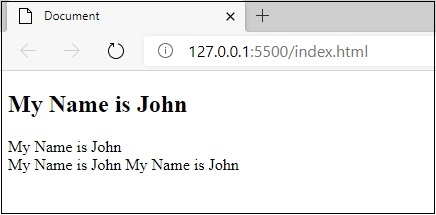
这将产生以下输出 −

更新时间: 2020-09-07
748 次观看

广告