
- Spring Boot 和 H2 教程
- Spring Boot 和 H2 - 主页
- Spring Boot 和 H2 - 概述
- Spring Boot 和 H2 - 环境设置
- Spring Boot 和 H2 - 项目设置
- Spring Boot 和 H2 - REST API
- Spring Boot 和 H2 - H2 控制台
- Spring Boot 和 H2 示例
- Spring Boot 和 H2 - 添加记录
- Spring Boot 和 H2 - 获取记录
- Spring Boot 和 H2 - 获取所有记录
- Spring Boot 和 H2 - 更新记录
- Spring Boot 和 H2 - 删除记录
- Spring Boot 和 H2 - 单元测试控制器
- Spring Boot 和 H2 - 单元测试服务
- Spring Boot 和 H2 - 单元测试存储库
- Spring Boot 和 H2 有用资源
- Spring Boot 和 H2 - 快速指南
- Spring Boot 和 H2 - 有用资源
- Spring Boot 和 H2 - 讨论
Spring Boot 和 H2 - 控制台
如前一章 应用程序设置 中所述,我们在 spring boot 项目中创建了所需文件。现在让我们来更新位于 **src/main/resources** 和 **pom.xml** 中的 **application.properties** 和 **pom.xml**,以使用版本不同的 **maven-resources-plugin**。
application.properties
spring.datasource.url=jdbc:h2:mem:testdb
pom.xml
...
<build>
   <plugins>
      <plugin>
         <groupId>org.springframework.boot</groupId>
         <artifactId>spring-boot-maven-plugin</artifactId>
      </plugin>
      <plugin>
         <groupId>org.apache.maven.plugins</groupId>
         <artifactId>maven-resources-plugin</artifactId>
      </plugin>
   </plugins>
</build>
...
运行应用程序
在 eclipse 中,运行 **人员应用程序** 配置,该配置是在 应用程序设置 期间准备的。
Eclipse 控制台将显示类似的输出。
[INFO] Scanning for projects...
[INFO]
[INFO] [1m------------------< [0;36mcom.tutorialspoint:springboot-h2[0;1m >------------------[m
[INFO] [1mBuilding springboot-h2 0.0.1-SNAPSHOT[m
[INFO]   from pom.xml
[INFO] [1m--------------------------------[ jar ]---------------------------------[m
...
[INFO] [1m--- [0;32mspring-boot:3.3.2:run[m [1m(default-cli)[m @ [36mspringboot-h2[0;1m ---[m
[INFO] Downloading from central: https://repo.maven.apache.org/maven2/org/springframework/boot/spring-boot-buildpack-platform/3.3.2/spring-boot-buildpack-platform-3.3.2.pom
...
[INFO] Downloaded from central: https://repo.maven.apache.org/maven2/org/apache/commons/commons-collections4/4.4/commons-collections4-4.4.jar (752 kB at 603 kB/s)
[INFO] Attaching agents: []

  .   ____          _            __ _ _
 /\\ / ___'_ __ _ _(_)_ __  __ _ \ \ \ \
( ( )\___ | '_ | '_| | '_ \/ _` | \ \ \ \
 \\/  ___)| |_)| | | | | || (_| |  ) ) ) )
  '  |____| .__|_| |_|_| |_\__, | / / / /
 =========|_|==============|___/=/_/_/_/

 :: Spring Boot ::                (v3.3.2)

2024-08-20T16:21:53.752+05:30  INFO 15660 --- [springboot-h2] [  restartedMain] c.t.s.SpringbootH2Application            : Starting SpringbootH2Application using Java 21.0.2 with PID 15660 (E:\Dev\springboot-h2\target\classes started by Tutorialspoint in E:\Dev\springboot-h2)
...
2024-08-20T16:21:57.864+05:30  INFO 15660 --- [springboot-h2] [  restartedMain] o.s.b.d.a.OptionalLiveReloadServer       : LiveReload server is running on port 35729
2024-08-20T16:21:57.899+05:30  INFO 15660 --- [springboot-h2] [  restartedMain] o.s.b.w.embedded.tomcat.TomcatWebServer  : Tomcat started on port 8080 (http) with context path '/'
2024-08-20T16:21:57.907+05:30  INFO 15660 --- [springboot-h2] [  restartedMain] c.t.s.SpringbootH2Application            : Started SpringbootH2Application in 4.738 seconds (process running for 5.305)
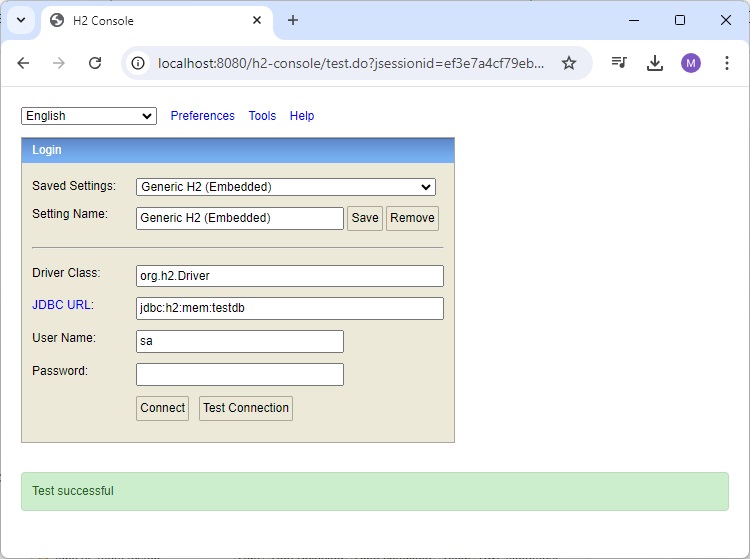
服务器启动并运行后,在浏览器中打开 **localhost:8080/h2-console**,然后单击“测试连接”以验证数据库连接。
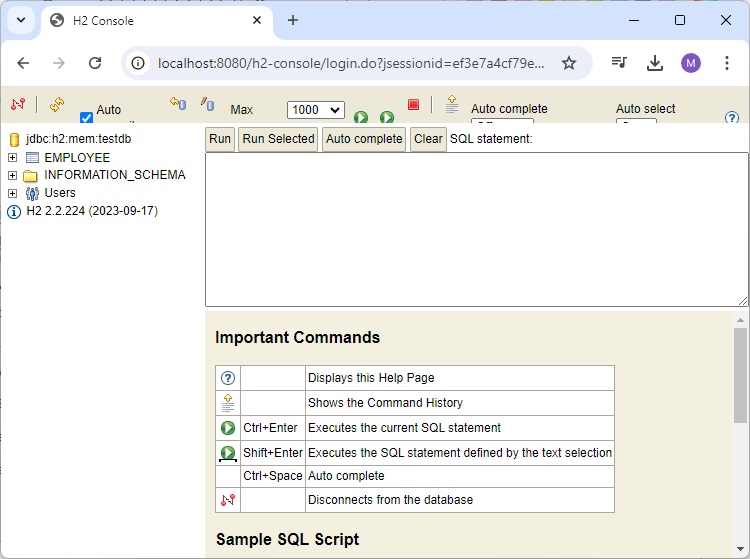
单击“连接”按钮,H2 数据库窗口将如下所示出现 −
广告