
- Spring WS 教程
- Spring WS - 首页
- Spring WS - 概述
- Spring WS - 环境设置
- Spring WS - 第一个应用程序
- Spring WS - 静态 WSDL
- Spring WS - 编写服务器
- Spring WS - 服务器单元测试
- Spring WS - 编写客户端
- Spring WS - 客户端单元测试
- Spring WS 有用资源
- Spring WS 快速指南
- Spring WS - 有用资源
- Spring WS - 讨论
Spring WS 快速指南
Spring WS - 概述
Spring Web Services (Spring-WS) 是 Spring 社区开发的项目之一。它的主要目标是创建文档驱动的 Web 服务。Spring Web Services 项目促进了契约优先的SOAP 服务开发,提供了多种创建灵活 Web 服务的方法,这些方法可以以多种方式操作 XML 有效负载。
Spring Web 服务无缝地使用了 Spring 概念,例如依赖注入和配置。Spring-WS 需要 Spring 3.0 版本。在契约优先开发中,我们从WSDL 契约开始,然后将使用 JAVA 实现所需的契约。
与 JAVA 接口生成 WSDL/XSD 契约的后契约方法相反。在契约优先方法中,基于 WSDL 的契约独立于 JAVA 实现。如果我们需要更改 JAVA 接口,则无需将对现有 WSDL 契约所做的更改传达给 Web 服务用户。Spring-WS 旨在提供 WSDL 契约与其基于 JAVA 的实现之间的松耦合。
特性
以下是 Spring Web Services 的特性:
将 XML 映射到对象 - 使用存储在消息有效负载、SOAP 操作标头中的信息或使用 XPath 表达式,可以将基于 XML 的请求映射到任何对象。
支持多种解析 XML 的 API - 除了用于解析传入 XML 请求的标准 JAXP API(DOM、SAX、StAX)之外,还支持其他库,例如 JDOM、dom4j、XOM。
支持多种编组 XML 的 API - Spring Web Services 使用其对象/XML 映射模块支持 JAXB 1 和 2、Castor、XMLBeans、JiBX 和 XStream 库。对象/XML 映射模块也可以在非 Web 服务代码中使用。
基于 Spring 的配置 - Spring Web Services 使用 Spring 应用程序上下文进行其配置,其架构与 Spring Web MVC 类似。
集成的 WS-Security 模块 - 使用 WS-Security 模块,您可以签署、加密、解密 SOAP 消息或对其进行身份验证。
支持 Acegi 安全性 - 使用 Spring Web Services 的 WS-Security 实现,可以将 Acegi 配置用于您的 SOAP 服务。
架构
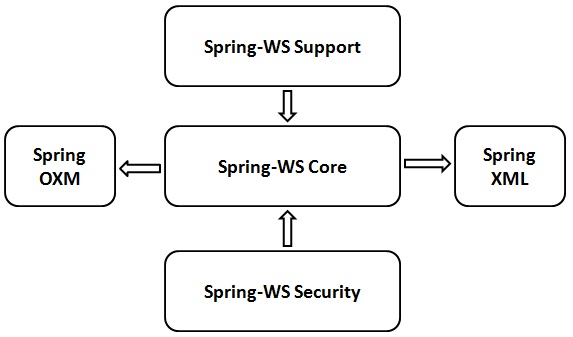
Spring-WS 项目包含五个主要模块,如下所述。
Spring-WS Core - 它是主要模块,并提供核心接口,如WebServiceMessage和SoapMessage、服务器端框架、强大的消息分发功能和用于实现 Web 服务端点的支持类。它还提供 Web 服务使用者客户端作为WebServiceTemplate。
Spring-WS 支持 - 此模块提供对 JMS、电子邮件等的支持。
Spring-WS 安全性 - 此模块负责提供与核心 Web 服务模块集成的 WS-Security 实现。使用此模块,我们可以添加主体令牌、签署、加密和解密 SOAP 消息。此模块允许使用现有的 Spring Security 实现进行身份验证和授权。
Spring XML - 此模块为 Spring Web Services 提供 XML 支持类。此模块由 Spring-WS 框架内部使用。
Spring OXM - 此模块为 XML 与对象映射提供支持类。
Spring WS - 环境设置
在本章中,我们将了解在基于 Windows 和 Linux 的系统上设置 Spring-WS 的过程。通过遵循一些简单的步骤,无需任何复杂的设置过程,Spring-WS 可以轻松安装并与您当前的Java 环境和MAVEN集成。安装过程中需要用户管理。
系统需求
下表列出了系统需求,后续步骤将指导我们完成环境设置过程。
| JDK | Java SE 2 JDK 1.5 或更高版本 |
| 内存 | 1 GB RAM(推荐) |
| 磁盘空间 | 无最低要求 |
| 操作系统版本 | Windows XP 或更高版本,Linux |
现在让我们继续执行安装 Spring-WS 的步骤。
步骤 1:验证 Java 安装
首先,您需要在系统上安装 Java 软件开发工具包 (SDK)。要验证这一点,请根据您正在使用的平台执行以下两个命令中的任何一个。
如果 Java 安装已正确完成,则它将显示 Java 安装的当前版本和规范。示例输出在下表中给出。
| 平台 | 命令 | 示例输出 |
|---|---|---|
| Windows |
打开命令控制台并键入: \>java -version |
Java version "1.7.0_60" Java (TM) SE Run Time Environment (build 1.7.0_60-b19) Java Hotspot (TM) 64-bit Server VM (build 24.60-b09,mixed mode) |
| Linux | 打开命令终端并键入: $java -version |
java version "1.7.0_25" Open JDK Runtime Environment (rhel-2.3.10.4.el6_4-x86_64) Open JDK 64-Bit Server VM (build 23.7-b01, mixed mode) |
我们假设本教程的读者在其系统上安装了 Java SDK 版本 1.7.0_60。
如果您没有 Java SDK,请从https://www.oracle.com/technetwork/java/javase/downloads/index.html下载其当前版本并安装。
步骤 2:设置 Java 环境
设置环境变量JAVA_HOME以指向 Java 安装在您机器上的基本目录位置。
| 序号 | 平台和描述 |
|---|---|
| 1 |
Windows 将 JAVA_HOME 设置为 C:\ProgramFiles\java\jdk1.7.0_60 |
| 2 |
Linux 导出 JAVA_HOME=/usr/local/java-current |
将 Java 编译器位置的完整路径附加到系统路径。
| 序号 | 平台和描述 |
|---|---|
| 1 |
Windows 将字符串“C:\Program Files\Java\jdk1.7.0_60\bin”附加到系统变量 PATH 的末尾。 |
| 2 |
Linux 导出 PATH=$PATH:$JAVA_HOME/bin/ |
从命令提示符执行命令java -version,如上所述。
步骤 3:下载 Maven 存档
从https://maven.apache.org/download.cgi下载 Maven 3.3.3
| 操作系统 | 存档名称 |
|---|---|
| Windows | apache-maven-3.3.3-bin.zip |
| Linux | apache-maven-3.3.3-bin.tar.gz |
| Mac | apache-maven-3.3.3-bin.tar.gz |
步骤 4:解压缩 Maven 存档
将存档解压缩到您希望安装 Maven 3.3.3 的目录中。子目录 apache-maven-3.3.3 将从存档中创建。
| 操作系统 | 位置(根据您的安装可能有所不同) |
|---|---|
| Windows | C:\Program Files\Apache Software Foundation\apache-maven-3.3.3 |
| Linux | /usr/local/apache-maven |
| Mac | /usr/local/apache-maven |
步骤 5:设置 Maven 环境变量
将 M2_HOME、M2 和 MAVEN_OPTS 添加到环境变量中。
| 操作系统 | 输出 |
|---|---|
| Windows |
使用系统属性设置环境变量。 M2_HOME=C:\Program Files\Apache Software Foundation\apache-maven-3.3.3 M2=%M2_HOME%\bin MAVEN_OPTS=-Xms256m -Xmx512m |
| Linux |
打开命令终端并设置环境变量。 export M2_HOME=/usr/local/apache-maven/apache-maven-3.3.3 export M2=$M2_HOME/bin export MAVEN_OPTS=-Xms256m -Xmx512m |
| Mac |
打开命令终端并设置环境变量。 export M2_HOME=/usr/local/apache-maven/apache-maven-3.3.3 export M2=$M2_HOME/bin export MAVEN_OPTS=-Xms256m -Xmx512m |
步骤 6:将 Maven bin 目录位置添加到系统路径
现在将 M2 变量附加到系统路径。
| 操作系统 | 输出 |
|---|---|
| Windows | 将字符串 ;%M2% 附加到系统变量 Path 的末尾。 |
| Linux | export PATH=$M2:$PATH |
| Mac | export PATH=$M2:$PATH |
步骤 7:验证 Maven 安装
现在打开控制台,执行以下mvn命令。
| 操作系统 | 任务 | 命令 |
|---|---|---|
| Windows | 打开命令控制台 | c:\> mvn --version |
| Linux | 打开命令终端 | $ mvn --version |
| Mac | 打开终端 | machine:< joseph$ mvn --version |
最后,验证上述命令的输出,它应该类似于以下内容:
| 操作系统 | 输出 |
|---|---|
| Windows |
Apache Maven 3.3.3 (7994120775791599e205a5524ec3e0dfe41d4a06; 2015-04-22T17:27:37+05:30) Maven home: C:\Program Files\Apache Software Foundation\apache-maven-3.3.3 Java version: 1.7.0_75, vendor: Oracle Corporation Java home: C:\Program Files\Java\jdk1.7.0_75\jre Default locale: en_US, platform encoding: Cp1252 |
| Linux |
Apache Maven 3.3.3 (7994120775791599e205a5524ec3e0dfe41d4a06; 2015-04-22T17:27:37+05:30) Maven home: /usr/local/apache-maven/apache-maven-3.3.3 Java version: 1.7.0_75, vendor: Oracle Corporation Java home: /usr/local/java-current/jdk1.7.0_75/jre |
| Mac |
Apache Maven 3.3.3 (7994120775791599e205a5524ec3e0dfe41d4a06; 2015-04-22T17:27:37+05:30) Maven home: /usr/local/apache-maven/apache-maven-3.3.3 Java version: 1.7.0_75, vendor: Oracle Corporation Java home: /Library/Java/Home/jdk1.7.0_75/jre |
步骤 8:设置 Eclipse IDE
本教程中的所有示例均使用 Eclipse IDE 编写。建议读者在其机器上安装最新版本的 Eclipse。要安装 Eclipse IDE,请从以下链接https://www.eclipse.org/downloads/下载最新的 Eclipse 二进制文件。下载安装程序后,将二进制分发版解压缩到方便的位置。
例如,在 Windows 上的C:\eclipse或 Linux/Unix 上的/usr/local/eclipse中,最后相应地设置 PATH 变量。可以通过在 Windows 机器上执行以下命令来启动 Eclipse,或者您可以简单地双击 eclipse.exe。
%C:\eclipse\eclipse.exe
可以通过在 UNIX(Solaris、Linux 等)机器上执行以下命令来启动 Eclipse:
$/usr/local/eclipse/eclipse
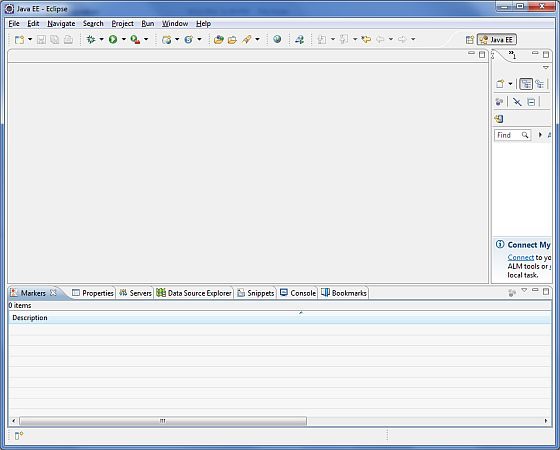
成功启动后,如果一切正常,则应显示以下屏幕:
步骤 9:设置 Apache Tomcat
我们可以从https://tomcat.net.cn/下载最新版本的 Tomcat。下载安装程序后,将二进制分发版解压缩到方便的位置。例如,在 Windows 机器上的C:\apache-tomcat-7.0.59或 Linux/Unix 机器上的/usr/local/apache-tomcat-7.0.59中,然后设置指向安装位置的CATALINA_HOME环境变量。
可以通过在 Windows 机器上执行以下命令来启动 Tomcat,或者您可以简单地双击 startup.bat
%CATALINA_HOME%\bin\startup.bat

or

C:\apache-tomcat-7.0.59\bin\startup.bat
可以通过在 UNIX(Solaris、Linux 等)机器上执行以下命令来启动 Tomcat:
$CATALINA_HOME/bin/startup.sh

or

/usr/local/apache-tomcat-7.0.59/bin/startup.sh
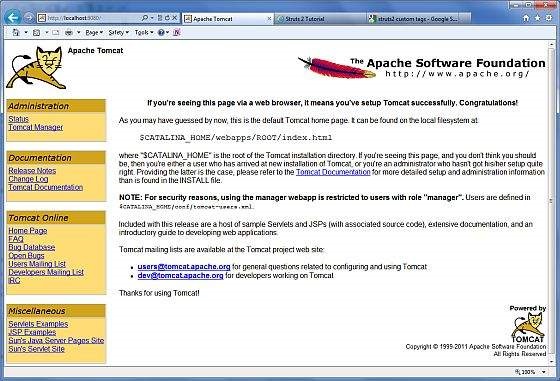
成功启动后,可以通过访问https://:8080/来使用 Tomcat 附带的默认 Web 应用程序。如果一切正常,则应显示以下屏幕:
有关配置和运行 Tomcat 的更多信息,请参阅此处包含的文档以及 Tomcat 网站:https://tomcat.net.cn
可以通过在 Windows 机器上执行以下命令来停止 Tomcat:
%CATALINA_HOME%\bin\shutdown

or

C:\apache-tomcat-7.0.59\bin\shutdown
可以通过在 UNIX(Solaris、Linux 等)机器上执行以下命令来停止 Tomcat:
$CATALINA_HOME/bin/shutdown.sh

or

/usr/local/apache-tomcat-7.0.59/bin/shutdown.sh
完成最后一步后,我们就可以开始第一个 Web Services 示例了,我们将在下一章中讨论它。
Spring WS - 第一个应用程序
让我们开始使用 Spring-WS 框架编写一个基于 SOAP 的实际 Web 服务。在使用 Spring-WS 框架编写第一个示例之前,我们必须确保 Spring-WS 环境已正确设置,如 Spring Web Services - 环境设置 章节中所述。我们假设读者对 Eclipse IDE 有一定的基本使用知识。
因此,让我们继续编写一个简单的 Spring WS 应用程序,该应用程序将公开一个 Web 服务方法,用于在 HR 门户中预订假期。
契约优先方法
Spring-WS 使用契约优先方法,这意味着在编写任何基于 JAVA 的实现代码之前,我们应该准备好我们的 XML 结构。我们正在定义一个 LeaveRequest 对象,它具有子对象 - Leave 和 Employee。
以下是所需的 XML 结构 -
Leave.xml
<Leave xmlns = "https://tutorialspoint.com/hr/schemas">
   <StartDate>2016-07-03</StartDate>
   <EndDate>2016-07-07</EndDate>
</Leave>
Employee.xml
<Employee xmlns = "https://tutorialspoint.com/hr/schemas">
   <Number>404</Number>
   <FirstName>Mahesh</FirstName>
   <LastName>Parashar</LastName>
</Employee>
LeaveRequest.xml
<LeaveRequest xmlns = "https://tutorialspoint.com/hr/schemas">
   <Leave>
      <StartDate>2016-07-03</StartDate>
      <EndDate>2016-07-07</EndDate>
   </Leave>

   <Employee>
      <Number>404</Number>
      <FirstName>Mahesh</FirstName>
      <LastName>Parashar</LastName>
   </Employee>
</LeaveRequest>
hr.xsd
<xs:schema xmlns:xs = "http://www.w3.org/2001/XMLSchema"
   xmlns:hr = "https://tutorialspoint.com/hr/schemas"
   elementFormDefault = "qualified"
   targetNamespace = "https://tutorialspoint.com/hr/schemas">

   <xs:element name = "LeaveRequest">
      <xs:complexType>
         <xs:all>
            <xs:element name = "Leave" type = "hr:LeaveType"/>
            <xs:element name = "Employee" type = "hr:EmployeeType"/>
         </xs:all>
      </xs:complexType>
   </xs:element>

   <xs:complexType name = "LeaveType">
      <xs:sequence>
         <xs:element name = "StartDate" type = "xs:date"/>
         <xs:element name = "EndDate" type = "xs:date"/>
      </xs:sequence>
   </xs:complexType>

   <xs:complexType name = "EmployeeType">
      <xs:sequence>
         <xs:element name = "Number" type = "xs:integer"/>
         <xs:element name = "FirstName" type = "xs:string"/>
         <xs:element name = "LastName" type = "xs:string"/>
      </xs:sequence>
   </xs:complexType>
</xs:schema>
创建项目
现在让我们打开命令控制台,转到 C:\MVN 目录并执行以下 mvn 命令。
C:\MVN>mvn archetype:generate -DarchetypeGroupId = org.springframework.ws
-DarchetypeArtifactId = spring-ws-archetype -DgroupId = com.tutorialspoint.hr
-DartifactId = leaveService
Maven 将开始处理并创建完整的 Java 应用程序项目结构。
[INFO] Scanning for projects...
[INFO]
[INFO] ------------------------------------------------------------------------
[INFO] Building Maven Stub Project (No POM) 1
[INFO] ------------------------------------------------------------------------
[INFO]
[INFO] Using property: groupId = com.tutorialspoint.hr
[INFO] Using property: artifactId = leaveService
Define value for property 'version':  1.0-SNAPSHOT: :
[INFO] Using property: package = com.tutorialspoint.hr
Confirm properties configuration:
groupId: com.tutorialspoint.hr
artifactId: leaveService
version: 1.0-SNAPSHOT
package: com.tutorialspoint.hr
 Y: :
[INFO] -------------------------------------------------------------------------
---
[INFO] Using following parameters for creating project from Old (1.x) Archetype:
 spring-ws-archetype:2.0.0-M1
[INFO] -------------------------------------------------------------------------
---
[INFO] Parameter: groupId, Value: com.tutorialspoint.hr
[INFO] Parameter: packageName, Value: com.tutorialspoint.hr
[INFO] Parameter: package, Value: com.tutorialspoint.hr
[INFO] Parameter: artifactId, Value: leaveService
[INFO] Parameter: basedir, Value: C:\mvn
[INFO] Parameter: version, Value: 1.0-SNAPSHOT
[INFO] project created from Old (1.x) Archetype in dir: C:\mvn\leaveService
[INFO] ------------------------------------------------------------------------
[INFO] BUILD SUCCESS
[INFO] ------------------------------------------------------------------------
[INFO] Total time: 35.989 s
[INFO] Finished at: 2017-01-21T11:18:31+05:30
[INFO] Final Memory: 17M/178M
[INFO] ------------------------------------------------------------------------
现在转到 C:/MVN 目录。我们将看到一个名为 leaveService(如 artifactId 中指定)的 Java 应用程序项目。更新 pom.xml 并将 HumanResourceService.java 和 HumanResourceServiceImpl.java 添加到以下文件夹中 – C:\MVN\leaveService\src\main\java\com\tutorialspoint\hr\service 文件夹。完成后,将 LeaveEndpoint.java 添加到以下文件夹中 – C:\MVN\leaveService\src\main\java\com\tutorialspoint\hr\ws 文件夹。
pom.xml
<?xml version = "1.0" encoding = "UTF-8"?>
<project xmlns = "http://maven.apache.org/POM/4.0.0"
   xmlns:xsi = "http://www.w3.org/2001/XMLSchema-instance"
   xsi:schemaLocation = "http://maven.apache.org/POM/4.0.0
   http://maven.apache.org/maven-v4_0_0.xsd">

   <modelVersion>4.0.0</modelVersion>
   <groupId>com.tutorialspoint.hr</groupId>
   <artifactId>leaveService</artifactId>
   <packaging>war</packaging>
   <version>1.0-SNAPSHOT</version>
   <name>leaveService Spring-WS Application</name>
   <url>http://www.springframework.org/spring-ws</url>

   <build>
      <finalName>leaveService</finalName>
   </build>

   <dependencies>
      <dependency>
         <groupId>org.springframework.ws</groupId>
         <artifactId>spring-ws-core</artifactId>
         <version>2.4.0.RELEASE</version>
      </dependency>

      <dependency>
         <groupId>jdom</groupId>
         <artifactId>jdom</artifactId>
         <version>1.0</version>
      </dependency>

      <dependency>
         <groupId>jaxen</groupId>
         <artifactId>jaxen</artifactId>
         <version>1.1</version>
      </dependency>

      <dependency>
         <groupId>wsdl4j</groupId>
         <artifactId>wsdl4j</artifactId>
         <version>1.6.2</version>
      </dependency>
   </dependencies>
</project>
HumanResourceService.java
package com.tutorialspoint.hr.service;

import java.util.Date;

public interface HumanResourceService {
   void bookLeave(Date startDate, Date endDate, String name);
}
HumanResourceServiceImpl.java
package com.tutorialspoint.hr.service;

import java.util.Date;
import org.springframework.stereotype.Service;

@Service
public class HumanResourceServiceImpl implements HumanResourceService {
   public void bookLeave(Date startDate, Date endDate, String name) {
      System.out.println("Booking holiday for [" + startDate + "-" + endDate + "]
         for [" + name + "] ");
   }
}
LeaveEndpoint.java
package com.tutorialspoint.hr.ws;

import java.text.SimpleDateFormat;
import java.util.Date;

import org.springframework.beans.factory.annotation.Autowired;
import org.springframework.ws.server.endpoint.annotation.Endpoint;
import org.springframework.ws.server.endpoint.annotation.PayloadRoot;
import org.springframework.ws.server.endpoint.annotation.RequestPayload;

import com.tutorialspoint.hr.service.HumanResourceService;
import org.jdom.Element;
import org.jdom.JDOMException;
import org.jdom.Namespace;
import org.jdom.xpath.XPath;

@Endpoint
public class LeaveEndpoint {
   private static final String NAMESPACE_URI = "https://tutorialspoint.com/hr/schemas";
   private XPath startDateExpression;
   private XPath endDateExpression;
   private XPath nameExpression;
   private HumanResourceService humanResourceService;

   @Autowired
   public LeaveEndpoint(HumanResourceService humanResourceService) throws JDOMException {
      this.humanResourceService = humanResourceService;

      Namespace namespace = Namespace.getNamespace("hr", NAMESPACE_URI);

      startDateExpression = XPath.newInstance("//hr:StartDate");
      startDateExpression.addNamespace(namespace);

      endDateExpression = XPath.newInstance("//hr:EndDate");
      endDateExpression.addNamespace(namespace);

      nameExpression = XPath.newInstance("concat(//hr:FirstName,' ',//hr:LastName)");
      nameExpression.addNamespace(namespace);
   }

   @PayloadRoot(namespace = NAMESPACE_URI, localPart = "LeaveRequest")
   public void handleLeaveRequest(@RequestPayload Element leaveRequest) throws Exception {
      SimpleDateFormat dateFormat = new SimpleDateFormat("yyyy-MM-dd");
      Date startDate = dateFormat.parse(startDateExpression.valueOf(leaveRequest));
      Date endDate = dateFormat.parse(endDateExpression.valueOf(leaveRequest));
      String name = nameExpression.valueOf(leaveRequest);

      humanResourceService.bookLeave(startDate, endDate, name);
   }
}
/WEB-INF/spring-ws-servlet.xml
<beans xmlns = "http://www.springframework.org/schema/beans"
   xmlns:xsi = "http://www.w3.org/2001/XMLSchema-instance"
   xmlns:context = "http://www.springframework.org/schema/context"
   xmlns:sws = "http://www.springframework.org/schema/web-services"
   xsi:schemaLocation = "http://www.springframework.org/schema/beans

   http://www.springframework.org/schema/beans/spring-beans-3.0.xsd
   http://www.springframework.org/schema/web-services
   http://www.springframework.org/schema/web-services/web-services-2.0.xsd
   http://www.springframework.org/schema/context
   http://www.springframework.org/schema/context/spring-context-3.0.xsd">

   <context:component-scan base-package = "com.tutorialspoint.hr"/>
   <bean id = "humanResourceService"
      class = "com.tutorialspoint.hr.service.HumanResourceServiceImpl" />
   <sws:annotation-driven/>

   <sws:dynamic-wsdl id = "leave"
      portTypeName = "HumanResource"
      locationUri = "/leaveService/"
      targetNamespace = "https://tutorialspoint.com/hr/definitions">
      <sws:xsd location = "/WEB-INF/hr.xsd"/>
   </sws:dynamic-wsdl>
</beans>
/WEB-INF/web.xml
<web-app xmlns = "http://java.sun.com/xml/ns/j2ee"
   xmlns:xsi = "http://www.w3.org/2001/XMLSchema-instance"
   xsi:schemaLocation = "http://java.sun.com/xml/ns/j2ee
   http://java.sun.com/xml/ns/j2ee/web-app_2_4.xsd"
   version = "2.4">

   <display-name>TutorialsPoint HR Leave Service</display-name>
   <servlet>
      <servlet-name>spring-ws</servlet-name>
      <servlet-class>
         org.springframework.ws.transport.http.MessageDispatcherServlet
      </servlet-class>
      <init-param>
         <param-name>transformWsdlLocations</param-name>
         <param-value>true</param-value>
      </init-param>
   </servlet>

   <servlet-mapping>
      <servlet-name>spring-ws</servlet-name>
      <url-pattern>/*</url-pattern>
   </servlet-mapping>
</web-app>
/WEB-INF/hr.xsd
<xs:schema xmlns:xs = "http://www.w3.org/2001/XMLSchema"
   xmlns:hr = "https://tutorialspoint.com/hr/schemas"
   elementFormDefault = "qualified"
   targetNamespace = "https://tutorialspoint.com/hr/schemas">

   <xs:element name = "LeaveRequest">
      <xs:complexType>
         <xs:all>
            <xs:element name = "Leave" type = "hr:LeaveType"/>
            <xs:element name = "Employee" type = "hr:EmployeeType"/>
         </xs:all>
      </xs:complexType>
   </xs:element>

   <xs:complexType name = "LeaveType">
      <xs:sequence>
         <xs:element name = "StartDate" type = "xs:date"/>
         <xs:element name = "EndDate" type = "xs:date"/>
      </xs:sequence>
   </xs:complexType>

   <xs:complexType name = "EmployeeType">
      <xs:sequence>
         <xs:element name = "Number" type = "xs:integer"/>
         <xs:element name = "FirstName" type = "xs:string"/>
         <xs:element name = "LastName" type = "xs:string"/>
      </xs:sequence>
   </xs:complexType>
</xs:schema>
构建项目
现在让我们打开命令控制台,转到 C:\MVN\leaveService 目录并执行以下 mvn 命令。
C:\MVN\leaveService>mvn clean package
Maven 将开始构建项目。
[INFO] Scanning for projects...
[INFO]
[INFO] ------------------------------------------------------------------------
[INFO] Building leaveService Spring-WS Application 1.0-SNAPSHOT
[INFO] ------------------------------------------------------------------------
[INFO]
[INFO] --- maven-clean-plugin:2.5:clean (default-clean) @ leaveService ---
[INFO] Deleting C:\mvn\leaveService\target
[INFO]
[INFO] --- maven-resources-plugin:2.6:resources (default-resources) @ leaveServi
ce ---
[WARNING] Using platform encoding (Cp1252 actually) to copy filtered resources,
i.e. build is platform dependent!
[INFO] Copying 0 resource
[INFO]
[INFO] --- maven-compiler-plugin:3.1:compile (default-compile) @ leaveService --
-
[INFO] Changes detected - recompiling the module!
[WARNING] File encoding has not been set, using platform encoding Cp1252, i.e. b
uild is platform dependent!
[INFO] Compiling 3 source files to C:\mvn\leaveService\target\classes
[INFO]
[INFO] --- maven-resources-plugin:2.6:testResources (default-testResources) @ le
aveService ---
[WARNING] Using platform encoding (Cp1252 actually) to copy filtered resources,
i.e. build is platform dependent!
[INFO] skip non existing resourceDirectory C:\mvn\leaveService\src\test\resource
s
[INFO]
[INFO] --- maven-compiler-plugin:3.1:testCompile (default-testCompile) @ leaveSe
rvice ---
[INFO] No sources to compile
[INFO]
[INFO] --- maven-surefire-plugin:2.12.4:test (default-test) @ leaveService ---
[INFO] No tests to run.
[INFO]
[INFO] --- maven-war-plugin:2.2:war (default-war) @ leaveService ---
[INFO] Packaging webapp
[INFO] Assembling webapp [leaveService] in [C:\mvn\leaveService\target\leaveServ
ice]
[INFO] Processing war project
[INFO] Copying webapp resources [C:\mvn\leaveService\src\main\webapp]
[INFO] Webapp assembled in [7159 msecs]
[INFO] Building war: C:\mvn\leaveService\target\leaveService.war
[INFO] WEB-INF\web.xml already added, skipping
[INFO] ------------------------------------------------------------------------
[INFO] BUILD SUCCESS
[INFO] ------------------------------------------------------------------------
[INFO] Total time: 19.667 s
[INFO] Finished at: 2017-01-21T11:56:43+05:30
[INFO] Final Memory: 18M/173M
[INFO] ------------------------------------------------------------------------
在 Eclipse 中导入项目
按照以下步骤在 Eclipse 中导入项目。
打开 Eclipse。
选择文件→导入→选项。
选择 Maven Projects 选项。点击下一步按钮。
选择项目位置,即使用 Maven 创建 leaveService 项目的位置。
点击完成按钮。
运行项目
完成源文件和配置文件的创建后,导出应用程序。右键单击应用程序,使用导出→WAR 文件选项并将 leaveService.war 文件保存在 Tomcat 的 webapps 文件夹中。
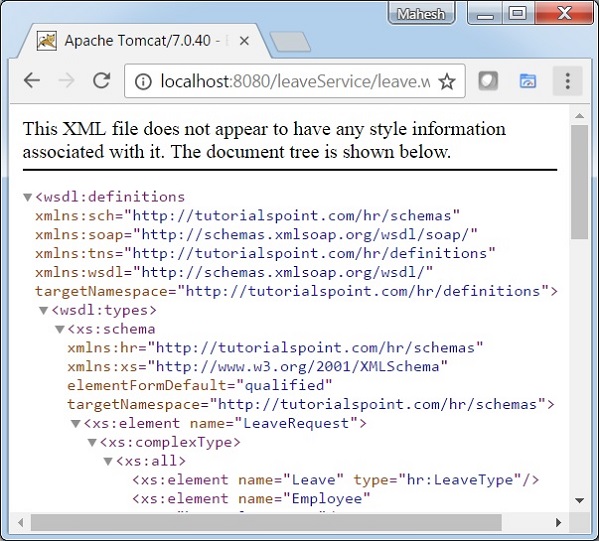
启动 Tomcat 服务器并确保我们能够使用标准浏览器从 webapps 文件夹访问其他网页。尝试访问 URL – https://:8080/leaveService/leave.wsdl,如果 Spring Web 应用程序一切正常,我们将看到以下屏幕。
Spring WS - 静态 WSDL
在上一章 Spring -WS - 第一个应用程序 中,我们使用 Spring WS 配置自动生成了 WSDL。在本例中,我们将展示如何使用 Spring WS 公开现有的 WSDL。
| 步骤 | 描述 |
|---|---|
| 1 | 如 Spring WS - 第一个应用程序章节中所述,创建一个名为 leaveService 的项目,放在 com.tutorialspoint 包下。 |
| 2 | 在 /WEB-INF/wsdl 子文件夹下创建一个 WSDL leave.wsdl。 |
| 3 | 更新 /WEB-INF 子文件夹下的 spring-ws-servlet.xml。我们在这里使用 static-wsdl 标记而不是 dynamic-wsdl。 |
| 4 | 最后一步是创建所有源文件和配置文件的内容,并导出应用程序,如下所述。 |
/WEB-INF/spring-ws-servlet.xml
<wsdl:definitions xmlns:wsdl = "http://schemas.xmlsoap.org/wsdl/"
   xmlns:soap = "http://schemas.xmlsoap.org/wsdl/soap/"
   xmlns:schema = "https://tutorialspoint.com/hr/schemas"
   xmlns:tns = "https://tutorialspoint.com/hr/definitions"
   targetNamespace = "https://tutorialspoint.com/hr/definitions">

   <wsdl:types>
      <xsd:schema xmlns:xsd = "http://www.w3.org/2001/XMLSchema">
         <xsd:import namespace = "https://tutorialspoint.com/hr/schemas"
            schemaLocation = "hr.xsd"/>
      </xsd:schema>
   </wsdl:types>

   <wsdl:message name = "LeaveRequest">
      <wsdl:part element = "schema:LeaveRequest" name = "LeaveRequest"/>
   </wsdl:message>

   <wsdl:portType name = "HumanResource">
      <wsdl:operation name = "Leave">
         <wsdl:input message = "tns:LeaveRequest" name = "LeaveRequest"/>
      </wsdl:operation>
   </wsdl:portType>

   <wsdl:binding name = "HumanResourceBinding" type = "tns:HumanResource">
      <soap:binding style = "document"
         transport = "http://schemas.xmlsoap.org/soap/http"/>
      <wsdl:operation name = "Leave">
         <soap:operation soapAction = "http://mycompany.com/RequestLeave"/>
         <wsdl:input name = "LeaveRequest">
            <soap:body use = "literal"/>
         </wsdl:input>
      </wsdl:operation>
   </wsdl:binding>

   <wsdl:service name = "HumanResourceService">
      <wsdl:port binding = "tns:HumanResourceBinding" name = "HumanResourcePort">
         <soap:address location = "https://:8080/leaveService/"/>
      </wsdl:port>
   </wsdl:service>
</wsdl:definitions>
/WEB-INF/spring-ws-servlet.xml
<beans xmlns = "http://www.springframework.org/schema/beans"
   xmlns:xsi = "http://www.w3.org/2001/XMLSchema-instance"
   xmlns:context = "http://www.springframework.org/schema/context"
   xmlns:sws = "http://www.springframework.org/schema/web-services"
   xsi:schemaLocation = "http://www.springframework.org/schema/beans

   http://www.springframework.org/schema/beans/spring-beans-3.0.xsd
   http://www.springframework.org/schema/web-services
   http://www.springframework.org/schema/web-services/web-services-2.0.xsd
   http://www.springframework.org/schema/context
   http://www.springframework.org/schema/context/spring-context-3.0.xsd">

   <context:component-scan base-package = "com.tutorialspoint.hr"/>
   <sws:annotation-driven/>
   <sws:static-wsdl id = "leave" location = "/WEB-INF/wsdl/leave.wsdl"/>
</beans>
运行项目
完成源文件和配置文件的创建后,应导出应用程序。右键单击应用程序,使用导出→WAR 文件选项并将 leaveService.war 文件保存在 Tomcat 的 webapps 文件夹中。
现在,启动 Tomcat 服务器并确保我们能够使用标准浏览器从 webapps 文件夹访问其他网页。尝试访问 URL – https://:8080/leaveService/leave.wsdl,如果 Spring Web 应用程序一切正常,我们将看到以下屏幕。
Spring WS - 编写服务器
在本章中,我们将了解如何使用 Spring WS 创建 Web 应用程序服务器。
| 步骤 | 描述 |
|---|---|
| 1 | 如 Spring WS - 第一个应用程序章节中所述,创建一个名为 countryService 的项目,放在 com.tutorialspoint 包下。 |
| 2 | 创建 countries.xsd、域类、CountryRepository 和 CountryEndPoint,如以下步骤中所述。 |
| 3 | 更新 /WEB-INF 子文件夹下的 spring-ws-servlet.xml。 |
| 4 | 最后一步是创建所有源文件和配置文件的内容,并导出应用程序,如下所述。 |
countries.xsd
<xs:schema xmlns:xs = "http://www.w3.org/2001/XMLSchema"
   xmlns:tns = "http://tutorialspoint/schemas"
   targetNamespace = "http://tutorialspoint/schemas"
   elementFormDefault = "qualified">

   <xs:element name = "getCountryRequest">
      <xs:complexType>
         <xs:sequence>
            <xs:element name = "name" type = "xs:string"/>
         </xs:sequence>
      </xs:complexType>
   </xs:element>

   <xs:element name = "getCountryResponse">
      <xs:complexType>
         <xs:sequence>
            <xs:element name = "country" type = "tns:country"/>
         </xs:sequence>
      </xs:complexType>
   </xs:element>

   <xs:complexType name = "country">
      <xs:sequence>
         <xs:element name = "name" type = "xs:string"/>
         <xs:element name = "population" type = "xs:int"/>
         <xs:element name = "capital" type = "xs:string"/>
         <xs:element name = "currency" type = "tns:currency"/>
      </xs:sequence>
   </xs:complexType>

   <xs:simpleType name = "currency">
      <xs:restriction base = "xs:string">
         <xs:enumeration value = "GBP"/>
         <xs:enumeration value = "USD"/>
         <xs:enumeration value = "INR"/>
      </xs:restriction>
   </xs:simpleType>
</xs:schema>
创建项目
让我们打开命令控制台,转到 C:\MVN 目录并执行以下 mvn 命令。
C:\MVN>mvn archetype:generate -DarchetypeGroupId = org.springframework.ws
-DarchetypeArtifactId = spring-ws-archetype -DgroupId = com.tutorialspoint
-DartifactId = countryService
Maven 将开始处理并创建完整的 Java 应用程序项目结构。
[INFO] Scanning for projects...
[INFO]
[INFO] ------------------------------------------------------------------------
[INFO] Building Maven Stub Project (No POM) 1
[INFO] ------------------------------------------------------------------------
[INFO]
[INFO] Using property: groupId = com.tutorialspoint
[INFO] Using property: artifactId = countryService
Define value for property 'version':  1.0-SNAPSHOT: :
[INFO] Using property: package = com.tutorialspoint
Confirm properties configuration:
groupId: com.tutorialspoint
artifactId: countryService
version: 1.0-SNAPSHOT
package: com.tutorialspoint
 Y: :
[INFO] -------------------------------------------------------------------------
---
[INFO] Using following parameters for creating project from Old (1.x) Archetype:
 spring-ws-archetype:2.0.0-M1
[INFO] -------------------------------------------------------------------------
---
[INFO] Parameter: groupId, Value: com.tutorialspoint
[INFO] Parameter: packageName, Value: com.tutorialspoint
[INFO] Parameter: package, Value: com.tutorialspoint
[INFO] Parameter: artifactId, Value: countryService
[INFO] Parameter: basedir, Value: C:\mvn
[INFO] Parameter: version, Value: 1.0-SNAPSHOT
[INFO] project created from Old (1.x) Archetype in dir: C:\mvn\countryService
[INFO] ------------------------------------------------------------------------
[INFO] BUILD SUCCESS
[INFO] ------------------------------------------------------------------------
[INFO] Total time: 35.989 s
[INFO] Finished at: 2017-01-21T11:18:31+05:30
[INFO] Final Memory: 17M/178M
[INFO] ------------------------------------------------------------------------
现在转到 C:/MVN 目录。我们将看到一个名为 countryService(如 artifactId 中指定)的 Java 应用程序项目。更新 pom.xml。
pom.xml
<?xml version = "1.0" encoding = "UTF-8"?>
<project xmlns = "http://maven.apache.org/POM/4.0.0"
   xmlns:xsi = "http://www.w3.org/2001/XMLSchema-instance"
   xsi:schemaLocation = "http://maven.apache.org/POM/4.0.0
   http://maven.apache.org/maven-v4_0_0.xsd">

   <modelVersion>4.0.0</modelVersion>
   <groupId>com.tutorialspoint.hr</groupId>
   <artifactId>countryService</artifactId>
   <packaging>war</packaging>
   <version>1.0-SNAPSHOT</version>
   <name>countryService Spring-WS Application</name>
   <url>http://www.springframework.org/spring-ws</url>

   <build>
      <finalName>countryService</finalName>
   </build>

   <dependencies>
      <dependency>
         <groupId>org.springframework.ws</groupId>
         <artifactId>spring-ws-core</artifactId>
         <version>2.4.0.RELEASE</version>
      </dependency>

      <dependency>
         <groupId>jdom</groupId>
         <artifactId>jdom</artifactId>
         <version>1.0</version>
      </dependency>

      <dependency>
         <groupId>jaxen</groupId>
         <artifactId>jaxen</artifactId>
         <version>1.1</version>
      </dependency>

      <dependency>
         <groupId>wsdl4j</groupId>
         <artifactId>wsdl4j</artifactId>
         <version>1.6.2</version>
      </dependency>
   </dependencies>
</project>
创建域类
将 countries.xsd 复制到 C:\mvn\countryService\src\main\resources 文件夹中。让我们打开命令控制台,转到 C:\mvn\countryService\src\main\resources 目录并执行以下 xjc 命令以使用 countries.xsd 生成域类。
C:\MVN\countryService\src\main\resources>xjc -p com.tutorialspoint countries.xsd
Maven 将开始处理并在 com.tutorialspoint 包中创建域类。
parsing a schema...
compiling a schema...
com\tutorialspoint\Country.java
com\tutorialspoint\Currency.java
com\tutorialspoint\GetCountryRequest.java
com\tutorialspoint\GetCountryResponse.java
com\tutorialspoint\ObjectFactory.java
com\tutorialspoint\package-info.java
在 C:\mvn\countryService\src\main 文件夹中创建文件夹 java。将所有类复制到 C:\mvn\countryService\src\main\java 文件夹中。创建 CountryRepository 和 CountryEndPoint 分别表示国家/地区数据库和国家/地区服务器。
CountryRepository.java
package com.tutorialspoint;

import java.util.ArrayList;
import java.util.List;
import org.springframework.beans.propertyeditors.CurrencyEditor;
import org.springframework.stereotype.Component;
import org.springframework.util.Assert;

@Component
public class CountryRepository {
   private static final List<Country> countries = new ArrayList<Country>();

   public CountryRepository(){
      initData();
   }
   public void initData() {
      Country us = new Country();
      us.setName("United States");
      us.setCapital("Washington");
      us.setCurrency(Currency.USD);
      us.setPopulation(46704314);

      countries.add(us);

      Country india = new Country();
      india.setName("India");
      india.setCapital("New Delhi");
      india.setCurrency(Currency.INR);
      india.setPopulation(138186860);

      countries.add(india);

      Country uk = new Country();
      uk.setName("United Kingdom");
      uk.setCapital("London");
      uk.setCurrency(Currency.GBP);
      uk.setPopulation(63705000);

      countries.add(uk);
   }
   public Country findCountry(String name) {
      Assert.notNull(name);
      Country result = null;

      for (Country country : countries) {
         if (name.trim().equals(country.getName())) {
            result = country;
         }
      }
      return result;
   }
}
CountryEndPoint.java
package com.tutorialspoint.ws;

import org.jdom.JDOMException;
import org.springframework.beans.factory.annotation.Autowired;
import org.springframework.ws.server.endpoint.annotation.Endpoint;
import org.springframework.ws.server.endpoint.annotation.PayloadRoot;
import org.springframework.ws.server.endpoint.annotation.RequestPayload;
import org.springframework.ws.server.endpoint.annotation.ResponsePayload;

import com.tutorialspoint.Country;
import com.tutorialspoint.CountryRepository;
import com.tutorialspoint.GetCountryRequest;
import com.tutorialspoint.GetCountryResponse;

@Endpoint
public class CountryEndPoint {
   private static final String NAMESPACE_URI = "http://tutorialspoint/schemas";
   private CountryRepository countryRepository;

   @Autowired
   public CountryEndPoint(CountryRepository countryRepository) throws JDOMException {
      this.countryRepository = countryRepository;
   }
   @PayloadRoot(namespace = NAMESPACE_URI, localPart = "getCountryRequest")
   @ResponsePayload
   public GetCountryResponse getCountry(@RequestPayload GetCountryRequest request)
      throws JDOMException {

      Country country = countryRepository.findCountry(request.getName());
      GetCountryResponse response = new GetCountryResponse();
      response.setCountry(country);
      return response;
   }
}
/WEB-INF/spring-ws-servlet.xml
<beans xmlns = "http://www.springframework.org/schema/beans"
   xmlns:xsi = "http://www.w3.org/2001/XMLSchema-instance"
   xmlns:context = "http://www.springframework.org/schema/context"
   xmlns:sws = "http://www.springframework.org/schema/web-services"
   xsi:schemaLocation = "http://www.springframework.org/schema/beans

   http://www.springframework.org/schema/beans/spring-beans-3.0.xsd
   http://www.springframework.org/schema/web-services
   http://www.springframework.org/schema/web-services/web-services-2.0.xsd
   http://www.springframework.org/schema/context
   http://www.springframework.org/schema/context/spring-context-3.0.xsd">

   <context:component-scan base-package = "com.tutorialspoint"/>
   <sws:annotation-driven/>

   <sws:dynamic-wsdl id="countries"
      portTypeName = "CountriesPort"
      locationUri = "/countryService/"
      targetNamespace = "https://tutorialspoint.com/definitions">
      <sws:xsd location = "/WEB-INF/countries.xsd"/>
   </sws:dynamic-wsdl>
</beans>
/WEB-INF/web.xml
<web-app xmlns = "http://java.sun.com/xml/ns/j2ee"
   xmlns:xsi = "http://www.w3.org/2001/XMLSchema-instance"
   xsi:schemaLocation = "http://java.sun.com/xml/ns/j2ee
   http://java.sun.com/xml/ns/j2ee/web-app_2_4.xsd"
   version = "2.4">

   <display-name>TutorialsPoint Country Service</display-name>

   <servlet>
      <servlet-name>spring-ws</servlet-name>
      <servlet-class>org.springframework.ws.transport.http.MessageDispatcherServlet
      </servlet-class>
      <init-param>
         <param-name>transformWsdlLocations</param-name>
         <param-value>true</param-value>
      </init-param>
   </servlet>

   <servlet-mapping>
      <servlet-name>spring-ws</servlet-name>
      <url-pattern>/*</url-pattern>
   </servlet-mapping>
</web-app>
构建项目
让我们打开命令控制台。转到 C:\MVN\countryService 目录并执行以下 mvn 命令。
C:\MVN\countryService>mvn clean package
Maven 将开始构建项目。
INFO] Scanning for projects...
[INFO]
[INFO] ------------------------------------------------------------------------
[INFO] Building countryService Spring-WS Application 1.0-SNAPSHOT
[INFO] ------------------------------------------------------------------------
[INFO]
[INFO] --- maven-clean-plugin:2.5:clean (default-clean) @ countryService ---
[INFO] Deleting C:\mvn\countryService\target
[INFO]
[INFO] --- maven-resources-plugin:2.6:resources (default-resources) @ countrySer
vice ---
[WARNING] Using platform encoding (Cp1252 actually) to copy filtered resources,
i.e. build is platform dependent!
[INFO] Copying 0 resource
[INFO]
[INFO] --- maven-compiler-plugin:3.1:compile (default-compile) @ countryService
---
[INFO] Changes detected - recompiling the module!
[WARNING] File encoding has not been set, using platform encoding Cp1252, i.e.
build is platform dependent!
[INFO] Compiling 4 source files to C:\mvn\countryService\target\classes
[INFO]
[INFO] --- maven-resources-plugin:2.6:testResources (default-testResources) @ co
untryService ---
[WARNING] Using platform encoding (Cp1252 actually) to copy filtered resources,
i.e. build is platform dependent!
[INFO] skip non existing resourceDirectory C:\mvn\countryService\src\test\resour
ces
[INFO]
[INFO] --- maven-compiler-plugin:3.1:testCompile (default-testCompile) @ country
Service ---
[INFO] No sources to compile
[INFO]
[INFO] --- maven-surefire-plugin:2.12.4:test (default-test) @ countryService ---

[INFO] No tests to run.
[INFO]
[INFO] --- maven-war-plugin:2.2:war (default-war) @ countryService ---
[INFO] Packaging webapp
[INFO] Assembling webapp [countryService] in [C:\mvn\countryService\target\count
ryService]
[INFO] Processing war project
[INFO] Copying webapp resources [C:\mvn\countryService\src\main\webapp]
[INFO] Webapp assembled in [5137 msecs]
[INFO] Building war: C:\mvn\countryService\target\countryService.war
[INFO] WEB-INF\web.xml already added, skipping
[INFO] ------------------------------------------------------------------------
[INFO] BUILD SUCCESS
[INFO] ------------------------------------------------------------------------
[INFO] Total time: 16.484 s
[INFO] Finished at: 2017-01-28T09:07:59+05:30
[INFO] Final Memory: 19M/170M
[INFO] ------------------------------------------------------------------------
运行项目
创建源文件和配置文件后,将 countryService.war 文件导出到 Tomcat 的 webapps 文件夹中。
现在,启动 Tomcat 服务器并确保我们能够使用标准浏览器从 webapps 文件夹访问其他网页。向 URL – https://:8080/countryService/ 发出 POST 请求,并使用任何 SOAP 客户端发出以下请求。
<x:Envelope xmlns:x = "http://schemas.xmlsoap.org/soap/envelope/"
   xmlns:tns = "http://tutorialspoint/schemas">
   <x:Header/>
   <x:Body>
      <tns:getCountryRequest>
         <tns:name>United States</tns:name>
      </tns:getCountryRequest>
   </x:Body>
</x:Envelope>
您将看到以下结果。
<SOAP-ENV:Envelope xmlns:SOAP-ENV = "http://schemas.xmlsoap.org/soap/envelope/">
   <SOAP-ENV:Header/>
   <SOAP-ENV:Body>
      <ns2:getCountryResponse xmlns:ns2 = "http://tutorialspoint/schemas">
         <ns2:country>
            <ns2:name>United States</ns2:name>
            <ns2:population>46704314</ns2:population>
            <ns2:capital>Washington</ns2:capital>
            <ns2:currency>USD</ns2:currency>
         </ns2:country>
      </ns2:getCountryResponse>
   </SOAP-ENV:Body>
</SOAP-ENV:Envelope>
Spring WS - 服务器单元测试
在本章中,我们将了解如何对使用 Spring WS 创建的 Web 应用程序服务进行单元测试。
| 步骤 | 描述 |
|---|---|
| 1 | 更新在 Spring WS – 编写服务器章节中创建的项目 countryService。添加 src/test/java 文件夹。 |
| 2 | 在 – src/test/java/com/tutorialspoint/ws 文件夹下创建 CustomerEndPointTest.java,然后按如下所示更新 POM.xml。 |
| 3 | 在 src/main/resources 子文件夹下添加 spring-context.xml。 |
| 4 | 最后一步是创建所有源文件和配置文件的内容,并测试应用程序,如下所述。 |
POM.xml
<?xml version = "1.0" encoding = "UTF-8"?>
<project xmlns = "http://maven.apache.org/POM/4.0.0"
   xmlns:xsi = "http://www.w3.org/2001/XMLSchema-instance"
   xsi:schemaLocation = "http://maven.apache.org/POM/4.0.0
   http://maven.apache.org/maven-v4_0_0.xsd">

   <modelVersion>4.0.0</modelVersion>
   <groupId>com.tutorialspoint</groupId>
   <artifactId>countryService</artifactId>
   <packaging>war</packaging>
   <version>1.0-SNAPSHOT</version>
   <name>countryService Spring-WS Application</name>
   <url>http://www.springframework.org/spring-ws</url>
   <build>
      <finalName>countryService</finalName>
   </build>

   <dependencies>
      <dependency>
         <groupId>org.springframework.ws</groupId>
         <artifactId>spring-ws-core</artifactId>
         <version>2.4.0.RELEASE</version>
      </dependency>

      <dependency>
         <groupId>org.springframework</groupId>
         <artifactId>spring-test</artifactId>
         <version>2.5</version>
      </dependency>

      <dependency>
         <groupId>org.springframework.ws</groupId>
         <artifactId>spring-ws-test</artifactId>
         <version>2.4.0.RELEASE</version>
      </dependency>

      <dependency>
         <groupId>org.springframework</groupId>
         <artifactId>spring-tx</artifactId>
         <version>3.1.2.RELEASE</version>
      </dependency>

      <dependency>
         <groupId>jdom</groupId>
         <artifactId>jdom</artifactId>
         <version>1.0</version>
      </dependency>

      <dependency>
         <groupId>jaxen</groupId>
         <artifactId>jaxen</artifactId>
         <version>1.1</version>
      </dependency>

      <dependency>
         <groupId>wsdl4j</groupId>
         <artifactId>wsdl4j</artifactId>
         <version>1.6.2</version>
      </dependency>

      <dependency>
         <groupId>junit</groupId>
         <artifactId>junit</artifactId>
         <version>4.5</version>
         <scope>test</scope>
      </dependency>
   </dependencies>
</project>
spring-context.xml
<beans xmlns = "http://www.springframework.org/schema/beans"
   xmlns:xsi = "http://www.w3.org/2001/XMLSchema-instance"
   xmlns:context = "http://www.springframework.org/schema/context"
   xmlns:sws = "http://www.springframework.org/schema/web-services"
   xsi:schemaLocation = "http://www.springframework.org/schema/beans

   http://www.springframework.org/schema/beans/spring-beans-3.0.xsd
   http://www.springframework.org/schema/web-services
   http://www.springframework.org/schema/web-services/web-services-2.0.xsd
   http://www.springframework.org/schema/context
   http://www.springframework.org/schema/context/spring-context-3.0.xsd">

   <context:component-scan base-package = "com.tutorialspoint"/>
   <sws:annotation-driven/>

   <bean id = "schema" class = "org.springframework.core.io.ClassPathResource">
      <constructor-arg index = "0" value = "countries.xsd" />
   </bean>
</beans>
CustomerEndPointTest.java
package com.tutorialspoint.ws;

import javax.xml.transform.Source;

import org.junit.Before;
import org.junit.Test;
import org.junit.runner.RunWith;

import org.springframework.beans.factory.annotation.Autowired;
import org.springframework.beans.factory.xml.XmlBeanDefinitionReader;
import org.springframework.context.ApplicationContext;
import org.springframework.context.support.GenericApplicationContext;
import org.springframework.test.context.ContextConfiguration;
import org.springframework.test.context.junit4.SpringJUnit4ClassRunner;
import org.springframework.ws.test.server.MockWebServiceClient;
import org.springframework.xml.transform.StringSource;

import static org.springframework.ws.test.server.RequestCreators.withPayload;
import static org.springframework.ws.test.server.ResponseMatchers.payload;

@RunWith(SpringJUnit4ClassRunner.class)
@ContextConfiguration( locations = "/spring-context.xml" )
public class CustomerEndPointTest {
   @Autowired
   private ApplicationContext applicationContext;
   private MockWebServiceClient mockClient;

   @Before
   public void createClient() {
      mockClient = MockWebServiceClient.createClient(applicationContext);
      GenericApplicationContext ctx = (GenericApplicationContext) applicationContext;
      final XmlBeanDefinitionReader definitionReader = new XmlBeanDefinitionReader(ctx);
      definitionReader.setValidationMode(XmlBeanDefinitionReader.VALIDATION_NONE);
      definitionReader.setNamespaceAware(true);
   }
   @Test
   public void testCountryEndpoint() throws Exception {
      Source requestPayload = new StringSource(
         "<getCountryRequest xmlns = 'http://tutorialspoint/schemas'>"+
         "<name>United States</name>"+
         "</getCountryRequest>");
      Source responsePayload = new StringSource(
         "<getCountryResponse xmlns='http://tutorialspoint/schemas'>" +
         "<country>" +
         "<name>United States</name>"+
         "<population>46704314</population>"+
         "<capital>Washington</capital>"+
         "<currency>USD</currency>"+
         "</country>"+
         "</getCountryResponse>");
      mockClient.sendRequest(withPayload(requestPayload)).andExpect(payload(responsePayload));
   }
}
构建项目
让我们打开命令控制台,转到 C:\MVN\countryService 目录并执行以下 mvn 命令。
C:\MVN\countryService>mvn test
Maven 将开始构建和测试项目。
[INFO] Scanning for projects...
[INFO]
[INFO] ------------------------------------------------------------------------
[INFO] Building countryService Spring-WS Application 1.0-SNAPSHOT
[INFO] ------------------------------------------------------------------------
[INFO]
[INFO] --- maven-resources-plugin:2.6:resources (default-resources) @ countrySer
vice ---
[WARNING] Using platform encoding (Cp1252 actually) to copy filtered resources,
i.e. build is platform dependent!
[INFO] Copying 2 resources
[INFO]
[INFO] --- maven-compiler-plugin:3.1:compile (default-compile) @ countryService
---
[INFO] Nothing to compile - all classes are up to date
[INFO]
[INFO] --- maven-resources-plugin:2.6:testResources (default-testResources) @ co
untryService ---
[WARNING] Using platform encoding (Cp1252 actually) to copy filtered resources,
i.e. build is platform dependent!
[INFO] skip non existing resourceDirectory C:\MVN\countryService\src\test\resour
ces
[INFO]
[INFO] --- maven-compiler-plugin:3.1:testCompile (default-testCompile) @ country
Service ---
[INFO] Nothing to compile - all classes are up to date
[INFO]
[INFO] --- maven-surefire-plugin:2.12.4:test (default-test) @ countryService ---

[INFO] Surefire report directory: C:\MVN\countryService\target\surefire-reports

-------------------------------------------------------
 T E S T S
-------------------------------------------------------
Running com.tutorialspoint.ws.CustomerEndPointTest
Feb 27, 2017 11:49:30 AM org.springframework.test.context.TestContextManager ret
rieveTestExecutionListeners
INFO: @TestExecutionListeners is not present for class [class com.tutorialspoint
.ws.CustomerEndPointTest]: using defaults.
Feb 27, 2017 11:49:30 AM org.springframework.beans.factory.xml.XmlBeanDefinition
Reader loadBeanDefinitions
INFO: Loading XML bean definitions from class path resource [spring-context.xml]

Feb 27, 2017 11:49:30 AM org.springframework.context.support.GenericApplicationC
ontext prepareRefresh
INFO: Refreshing org.springframework.context.support.GenericApplicationContext@b
2eddc0: startup date [Mon Feb 27 11:49:30 IST 2017]; root of context hierarchy
Feb 27, 2017 11:49:31 AM org.springframework.ws.soap.addressing.server.Annotatio
nActionEndpointMapping afterPropertiesSet
INFO: Supporting [WS-Addressing August 2004, WS-Addressing 1.0]
Feb 27, 2017 11:49:31 AM org.springframework.ws.soap.saaj.SaajSoapMessageFactory
 afterPropertiesSet
INFO: Creating SAAJ 1.3 MessageFactory with SOAP 1.1 Protocol
Tests run: 1, Failures: 0, Errors: 0, Skipped: 0, Time elapsed: 1.386 sec
Feb 27, 2017 11:49:31 AM org.springframework.context.support.GenericApplicationC
ontext doClose
INFO: Closing org.springframework.context.support.GenericApplicationContext@b2ed
dc0: startup date [Mon Feb 27 11:49:30 IST 2017]; root of context hierarchy

Results :

Tests run: 1, Failures: 0, Errors: 0, Skipped: 0

[INFO] ------------------------------------------------------------------------
[INFO] BUILD SUCCESS
[INFO] ------------------------------------------------------------------------
[INFO] Total time: 3.517 s
[INFO] Finished at: 2017-02-27T11:49:31+05:30
[INFO] Final Memory: 11M/109M
[INFO] ------------------------------------------------------------------------
Spring WS - 编写客户端
在本章中,我们将学习如何为在 Spring WS - 编写服务器 中创建的 Web 应用程序服务器创建客户端,使用 Spring WS。
| 步骤 | 描述 |
|---|---|
| 1 | 更新 com.tutorialspoint 包下的项目 countryService,如 Spring WS – 编写服务器章节中所述。 |
| 2 | 在 com.tutorialspoint.client 包下创建 CountryServiceClient.java,在 com.tutorialspoint 包下创建 MainApp.java,如以下步骤中所述。 |
CountryServiceClient.java
package com.tutorialspoint.client;

import org.springframework.ws.client.core.support.WebServiceGatewaySupport;
import com.tutorialspoint.GetCountryRequest;
import com.tutorialspoint.GetCountryResponse;

public class CountryServiceClient extends WebServiceGatewaySupport {
   public GetCountryResponse getCountryDetails(String country){
      String uri = "https://:8080/countryService/";
      GetCountryRequest request = new GetCountryRequest();
      request.setName(country);

      GetCountryResponse response =(GetCountryResponse) getWebServiceTemplate()
         .marshalSendAndReceive(uri, request);
      return response;
   }
}
MainApp.java
package com.tutorialspoint;

import org.springframework.oxm.jaxb.Jaxb2Marshaller;
import com.tutorialspoint.client.CountryServiceClient;

public class MainApp {
   public static void main(String[] args) {
      CountryServiceClient client = new CountryServiceClient();
      Jaxb2Marshaller marshaller = new Jaxb2Marshaller();
      marshaller.setContextPath("com.tutorialspoint");
      client.setMarshaller(marshaller);
      client.setUnmarshaller(marshaller);
      GetCountryResponse response = client.getCountryDetails("United States");

      System.out.println("Country : " + response.getCountry().getName());
      System.out.println("Capital : " + response.getCountry().getCapital());
      System.out.println("Population : " + response.getCountry().getPopulation());
      System.out.println("Currency : " + response.getCountry().getCurrency());
   }
}
启动 Web 服务
启动 Tomcat 服务器并确保我们能够使用标准浏览器从 webapps 文件夹访问其他网页。
测试 Web 服务客户端
右键单击 Eclipse 中应用程序下的 MainApp.java,使用 作为 Java 应用程序运行命令。如果应用程序一切正常,它将打印以下消息。
Country : United States
Capital : Washington
Population : 46704314
Currency : USD
在这里,我们为基于 SOAP 的 Web 服务创建了一个客户端 - CountryServiceClient.java。MainApp 使用 CountryServiceClient 对 Web 服务进行命中,发出 POST 请求并获取数据。
Spring WS - 客户端单元测试
在本章中,我们将学习如何对在 Spring WS - 编写客户端 中创建的客户端进行单元测试,该客户端用于在章节 Spring WS - 编写服务器 中创建的 Web 应用程序服务器,使用 Spring WS。
| 步骤 | 描述 |
|---|---|
| 1 | 更新 com.tutorialspoint 包下的项目 countryService,如 Spring WS - 编写服务器章节中所述。 |
| 2 | 在 com.tutorialspoint 包下的 SRC → Test → Java 文件夹中创建 CountryServiceClientTest.java,如以下步骤中所述。 |
CountryServiceClientTest.java
package com.tutorialspoint;

import static org.junit.Assert.*;

import org.junit.Assert;
import org.junit.Before;
import org.junit.Test;
import org.springframework.oxm.jaxb.Jaxb2Marshaller;

import com.tutorialspoint.client.CountryServiceClient;

public class CountryServiceClientTest {
   CountryServiceClient client;

   @Before
   public void setUp() throws Exception {
      client = new CountryServiceClient();
      Jaxb2Marshaller marshaller = new Jaxb2Marshaller();
      marshaller.setContextPath("com.tutorialspoint");
      client.setMarshaller(marshaller);
      client.setUnmarshaller(marshaller);
   }
   @Test
   public void test() {
      GetCountryResponse response = client.getCountryDetails("United States");
      Country expectedCountry = new Country();
      expectedCountry.setCapital("Washington");
      Country actualCountry = response.getCountry();
      Assert.assertEquals(expectedCountry.getCapital(), actualCountry.getCapital());
   }
}
启动 Web 服务
启动 Tomcat 服务器并确保我们能够使用标准浏览器从 webapps 文件夹访问其他网页。
单元测试 Web 服务客户端
让我们打开命令控制台,转到 C:\MVN\countryService 目录并执行以下 mvn 命令。
C:\MVN\countryService>mvn test
Maven 将开始构建和测试项目。
[INFO] Scanning for projects...
[INFO]
[INFO] ------------------------------------------------------------------------
[INFO] Building countryService Spring-WS Application 1.0-SNAPSHOT
[INFO] ------------------------------------------------------------------------
[INFO]
[INFO] --- maven-resources-plugin:2.6:resources (default-resources) @ countrySer
vice ---
[WARNING] Using platform encoding (Cp1252 actually) to copy filtered resources,
i.e. build is platform dependent!
[INFO] Copying 2 resources
[INFO]
[INFO] --- maven-compiler-plugin:3.1:compile (default-compile) @ countryService
---
[INFO] Changes detected - recompiling the module!
[WARNING] File encoding has not been set, using platform encoding Cp1252, i.e. b
uild is platform dependent!
[INFO] Compiling 10 source files to C:\MVN\countryService\target\classes
[INFO]
[INFO] --- maven-resources-plugin:2.6:testResources (default-testResources) @ co
untryService ---
[WARNING] Using platform encoding (Cp1252 actually) to copy filtered resources,
i.e. build is platform dependent!
[INFO] skip non existing resourceDirectory C:\MVN\countryService\src\test\resour
ces
[INFO]
[INFO] --- maven-compiler-plugin:3.1:testCompile (default-testCompile) @ country
Service ---
[INFO] Changes detected - recompiling the module!
[WARNING] File encoding has not been set, using platform encoding Cp1252, i.e. b
uild is platform dependent!
[INFO] Compiling 2 source files to C:\MVN\countryService\target\test-classes
[INFO]
[INFO] --- maven-surefire-plugin:2.12.4:test (default-test) @ countryService ---

[INFO] Surefire report directory: C:\MVN\countryService\target\surefire-reports

-------------------------------------------------------
 T E S T S
-------------------------------------------------------
Running com.tutorialspoint.CountryServiceClientTest
Feb 27, 2017 8:45:26 PM org.springframework.ws.soap.saaj.SaajSoapMessageFactory
afterPropertiesSet
INFO: Creating SAAJ 1.3 MessageFactory with SOAP 1.1 Protocol
Feb 27, 2017 8:45:26 PM org.springframework.oxm.jaxb.Jaxb2Marshaller createJaxbC
ontextFromContextPath
INFO: Creating JAXBContext with context path [com.tutorialspoint]
Tests run: 1, Failures: 0, Errors: 0, Skipped: 0, Time elapsed: 0.457 sec
Running com.tutorialspoint.ws.CustomerEndPointTest
Feb 27, 2017 8:45:27 PM org.springframework.test.context.TestContextManager retr
ieveTestExecutionListeners
INFO: @TestExecutionListeners is not present for class [class com.tutorialspoint
.ws.CustomerEndPointTest]: using defaults.
Feb 27, 2017 8:45:27 PM org.springframework.beans.factory.xml.XmlBeanDefinitionR
eader loadBeanDefinitions
INFO: Loading XML bean definitions from class path resource [spring-context.xml]

Feb 27, 2017 8:45:27 PM org.springframework.context.support.GenericApplicationCo
ntext prepareRefresh
INFO: Refreshing org.springframework.context.support.GenericApplicationContext@5
17c642: startup date [Mon Feb 27 20:45:27 IST 2017]; root of context hierarchy
Feb 27, 2017 8:45:28 PM org.springframework.ws.soap.addressing.server.Annotation
ActionEndpointMapping afterPropertiesSet
INFO: Supporting [WS-Addressing August 2004, WS-Addressing 1.0]
Feb 27, 2017 8:45:28 PM org.springframework.ws.soap.saaj.SaajSoapMessageFactory
afterPropertiesSet
INFO: Creating SAAJ 1.3 MessageFactory with SOAP 1.1 Protocol
Tests run: 1, Failures: 0, Errors: 0, Skipped: 0, Time elapsed: 1.243 sec
Feb 27, 2017 8:45:28 PM org.springframework.context.support.GenericApplicationCo
ntext doClose
INFO: Closing org.springframework.context.support.GenericApplicationContext@517c
642: startup date [Mon Feb 27 20:45:27 IST 2017]; root of context hierarchy

Results :

Tests run: 2, Failures: 0, Errors: 0, Skipped: 0

[INFO] ------------------------------------------------------------------------
[INFO] BUILD SUCCESS
[INFO] ------------------------------------------------------------------------
[INFO] Total time: 5.686 s
[INFO] Finished at: 2017-02-27T20:45:28+05:30
[INFO] Final Memory: 17M/173M
[INFO] ------------------------------------------------------------------------