- Swing 教程
- Swing - 首页
- Swing - 概述
- Swing - 环境
- Swing - 控件
- Swing - 事件处理
- Swing - 事件类
- Swing - 事件监听器
- Swing - 事件适配器
- Swing - 布局
- Swing - 菜单
- Swing - 容器
- Swing 有用资源
- Swing - 快速指南
- Swing - 有用资源
- Swing - 讨论
Swing - GridLayout 类
简介
GridLayout 类将组件排列在矩形网格中。
类声明
以下是 java.awt.GridLayout 类的声明:
public class GridLayout
   extends Object
      implements LayoutManager, Serializable
类构造函数
| 序号 | 构造函数 & 描述 |
|---|---|
| 1 |
GridLayout() 创建一个网格布局,默认情况下每个组件一列,一行。 |
| 2 |
GridLayout(int rows, int cols) 创建一个具有指定行数和列数的网格布局。 |
| 3 |
GridLayout(int rows, int cols, int hgap, int vgap) 创建一个具有指定行数和列数的网格布局。 |
类方法
| 序号 | 方法 & 描述 |
|---|---|
| 1 |
void addLayoutComponent(String name, Component comp) 将指定的组件及其名称添加到布局中。 |
| 2 |
int getColumns() 获取此布局中的列数。 |
| 3 |
int getHgap() 获取组件之间的水平间隙。 |
| 4 |
int getRows() 获取此布局中的行数。 |
| 5 |
int getVgap() 获取组件之间的垂直间隙。 |
| 6 |
void layoutContainer(Container parent) 使用此布局布置指定的容器。 |
| 7 |
Dimension minimumLayoutSize(Container parent) 使用此网格布局确定容器参数的最小大小。 |
| 8 |
Dimension preferredLayoutSize(Container parent) 使用此网格布局确定容器参数的首选大小。 |
| 9 |
void removeLayoutComponent(Component comp) 从布局中删除指定的组件。 |
| 10 |
void setColumns(int cols) 将此布局中的列数设置为指定值。 |
| 11 |
void setHgap(int hgap) 将组件之间的水平间隙设置为指定值。 |
| 12 |
void setRows(int rows) 将此布局中的行数设置为指定值。 |
| 13 |
void setVgap(int vgap) 将组件之间的垂直间隙设置为指定值。 |
| 14 |
String toString() 返回此网格布局值的字符串表示形式。 |
继承的方法
此类继承自以下类:
- java.lang.Object
GridLayout 示例
使用您选择的任何编辑器创建以下 Java 程序,例如在 D:/ > SWING > com > tutorialspoint > gui > 中创建
SwingLayoutDemo.java
package com.tutorialspoint.gui;

import javax.swing.*;

public class SwingLayoutDemo {
   private JFrame mainFrame;
   private JLabel headerLabel;
   private JLabel statusLabel;
   private JPanel controlPanel;
   private JLabel msglabel;

   public SwingLayoutDemo(){
      prepareGUI();
   }
   public static void main(String[] args){
      SwingLayoutDemo swingLayoutDemo = new SwingLayoutDemo();
      swingLayoutDemo.showGridLayoutDemo();
   }
   private void prepareGUI(){
      mainFrame = new JFrame("Java SWING Examples");
      mainFrame.setSize(400,400);
      mainFrame.setLayout(new GridLayout(3, 1));

      headerLabel = new JLabel("",JLabel.CENTER );
      statusLabel = new JLabel("",JLabel.CENTER);
      statusLabel.setSize(350,100);

      mainFrame.addWindowListener(new WindowAdapter() {
         public void windowClosing(WindowEvent windowEvent){
            System.exit(0);
         }
      });
      controlPanel = new JPanel();
      controlPanel.setLayout(new FlowLayout());

      mainFrame.add(headerLabel);
      mainFrame.add(controlPanel);
      mainFrame.add(statusLabel);
      mainFrame.setVisible(true);
   }
   private void showGridLayoutDemo(){
      headerLabel.setText("Layout in action: GridLayout");

      JPanel panel = new JPanel();
      panel.setBackground(Color.darkGray);
      panel.setSize(300,300);
      GridLayout layout = new GridLayout(0,3);
      layout.setHgap(10);
      layout.setVgap(10);

      panel.setLayout(layout);
      panel.add(new JButton("Button 1"));
      panel.add(new JButton("Button 2"));
      panel.add(new JButton("Button 3"));
      panel.add(new JButton("Button 4"));
      panel.add(new JButton("Button 5"));
      controlPanel.add(panel);
      mainFrame.setVisible(true);
   }
}
使用命令提示符编译程序。转到 D:/ > SWING 并键入以下命令。
D:\SWING>javac com\tutorialspoint\gui\SwingLayoutDemo.java
如果未出现错误,则表示编译成功。使用以下命令运行程序。
D:\SWING>java com.tutorialspoint.gui.SwingLayoutDemo
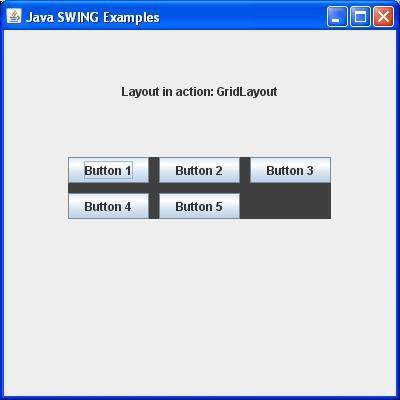
验证以下输出。