- Swing 教程
- Swing - 首页
- Swing - 概述
- Swing - 环境
- Swing - 控件
- Swing - 事件处理
- Swing - 事件类
- Swing - 事件监听器
- Swing - 事件适配器
- Swing - 布局
- Swing - 菜单
- Swing - 容器
- Swing 有用资源
- Swing - 快速指南
- Swing - 有用资源
- Swing - 讨论
Swing - JComboBox 类
简介
JComboBox 类是一个组件,它组合了一个按钮或可编辑字段和一个下拉列表。
类声明
以下是 javax.swing.JComboBox 类的声明:
public class JComboBox
   extends JComponent
      implements ItemSelectable, ListDataListener, ActionListener, Accessible
字段
以下是 javax.swing.JList 类的字段:
protected String actionCommand - 此受保护字段是实现特定的。
protected ComboBoxModel dataModel - 此受保护字段是实现特定的。
protected ComboBoxEditor editor - 此受保护字段是实现特定的。
protected boolean isEditable - 此受保护字段是实现特定的。
protected JComboBox.KeySelectionManager keySelectionManager - 此受保护字段是实现特定的。
protected boolean lightWeightPopupEnabled - 此受保护字段是实现特定的。
protected int maximumRowCount - 此受保护字段是实现特定的。
protected ListCellRenderer renderer - 此受保护字段是实现特定的。
protected Object selectedItemReminder - 此受保护字段是实现特定的。
类构造函数
| 序号 | 构造函数 & 描述 |
|---|---|
| 1 |
JComboBox() 创建一个具有默认数据模型的 JComboBox。 |
| 2 |
JComboBox(ComboBoxModel aModel) 创建一个 JComboBox,其项目来自现有的 ComboBoxModel。 |
| 3 |
JComboBox(Object[] items) 创建一个包含指定数组中元素的 JComboBox。 |
| 4 |
JComboBox(Vector<?> items) 创建一个包含指定 Vector 中元素的 JComboBox。 |
类方法
| 序号 | 方法 & 描述 |
|---|---|
| 1 |
void actionPerformed(ActionEvent e) 此方法作为实现副作用是公共的。 |
| 2 |
protected void actionPropertyChanged(Action action, String propertyName) 根据关联操作中的属性更改更新 ComboBox 的状态。 |
| 3 |
void addActionListener(ActionListener l) 添加一个 ActionListener。 |
| 4 |
void addItem(Object anObject) 向项目列表添加一个项目。 |
| 5 |
void addItemListener(ItemListener aListener) 添加一个 ItemListener。 |
| 6 |
void addPopupMenuListener(PopupMenuListener l) 添加一个 PopupMenu 监听器,它将监听来自 ComboBox 弹出部分的通知消息。 |
| 7 |
void configureEditor(ComboBoxEditor anEditor, Object anItem) 使用指定的项目初始化编辑器。 |
| 8 |
protected void configurePropertiesFromAction(Action a) 设置此 ComboBox 上的属性以匹配指定 Action 中的属性。 |
| 9 |
void contentsChanged(ListDataEvent e) 此方法作为实现副作用是公共的。 |
| 10 |
protected PropertyChangeListener createActionPropertyChangeListener(Action a) 创建并返回一个 PropertyChangeListener,负责监听来自指定 Action 的更改并更新相应的属性。 |
| 11 |
protected JComboBox.KeySelectionManager createDefaultKeySelectionManager() 返回默认键选择管理器的一个实例。 |
| 12 |
protected void fireActionEvent() 通知所有已注册对此事件类型进行通知的监听器。 |
| 13 |
protected void fireItemStateChanged(ItemEvent e) 通知所有已注册对此事件类型进行通知的监听器。 |
| 14 |
void firePopupMenuCanceled() 通知 PopupMenuListeners ComboBox 的弹出部分已被取消。 |
| 15 |
void firePopupMenuWillBecomeInvisible() 通知 PopupMenuListeners ComboBox 的弹出部分已变为不可见。 |
| 16 |
void firePopupMenuWillBecomeVisible() 通知 PopupMenuListeners ComboBox 的弹出部分将变为可见。 |
| 17 |
AccessibleContext getAccessibleContext() 获取与此 JComboBox 关联的 AccessibleContext。 |
| 18 |
Action getAction() 返回为此 ActionEvent 源当前设置的操作,如果未设置任何操作,则返回 null。 |
| 19 |
String getActionCommand() 返回包含在发送到操作监听器的事件中的操作命令。 |
| 20 |
ActionListener[] getActionListeners() 返回使用 addActionListener() 添加到此 JComboBox 的所有 ActionListener 的数组。 |
| 21 |
ComboBoxEditor getEditor() 返回用于绘制和编辑 JComboBox 字段中所选项目的编辑器。 |
| 22 |
Object getItemAt(int index) 返回指定索引处的列表项。 |
| 23 |
int getItemCount() 返回列表中项目的数量。 |
| 24 |
ItemListener[] getItemListeners() 返回使用 addItemListener() 添加到此 JComboBox 的所有 ItemListener 的数组。 |
| 25 |
JComboBox.KeySelectionManager getKeySelectionManager() 返回列表的键选择管理器。 |
| 26 |
int getMaximumRowCount() 返回组合框在没有滚动条的情况下可以显示的最大项目数。 |
| 27 |
ComboBoxMode getModel() 返回 JComboBox 当前使用的模型。 |
| 28 |
PopupMenuListener[]getPopupMenuListeners() 返回使用 addPopupMenuListener() 添加到此 JComboBox 的所有 PopupMenuListeners 的数组。 |
| 29 |
Object getPrototypeDisplayValue() 返回“原型显示”值 - 用于计算显示高度和宽度的对象。 |
| 30 |
ListCellRenderer getRenderer() 返回用于在 JComboBox 字段中显示所选项目的渲染器。 |
| 31 |
int getSelectedIndex() 返回列表中与给定项目匹配的第一个项目。 |
| 32 |
Object getSelectedItem() 返回当前选定的项目。 |
| 33 |
Object[] getSelectedObjects() 返回一个包含所选项目的数组。 |
| 34 |
ComboBoxUI getUI() 返回呈现此组件的 L&F 对象。 |
| 35 |
String getUIClassID() 返回呈现此组件的 L&F 类的名称。 |
| 36 |
void hidePopup() 使 ComboBox 关闭其弹出窗口。 |
| 37 |
void insertItemAt(Object anObject, int index) 在给定索引处的项目列表中插入一个项目。 |
| 38 |
protected void installAncestorListener() |
| 39 |
void intervalAdded(ListDataEvent e) 此方法作为实现副作用是公共的。 |
| 40 |
void intervalRemoved(ListDataEvent e) 此方法作为实现副作用是公共的。 |
| 41 |
boolean isEditable() 如果 JComboBox 可编辑,则返回 true。 |
| 42 |
boolean isLightWeightPopupEnabled() 获取 lightWeightPopupEnabled 属性的值。 |
| 43 |
boolean isPopupVisible() 确定弹出窗口的可见性。 |
| 44 |
protected String paramString() 返回此 JComboBox 的字符串表示形式。 |
| 45 |
void processKeyEvent(KeyEvent e) 处理 KeyEvents,查找 Tab 键。 |
| 46 |
void removeActionListener(ActionListener l) 删除一个 ActionListener。 |
| 47 |
void removeAllItems() 从项目列表中删除所有项目。 |
| 48 |
void removeItem(Object anObject) 从项目列表中删除一个项目。 |
| 49 |
void removeItemAt(int anIndex) 删除 anIndex 处的项目。此方法仅在 JComboBox 使用可变数据模型时才有效。 |
| 50 |
void removeItemListener(ItemListener aListener) 删除一个 ItemListener。 |
| 51 |
void removePopupMenuListener(PopupMenuListener l) 删除一个 PopupMenuListener。 |
| 52 |
protected void selectedItemChanged() 此受保护方法是实现特定的。 |
| 53 |
boolean selectWithKeyChar(char keyChar) 选择与指定键盘字符对应的列表项并返回 true,如果存在与该字符对应的项目。 |
| 54 |
void setAction(Action a) 设置 ActionEvent 源的操作。 |
| 55 |
void setActionCommand(String aCommand) 设置应包含在发送到操作监听器的事件中的操作命令。 |
| 56 |
void setEditable(boolean aFlag) 确定 JComboBox 字段是否可编辑。 |
| 57 |
void setEditor(ComboBoxEditor anEditor) 设置用于绘制和编辑 JComboBox 字段中所选项目的编辑器。 |
| 58 |
void setEnabled(boolean b) 启用 ComboBox 以便可以选择项目。 |
| 59 |
void setKeySelectionManager(JComboBox.KeySelectionManager aManager) 设置对象将键盘字符转换为列表选择。 |
| 60 |
void setLightWeightPopupEnabled(boolean aFlag) 设置 lightWeightPopupEnabled 属性,该属性提供一个提示,指示是否应使用轻量级组件来包含 JComboBox,而不是重量级组件(如面板或窗口)。 |
| 61 |
void setMaximumRowCount(int count) 设置 JComboBox 显示的最大行数。 |
| 62 |
void setModel(ComboBoxModel aModel) 设置 JComboBox 用于获取项目列表的数据模型。 |
| 63 |
void setPopupVisible(boolean v) 设置弹出窗口的可见性。 |
| 64 |
void setPrototypeDisplayValue(Object prototypeDisplayValue) 设置用于计算 UI 部分显示大小的原型显示值。 |
| 65 |
void setRenderer(ListCellRenderer aRenderer) 设置渲染器,该渲染器绘制列表项以及 JComboBox 字段中从列表中选择的项目。 |
| 66 |
void setSelectedIndex(int anIndex) 选择 anIndex 索引处的项目。 |
| 67 |
void setSelectedItem(Object anObject) 将 ComboBox 显示区域中的所选项目设置为参数中的对象。 |
| 68 |
void setUI(ComboBoxUI ui) 设置呈现此组件的 L&F 对象。 |
| 69 |
void showPopup() 使 ComboBox 显示其弹出窗口。 |
| 70 |
void updateUI() 将 UI 属性重置为当前外观和风格中的值。 |
继承的方法
此类继承自以下类:
- javax.swing.JComponent
- java.awt.Container
- java.awt.Component
- java.lang.Object
JComboBox 示例
使用您选择的任何编辑器创建以下 Java 程序,例如在 D:/ > SWING > com > tutorialspoint > gui >
SwingControlDemo.java
package com.tutorialspoint.gui;

import java.awt.*;
import java.awt.event.*;
import javax.swing.*;

public class SwingControlDemo {
   private JFrame mainFrame;
   private JLabel headerLabel;
   private JLabel statusLabel;
   private JPanel controlPanel;

   public SwingControlDemo(){
      prepareGUI();
   }
   public static void main(String[] args){
      SwingControlDemo  swingControlDemo = new SwingControlDemo();
      swingControlDemo.showComboboxDemo();
   }
   private void prepareGUI(){
      mainFrame = new JFrame("Java Swing Examples");
      mainFrame.setSize(400,400);
      mainFrame.setLayout(new GridLayout(3, 1));

      mainFrame.addWindowListener(new WindowAdapter() {
         public void windowClosing(WindowEvent windowEvent){
            System.exit(0);
         }
      });
      headerLabel = new JLabel("", JLabel.CENTER);
      statusLabel = new JLabel("",JLabel.CENTER);
      statusLabel.setSize(350,100);

      controlPanel = new JPanel();
      controlPanel.setLayout(new FlowLayout());

      mainFrame.add(headerLabel);
      mainFrame.add(controlPanel);
      mainFrame.add(statusLabel);
      mainFrame.setVisible(true);
   }
   private void showComboboxDemo(){
      headerLabel.setText("Control in action: JComboBox");
      final DefaultComboBoxModel fruitsName = new DefaultComboBoxModel();

      fruitsName.addElement("Apple");
      fruitsName.addElement("Grapes");
      fruitsName.addElement("Mango");
      fruitsName.addElement("Peer");

      final JComboBox fruitCombo = new JComboBox(fruitsName);
      fruitCombo.setSelectedIndex(0);

      JScrollPane fruitListScrollPane = new JScrollPane(fruitCombo);
      JButton showButton = new JButton("Show");

      showButton.addActionListener(new ActionListener() {
         public void actionPerformed(ActionEvent e) {
            String data = "";
            if (fruitCombo.getSelectedIndex() != -1) {
               data = "Fruits Selected: "
                  + fruitCombo.getItemAt
                  (fruitCombo.getSelectedIndex());
            }
            statusLabel.setText(data);
         }
      });
      controlPanel.add(fruitListScrollPane);
      controlPanel.add(showButton);
      mainFrame.setVisible(true);
   }
}
使用命令提示符编译程序。转到 D:/ > SWING 并键入以下命令。
D:\SWING>javac com\tutorialspoint\gui\SwingControlDemo.java
如果未发生错误,则表示编译成功。使用以下命令运行程序。
D:\SWING>java com.tutorialspoint.gui.SwingControlDemo
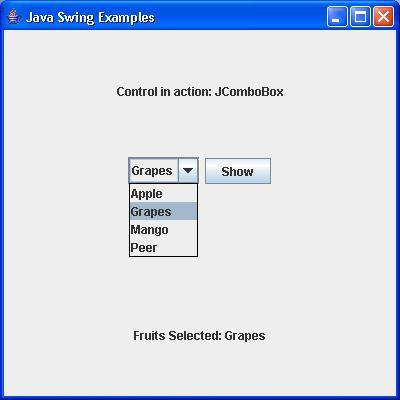
验证以下输出。