- Swing 教程
- Swing - 首页
- Swing - 概述
- Swing - 环境
- Swing - 控件
- Swing - 事件处理
- Swing - 事件类
- Swing - 事件监听器
- Swing - 事件适配器
- Swing - 布局
- Swing - 菜单
- Swing - 容器
- Swing 有用资源
- Swing - 快速指南
- Swing - 有用资源
- Swing - 讨论
Swing - JOptionPane 类
介绍
JOptionPane 类是一个组件,它提供标准方法来弹出一个标准对话框以获取值或通知用户某些信息。
类声明
以下是 javax.swing.JOptionPane 类的声明:
public class JOptionPane
   extends JComponent
      implements Accessible
字段
以下是 javax.swing.JOptionPane 类的字段:
static int CANCEL_OPTION - 如果选择取消,则来自类方法的返回值。
static int CLOSED_OPTION - 如果用户在不选择任何内容的情况下关闭窗口,则来自类方法的返回值,很可能这应该被视为 CANCEL_OPTION 或 NO_OPTION。
static int DEFAULT_OPTION - 类型表示外观和感觉不应提供任何选项,只使用来自 JOptionPane 的选项。
static int ERROR_MESSAGE - 用于错误消息。
protected Icon icon - 面板中使用的图标。
static string ICON_PROPERTY - 图标的绑定属性名称。
static int INFORMATION_MESSAGE - 用于信息消息。
static string INITIAL_SELECTION_VALUE_PROPERTY - initialSelectionValue 的绑定属性名称。
static string INITIAL_VALUE_PROPERTY - initialValue 的绑定属性名称。
protected Object initialSelectionValue - 要在 selectionValues 中选择的初始值。
protected Object initialValue - 应在选项中最初选择的的值。
static string INPUT_VALUE_PROPERTY - inputValue 的绑定属性名称。
protected Object inputValue - 用户输入的值。
protected Object message - 要显示的消息。
static string MESSAGE_PROPERTY - message 的绑定属性名称。
static string MESSAGE_TYPE_PROPERTY - type 的绑定属性名称。
static int OK_CANCEL_OPTION - 用于 showConfirmDialog 的类型。
protected int messageType - 消息类型。
static int NO_OPTION - 如果选择否,则来自类方法的返回值。
static int OK_OPTION - 如果选择确定,则来自类方法的返回值。
static string OPTION_TYPE_PROPERTY - optionType 的绑定属性名称。
protected Object[] options - 要显示给用户的选项。
static string OPTIONS_PROPERTY - option 的绑定属性名称。
protected int optionType - 选项类型,DEFAULT_OPTION、YES_NO_OPTION、YES_NO_CANCEL_OPTION 或 OK_CANCEL_OPTION 之一。
static int PLAIN_MESSAGE - 不使用图标。
static int QUESTION_MESSAGE - 用于问题。
static string SELECTION_VALUES_PROPERTY - selectionValues 的绑定属性名称。
protected Object[] selectionValues - 用户可以从中选择的数组值。
static Object UNINITIALIZED_VALUE - 指示用户尚未选择值。
protected Object value - 当前选定的值,将是有效选项,或 UNINITIALIZED_VALUE 或 null。
static string VALUE_PROPERTY - value 的绑定属性名称。
static string WANTS_INPUT_PROPERTY - wantsInput 的绑定属性名称。
protected boolean wantsInput - 如果为真,则将为用户提供 UI 小部件以获取输入。
static int WARNING_MESSAGE - 用于警告消息。
static int YES_NO_CANCEL_OPTION - 用于 showConfirmDialog 的类型。
static int YES_NO_OPTION - 用于 showConfirmDialog 的类型。
static int YES_OPTION - 如果选择是,则来自类方法的返回值。
类构造函数
| 序号 | 构造函数 & 描述 |
|---|---|
| 1 |
JOptionPane() 创建一个带有测试消息的 JOptionPane。 |
| 2 |
JOptionPane(Object message) 创建一个 JOptionPane 实例,以使用普通消息消息类型和 UI 提供的默认选项显示消息。 |
| 3 |
JOptionPane(Object message, int messageType) 创建一个 JOptionPane 实例,以使用指定的 messageType 和默认选项显示消息。 |
| 4 |
JOptionPane(Object message, int messageType, int optionType) 创建一个 JOptionPane 实例,以使用指定的 messageType 和选项显示消息。 |
| 5 |
JOptionPane(Object message, int messageType, int optionType, Icon icon) 创建一个 JOptionPane 实例,以使用指定的 messageType、选项和图标显示消息。 |
| 6 |
JOptionPane(Object message, int messageType, int optionType, Icon icon, Object[] options) 创建一个 JOptionPane 实例,以使用指定的 messageType、图标和选项显示消息。 |
| 7 |
JOptionPane(Object message, int messageType, int optionType, Icon icon, Object[] options, Object initialValue) 创建一个 JOptionPane 实例,以使用指定的 messageType、图标和选项显示消息,并指定最初选择的选项。 |
类方法
| 序号 | 方法 & 描述 |
|---|---|
| 1 |
JDialog createDialog(Component parentComponent, String title) 创建一个新的 JDialog 并将其返回,该 JDialog 包裹在父组件的框架中,并以父组件为中心。 |
| 2 |
JDialog createDialog(String title) 创建一个新的无父 JDialog 并将其返回,该 JDialog 具有指定的标题。 |
| 3 |
JInternalFrame createInternalFrame(Component parentComponent, String title) 创建并返回一个 JInternalFrame 实例。 |
| 4 |
AccessibleContext getAccessibleContext() 返回与此 JOptionPane 关联的 AccessibleContext。 |
| 5 |
static JDesktopPane getDesktopPaneForComponent(Component parentComponent) 返回指定组件的桌面窗格。 |
| 6 |
static Frame getFrameForComponent(Component parentComponent) 返回指定组件的 Frame。 |
| 7 |
Icon getIcon() 返回此面板显示的图标。 |
| 8 |
Object getInitialSelectionValue() 返回最初显示给用户的输入值。 |
| 9 |
Object getInitialValue() 返回初始值。 |
| 10 |
Object getInputValue() 返回用户输入的值,如果 wantsInput 为真。 |
| 11 |
int getMaxCharactersPerLineCount() 返回要在消息中放置在一行上的最大字符数。 |
| 12 |
Object getMessage() 返回此面板显示的消息对象。 |
| 13 |
int getMessageType() 返回消息类型。 |
| 14 |
Object[] getOptions() 返回用户可以做出的选择。 |
| 15 |
int getOptionType() 返回显示的选项类型。 |
| 16 |
static Frame getRootFrame() 返回 Frame,用于在未提供 Frame 的类方法中使用。 |
| 17 |
Object[] getSelectionValues() 返回输入选择值。 |
| 18 |
OptionPaneUI getUI() 返回实现此组件 L&F 的 UI 对象。 |
| 19 |
String getUIClassID() 返回实现此组件 L&F 的 UI 类的名称。 |
| 20 |
Object getValue() 返回用户选择的值。 |
| 21 |
boolean getWantsInput() 返回 wantsInput 属性的值。 |
| 22 |
protected String paramString() 返回此 JOptionPane 的字符串表示形式。 |
| 23 |
void selectInitialValue() 请求选择初始值,这将使焦点设置到初始值。 |
| 24 |
void setIcon(Icon newIcon) 设置要显示的图标。 |
| 25 |
void setInitialSelectionValue(Object newValue) 设置最初显示为用户选择的值。 |
| 26 |
void setInitialValue(Object newInitialValue) 设置要启用的初始值 - 面板最初显示时具有焦点的组件。 |
| 27 |
void setInputValue(Object newValue) 设置用户选择或输入的输入值。 |
| 28 |
void setMessage(Object newMessage) 设置选项面板的消息对象。 |
| 29 |
void setMessageType(int newType) 设置选项面板的消息类型。 |
| 30 |
void setOptions(Object[] newOptions) 设置此面板显示的选项。 |
| 31 |
void setOptionType(int newType) 设置要显示的选项。 |
| 32 |
static voidsetRootFrame(Frame newRootFrame) 设置 Frame,用于在未提供 Frame 的类方法中使用。 |
| 33 |
void setSelectionValues(Object[] newValues) 设置提供给用户一列项目以供选择的窗格的输入选择值。 |
| 34 |
void setUI(OptionPaneUI ui) 设置实现此组件 L&F 的 UI 对象。 |
| 35 |
void setValue(Object newValue) 设置用户选择的值。 |
| 36 |
void setWantsInput(boolean newValue) 设置 wantsInput 属性。 |
| 37 |
static int showConfirmDialog(Component parentComponent, Object message) 弹出一个具有是、否和取消选项的对话框;标题为“选择一个选项”。 |
| 38 |
static int showConfirmDialog(Component parentComponent, Object message, String title, int optionType) 弹出一个对话框,其中选项的数量由 optionType 参数确定。 |
| 39 |
static int showConfirmDialog(Component parentComponent, Object message, String title, int optionType, int messageType) 弹出一个对话框,其中选项的数量由 optionType 参数确定,其中 messageType 参数确定要显示的图标。 |
| 40 |
static int showConfirmDialog(Component parentComponent, Object message, String title, int optionType, int messageType, Icon icon) 弹出一个具有指定图标的对话框,其中选项的数量由 optionType 参数确定。 |
| 41 |
static String showInputDialog(Component parentComponent, Object message) 显示一个询问消息对话框,请求来自父组件的用户输入。 |
| 42 |
static String showInputDialog(Component parentComponent, Object message, Object initialSelectionValue) 显示一个询问消息对话框,请求来自用户输入并作为父组件。 |
| 43 |
static String showInputDialog(Component parentComponent, Object message, String title, int essageType) 显示一个对话框,请求来自父组件的用户输入,该对话框具有标题 title 和消息类型 messageType。 |
| 44 |
static Object showInputDialog(Component parentComponent, Object message, String title, int messageType, Icon icon, Object[] selectionValues, Object initialSelectionValue) 在阻塞对话框中提示用户输入,其中可以指定初始选择、可能的选择以及所有其他选项。 |
| 45 |
static String showInputDialog(Object message) 显示一个询问消息对话框,请求用户输入。 |
| 46 |
static String showInputDialog(Object message, Object initialSelectionValue) 显示一个询问消息对话框,请求用户输入,输入值初始化为 initialSelectionValue。 |
| 47 |
static int showInternalConfirmDialog(Component parentComponent, Object message) 弹出一个内部对话框面板,提供“是”、“否”和“取消”选项;标题为“选择一个选项”。 |
| 48 |
static int showInternalConfirmDialog(Component parentComponent, Object message, String title, int optionType) 弹出一个内部对话框面板,选项数量由 optionType 参数决定。 |
| 49 |
static int showInternalConfirmDialog(Component parentComponent, Object message, String title, int optionType, int messageType) 弹出一个内部对话框面板,选项数量由 optionType 参数决定, messageType 参数决定显示的图标。 |
| 50 |
static int showInternalConfirmDialog(Component parentComponent, Object message, String title, int optionType, int messageType, Icon icon) 弹出一个带有指定图标的内部对话框面板,选项数量由 optionType 参数决定。 |
| 51 |
static String showInternalInputDialog(Component parentComponent, Object message) 显示一个内部询问消息对话框,请求用户输入,并将其作为 parentComponent 的子组件。 |
| 52 |
static String showInternalInputDialog(Component parentComponent, Object message, String title, int messageType) 显示一个内部对话框,请求用户输入,并将其作为 parentComponent 的子组件,对话框标题为 title,消息类型为 messageType。 |
| 53 |
static Object showInternalInputDialog(Component parentComponent, Object message, String title, int messageType, Icon icon, Object[] selectionValues, Object initialSelectionValue) 在阻塞的内部对话框中提示用户输入,可以指定初始选择、可选选择和其他所有选项。 |
| 54 |
static voidshowInternalMessageDialog(Component parentComponent, Object message) 弹出一个内部确认对话框面板。 |
| 55 |
static voidshowInternalMessageDialog(Component parentComponent, Object message, String title, int messageType) 弹出一个内部对话框面板,使用由 messageType 参数决定的默认图标显示消息。 |
| 56 |
static voidshowInternalMessageDialog(Component parentComponent, Object message, String title, int messageType, Icon icon) 弹出一个内部对话框面板显示消息,指定所有参数。 |
| 57 |
static voidshowMessageDialog(Component parentComponent, Object message) 弹出一个标题为“消息”的信息消息对话框。 |
| 58 |
static voidshowMessageDialog(Component parentComponent, Object message, String title, int messageType) 弹出一个对话框,使用由 messageType 参数决定的默认图标显示消息。 |
| 59 |
static voidshowMessageDialog(Component parentComponent, Object message, String title, int messageType, Icon icon) 弹出一个对话框显示消息,指定所有参数。 |
| 60 |
static int showOptionDialog(Component parentComponent, Object message, String title, int optionType, int messageType, Icon icon, Object[] options, Object initialValue) 弹出一个带有指定图标的对话框,初始选择由 initialValue 参数决定,选项数量由 optionType 参数决定。 |
| 61 |
void updateUI() 来自 UIManager 的通知,表示 L&F 已更改。 |
| 62 |
static int showInternalOptionDialog(Component parentComponent, Object message, String title, int optionType, int messageType, Icon icon, Object[] options, Object initialValue) 弹出一个带有指定图标的内部对话框面板,初始选择由 initialValue 参数决定,选项数量由 optionType 参数决定。 |
继承的方法
此类继承自以下类:
- javax.swing.JComponent
- java.awt.Container
- java.awt.Component
- java.lang.Object
JOptionPane 示例
使用任意编辑器在例如 D:/ > SWING > com > tutorialspoint > gui > 中创建以下 Java 程序。
SwingControlDemo.java
package com.tutorialspoint.gui;

import java.awt.*;
import java.awt.event.*;
import javax.swing.*;

public class SwingControlDemo {
   private JFrame mainFrame;
   private JLabel headerLabel;
   private JLabel statusLabel;
   private JPanel controlPanel;

   public SwingControlDemo(){
      prepareGUI();
   }
   public static void main(String[] args){
      SwingControlDemo  swingControlDemo = new SwingControlDemo();
      swingControlDemo.showDialogDemo();
   }
   private void prepareGUI(){
      mainFrame = new JFrame("Java Swing Examples");
      mainFrame.setSize(400,400);
      mainFrame.setLayout(new GridLayout(3, 1));

      mainFrame.addWindowListener(new WindowAdapter() {
         public void windowClosing(WindowEvent windowEvent){
            System.exit(0);
         }
      });
      headerLabel = new JLabel("", JLabel.CENTER);
      statusLabel = new JLabel("",JLabel.CENTER);
      statusLabel.setSize(350,100);

      controlPanel = new JPanel();
      controlPanel.setLayout(new FlowLayout());

      mainFrame.add(headerLabel);
      mainFrame.add(controlPanel);
      mainFrame.add(statusLabel);
      mainFrame.setVisible(true);
   }
   private void showDialogDemo(){
      headerLabel.setText("Control in action: JOptionPane");

      JButton okButton = new JButton("OK");
      JButton javaButton = new JButton("Yes/No");
      JButton cancelButton = new JButton("Yes/No/Cancel");

      okButton.addActionListener(new ActionListener() {
         public void actionPerformed(ActionEvent e) {
            JOptionPane.showMessageDialog(mainFrame, "Welcome to TutorialsPoint.com");
         }
      });
      javaButton.addActionListener(new ActionListener() {
         public void actionPerformed(ActionEvent e) {
            int output = JOptionPane.showConfirmDialog(mainFrame
               , "Click any button"
               ,"TutorialsPoint.com"
               ,JOptionPane.YES_NO_OPTION);

            if(output == JOptionPane.YES_OPTION){
               statusLabel.setText("Yes selected.");
            } else if(output == JOptionPane.NO_OPTION){
               statusLabel.setText("No selected.");
            }
         }
      });
      cancelButton.addActionListener(new ActionListener() {
         public void actionPerformed(ActionEvent e) {
            int output = JOptionPane.showConfirmDialog(mainFrame
               , "Click any button"
               ,"TutorialsPoint.com"
               ,JOptionPane.YES_NO_CANCEL_OPTION,
               JOptionPane.INFORMATION_MESSAGE);

            if(output == JOptionPane.YES_OPTION){
               statusLabel.setText("Yes selected.");
            } else if(output == JOptionPane.NO_OPTION){
               statusLabel.setText("No selected.");
            } else if(output == JOptionPane.CANCEL_OPTION){
               statusLabel.setText("Cancel selected.");
            }
         }
      });
      controlPanel.add(okButton);
      controlPanel.add(javaButton);
      controlPanel.add(cancelButton);
      mainFrame.setVisible(true);
   }
}
使用命令提示符编译程序。转到 D:/ > SWING 并输入以下命令。
D:\SWING>javac com\tutorialspoint\gui\SwingControlDemo.java
如果未出现错误,则表示编译成功。使用以下命令运行程序。
D:\SWING>java com.tutorialspoint.gui.SwingControlDemo
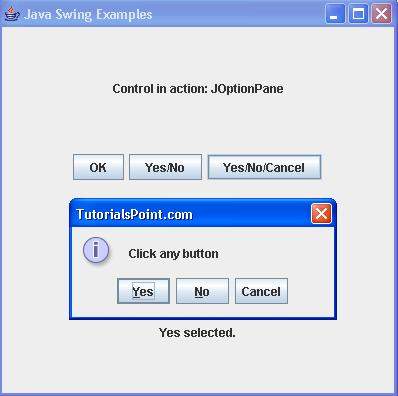
验证以下输出。