- SWING 教程
- SWING - 主页
- SWING - 概述
- SWING - 环境
- SWING - 控件
- SWING - 事件处理
- SWING - 事件类
- SWING - 事件监听器
- SWING - 事件适配器
- SWING - 布局
- SWING - 菜单
- SWING -容器
- SWING 实用资源
- SWING - 快速指南
- SWING - 实用资源
- SWING - 讨论
SWING - JTextField 类
简介
JTextField 类是一个组件,允许编辑单行文本。
类声明
以下是 javax.swing.JTextField 类的声明 -
public class JTextField
   extends JTextComponent
      implements SwingConstants
字段
以下是 javax.swing.JList 类的字段 -
static String notifyAction - 发送通知操作的名称,即已接受该字段的内容。
类构造函数
| 序列号 | 构造函数和说明 |
|---|---|
| 1 |
JTextField() 构造一个新的 TextField。 |
| 2 |
JTextField(Document doc, String text, int columns) 使用给定的文本存储模型和给定的列数构造一个新的 JTextField。 |
| 3 |
JTextField(int columns) 使用指定列数构造一个新的空 TextField。 |
| 4 |
JTextField(String text) 使用指定文本初始化一个新的 TextField。 |
| 5 |
JTextField(String text, int columns) 使用指定文本和列数初始化一个新的 TextField。 |
类方法
| 序列号 | 方法和说明 |
|---|---|
| 1 |
protected void actionPropertyChanged(Action action, String propertyName) 响应关联操作的属性更改来更新文本字段的状态。 |
| 2 |
void addActionListener(ActionListener l) 添加指定的操作侦听器以从该文本字段接收操作事件 |
| 3 |
protected void configurePropertiesFromAction(Action a) 设置该文本字段上的属性以匹配指定操作中的属性 |
| 4 |
protected PropertyChangeListener createActionPropertyChangeListener(Action a) 创建一个 PropertyChangeListener,该监听器负责侦听指定操作的更改并更新适当的属性 |
| 5 |
protected Document createDefaultModel() 如果未明确给出,则创建将用于构建的模型的默认实现 |
| 6 |
protected void fireActionPerformed() 通知对注册的此事件类型感兴趣的所有侦听器 |
| 7 |
AccessibleContext getAccessibleContext() 获取与此 JTextField 关联的 AccessibleContext |
| 8 |
Action getAction() 如果未设置任何操作,则返回为此 ActionEvent 源当前设置的操作,否则返回 null |
| 9 |
ActionListener[] getActionListeners() 返回使用 addActionListener() 添加到此 JTextField 的所有 ActionListener 的数组 |
| 10 |
Action[] getActions() 获取编辑器的命令列表 |
| 11 |
int getColumns() 返回此 TextField 中的列数 |
| 12 |
protected int getColumnWidth() 返回列宽 |
| 13 |
int getHorizontalAlignment() 返回文本的水平对齐方式 |
| 14 |
BoundedRangeModel getHorizontalVisibility() 获取文本字段的可见性 |
| 15 |
Dimension getPreferredSize() 返回此 TextField 所需的首选大小维度 |
| 16 |
int getScrollOffset() 以像素为单位获取滚动偏移量 |
| 17 |
String getUIClassID() 获取用于 UI 的类 ID |
| 18 |
boolean isValidateRoot() 来自文本字段自身的 revalidate 调用将通过验证文本字段来处理,除非文本字段包含在 JViewport 中,在这种情况下返回 false |
| 19 |
protected String paramString() 返回此 JTextField 的字符串表示形式 |
| 20 |
void postActionEvent() 通过将操作事件分派给任何注册的 ActionListener 对象来处理在此文本字段上发生的事件 |
| 21 |
void removeActionListener(ActionListener l) 从该文本框移除指定的操作侦听器,此侦听器将不再从该文本框接收操作事件。 |
| 22 |
void scrollRectToVisible(Rectangle r) 将该字段滚动到左边或右边。 |
| 23 |
void setAction(Action a) 设置 ActionEvent 源的 Action。 |
| 24 |
void setActionCommand(String command) 设置用于操作事件的命令字符串。 |
| 25 |
void setColumns(int columns) 设置此 TextField 中的列数,然后使布局失效。 |
| 26 |
void setDocument(Document doc) 将编辑器与文本文档关联。 |
| 27 |
void setFont(Font f) 设置当前字体。 |
| 28 |
void setHorizontalAlignment(int alignment) 设置文本的水平对齐方式。 |
| 29 |
void setScrollOffset(int scrollOffset) 设置滚动偏移量(以像素为单位)。 |
Methods Inherited
此类从以下类继承方法——
- javax.swing.text.JTextComponent
- javax.swing.JComponent
- java.awt.Container
- java.awt.Component
- java.lang.Object
JTextField 示例
在您选择的任何编辑器中创建一个 Java 程序,例如 D:/ > SWING > com > tutorialspoint > gui >
SwingControlDemo.java
package com.tutorialspoint.gui;

import java.awt.*;
import java.awt.event.*;
import javax.swing.*;

public class SwingControlDemo {
   private JFrame mainFrame;
   private JLabel headerLabel;
   private JLabel statusLabel;
   private JPanel controlPanel;

   public SwingControlDemo(){
      prepareGUI();
   }
   public static void main(String[] args){
      SwingControlDemo  swingControlDemo = new SwingControlDemo();
      swingControlDemo.showTextFieldDemo();
   }
   private void prepareGUI(){
      mainFrame = new JFrame("Java Swing Examples");
      mainFrame.setSize(400,400);
      mainFrame.setLayout(new GridLayout(3, 1));

      mainFrame.addWindowListener(new WindowAdapter() {
         public void windowClosing(WindowEvent windowEvent){
            System.exit(0);
         }
      });
      headerLabel = new JLabel("", JLabel.CENTER);
      statusLabel = new JLabel("",JLabel.CENTER);
      statusLabel.setSize(350,100);

      controlPanel = new JPanel();
      controlPanel.setLayout(new FlowLayout());

      mainFrame.add(headerLabel);
      mainFrame.add(controlPanel);
      mainFrame.add(statusLabel);
      mainFrame.setVisible(true);
   }
   private void showTextFieldDemo(){
      headerLabel.setText("Control in action: JTextField");

      JLabel  namelabel= new JLabel("User ID: ", JLabel.RIGHT);
      JLabel  passwordLabel = new JLabel("Password: ", JLabel.CENTER);
      final JTextField userText = new JTextField(6);
      final JPasswordField passwordText = new JPasswordField(6);

      JButton loginButton = new JButton("Login");
      loginButton.addActionListener(new ActionListener() {
         public void actionPerformed(ActionEvent e) {
            String data = "Username " + userText.getText();
            data += ", Password: " + new String(passwordText.getPassword());
            statusLabel.setText(data);
         }
      });
      controlPanel.add(namelabel);
      controlPanel.add(userText);
      controlPanel.add(passwordLabel);
      controlPanel.add(passwordText);
      controlPanel.add(loginButton);
      mainFrame.setVisible(true);
   }
}
使用命令提示符编译程序。转到 D:/ > SWING 并键入以下命令。
D:\SWING>javac com\tutorialspoint\gui\SwingControlDemo.java
如果没有错误,则表示编译成功。使用以下命令运行程序。
D:\SWING>java com.tutorialspoint.gui.SwingControlDemo
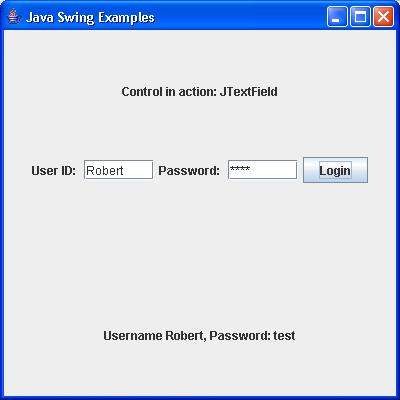
验证以下输出。