- Symfony 教程
- Symfony - 首页
- Symfony - 简介
- Symfony - 安装
- Symfony - 架构
- Symfony - 组件
- Symfony - 服务容器
- Symfony - 事件 & 事件监听器
- Symfony - 表达式
- Symfony - Bundles
- 创建简单的 Web 应用程序
- Symfony - 控制器
- Symfony - 路由
- Symfony - 视图引擎
- Symfony - Doctrine ORM
- Symfony - 表单
- Symfony - 验证
- Symfony - 文件上传
- Symfony - Ajax 控制
- Cookie & 会话管理
- Symfony - 国际化
- Symfony - 日志记录
- Symfony - 邮件管理
- Symfony - 单元测试
- Symfony - 高级概念
- Symfony - REST 版本
- Symfony - CMF 版本
- 完整的运行示例
- Symfony 有用资源
- Symfony - 快速指南
- Symfony - 有用资源
- Symfony - 讨论
Symfony - 验证
在设计应用程序时,验证是最重要的方面。它会验证传入的数据。本章详细解释了表单验证。
验证约束
验证器旨在根据约束验证对象。如果验证对象,只需将一个或多个约束映射到其类,然后将其传递给验证器服务。默认情况下,在验证对象时,将检查相应类所有约束以查看它们是否真正通过。Symfony 支持以下值得注意的验证约束。
NotBlank
验证属性不为空白。其语法如下:
namespace AppBundle\Entity;
use Symfony\Component\Validator\Constraints as Assert;

class Student {
   /**
      * @Assert\NotBlank()
   */
   protected $studentName;
}
此 NotBlank 约束确保 studentName 属性不为空白。
NotNull
验证值不严格等于 null。其语法如下:
namespace AppBundle\Entity;
use Symfony\Component\Validator\Constraints as Assert;

class Student {
   /**
      * @Assert\NotNull()
   */
   protected $studentName;
}
验证值是否为有效的电子邮件地址。其语法如下:
namespace AppBundle\Entity;
use Symfony\Component\Validator\Constraints as Assert;

class Student {
   /**
      * @Assert\Email(
         * message = "The email '{{ value }}' is not a valid email.",
         * checkMX = true
      * )
   */
   protected $email;
}
IsNull
验证值是否完全等于 null。其语法如下:
namespace AppBundle\Entity;
use Symfony\Component\Validator\Constraints as Assert;

class Student {
   /**
      * @Assert\IsNull()
   */
   protected $studentName;
}
Length
验证给定字符串的长度是否在某个最小值和最大值之间。其语法如下:
namespace AppBundle\Entity;
use Symfony\Component\Validator\Constraints as Assert;

class Student {
   /**
      * @Assert\Length(
         * min = 5,
         * max = 25,
         * minMessage = "Your first name must be at least {{ limit }} characters long",
         * maxMessage = "Your first name cannot be longer than {{ limit }} characters"
      * )
   */
   protected $studentName;
}
Range
验证给定数字是否在某个最小值和最大值之间。其语法如下:
namespace AppBundle\Entity;
use Symfony\Component\Validator\Constraints as Assert;
class Student {
   /**
      * @Assert\Range(
         * min = 40,
         * max = 100,
         * minMessage = "You must be at least {{ limit }} marks”,
         * maxMessage = "Your maximum {{ limit }} marks”
      * )
   */
   protected $marks;
}
Date
验证值是否为有效日期。它遵循有效的 YYYY-MM-DD 格式。其语法如下:
namespace AppBundle\Entity;
use Symfony\Component\Validator\Constraints as Assert;

class Student {
   /**
      * @Assert\Date()
   */
   protected $joinedAt;
}
Choice
此约束用于确保给定值是给定一组有效选项中的一个。它还可以用于验证项目数组中的每个项目是否为这些有效选项之一。其语法如下:
namespace AppBundle\Entity;
use Symfony\Component\Validator\Constraints as Assert;

class Student {
   /**
      * @Assert\Choice(choices = {"male", "female"}, message = "Choose a valid gender.")
   */
   protected $gender;
}
UserPassword
这会验证输入值是否等于当前已认证用户的密码。这在用户可以更改其密码但出于安全原因需要输入其旧密码的表单中很有用。其语法如下:
namespace AppBundle\Form\Model;
use Symfony\Component\Security\Core\Validator\Constraints as SecurityAssert;

class ChangePassword {
   /**
      * @SecurityAssert\UserPassword(
         * message = "Wrong value for your current password"
      * )
   */
   protected $oldPassword;
}
此约束验证旧密码是否与用户的当前密码匹配。
验证示例
让我们编写一个简单的应用程序示例来理解验证的概念。
步骤 1 - 创建验证应用程序。
使用以下命令创建 Symfony 应用程序 validationsample。
symfony new validationsample
步骤 2 - 在 “src/AppBundle/Entity/” 目录下的 “FormValidation.php” 文件中创建名为 FormValidation 的实体。在文件中添加以下更改。
FormValidation.php
<?php
namespace AppBundle\Entity;
use Symfony\Component\Validator\Constraints as Assert;

class FormValidation {
   /**
      * @Assert\NotBlank()
   */
   protected $name;

   /**
      * @Assert\NotBlank()
   */
   protected $id;
   protected $age;

   /**
      * @Assert\NotBlank()
   */
   protected $address;
   public $password;

   /**
      * @Assert\Email(
         * message = "The email '{{ value }}' is not a valid email.",
         * checkMX = true
      * )
   */
   protected $email;

   public function getName() {
      return $this->name;
   }
   public function setName($name) {
      $this->name = $name;
   }
   public function getId() {
      return $this->id;
   }
   public function setId($id) {
      $this->id = $id;
   }
   public function getAge() {
      return $this->age;
   }
   public function setAge($age) {
      $this->age = $age;
   }
   public function getAddress() {
      return $this->address;
   }
   public function setAddress($address) {
      $this->address = $address;
   }
   public function getEmail() {
      return $this->email;
   }
   public function setEmail($email) {
      $this->email = $email;
   }
}
步骤 3 - 在 StudentController 中创建 validateAction 方法。移动到 “src/AppBundle/Controller” 目录,创建 “studentController.php” 文件,并在其中添加以下代码。
StudentController.php
use AppBundle\Entity\FormValidation;
/**
   * @Route("/student/validate")
*/
public function validateAction(Request $request) {
   $validate = new FormValidation();
   $form = $this->createFormBuilder($validate)
      ->add('name', TextType::class)
      ->add('id', TextType::class)
      ->add('age', TextType::class)
      ->add('address', TextType::class)
      ->add('email', TextType::class)
      ->add('save', SubmitType::class, array('label' => 'Submit'))
      ->getForm();

   $form->handleRequest($request);
   if ($form->isSubmitted() && $form->isValid()) {
      $validate = $form->getData();
      return new Response('Form is validated.');
   }
   return $this->render('student/validate.html.twig', array(
      'form' => $form->createView(),
   ));
}
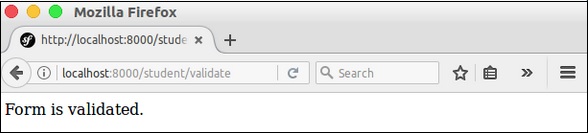
在这里,我们使用 Form 类创建了表单,然后处理了表单。如果表单提交且有效,则显示表单验证消息。否则,将显示默认表单。
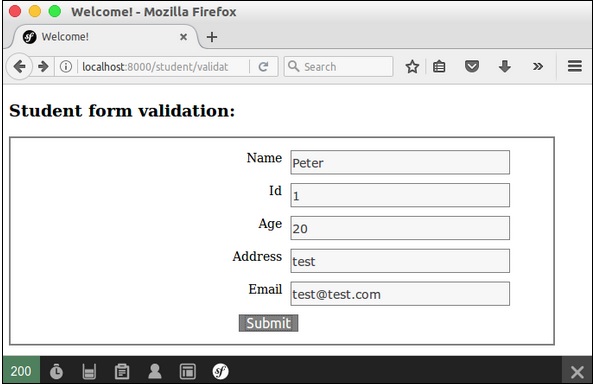
步骤 4 - 为 StudentController 中创建的操作创建视图。移动到 “app/Resources/views/student/” 目录。创建 “validate.html.twig” 文件并在其中添加以下代码。
{% extends 'base.html.twig' %}
{% block stylesheets %}
   <style>
      #simpleform {
         width:600px;
         border:2px solid grey;
         padding:14px;
      }
      #simpleform label {
         font-size:14px;
         float:left;
         width:300px;
         text-align:right;
         display:block;
      }
      #simpleform span {
         font-size:11px;
         color:grey;
         width:100px;
         text-align:right;
         display:block;
      }
      #simpleform input {
         border:1px solid grey;
         font-family:verdana;
         font-size:14px;
         color:light blue;
         height:24px;
         width:250px;
         margin: 0 0 10px 10px;
      }
      #simpleform textarea {
         border:1px solid grey;
         font-family:verdana;
         font-size:14px;
         color:light blue;
         height:120px;
         width:250px;
         margin: 0 0 20px 10px;
      }
      #simpleform select {
         margin: 0 0 20px 10px;
      }
      #simpleform button {
         clear:both;
         margin-left:250px;
         background: grey;
         color:#FFFFFF;
         border:solid 1px #666666;
         font-size:16px;
      }
   </style>
{% endblock %}

{% block body %}
   <h3>Student form validation:</h3>
   <div id = "simpleform">
      {{ form_start(form) }}
      {{ form_widget(form) }}
      {{ form_end(form) }}
   </div>
{% endblock %}
在这里,我们使用了表单标签来创建表单。
步骤 5 - 最后,运行应用程序,https://:8000/student/validate。
结果:初始页面
结果:最终页面