
- Beautiful Soup 教程
- Beautiful Soup - 首页
- Beautiful Soup - 概述
- Beautiful Soup - 网页抓取
- Beautiful Soup - 安装
- Beautiful Soup - 解析页面
- Beautiful Soup - 对象类型
- Beautiful Soup - 检查数据源
- Beautiful Soup - 抓取 HTML 内容
- Beautiful Soup - 通过标签导航
- Beautiful Soup - 通过 ID 查找元素
- Beautiful Soup - 通过 Class 查找元素
- Beautiful Soup - 通过属性查找元素
- Beautiful Soup - 搜索树
- Beautiful Soup - 修改树
- Beautiful Soup - 解析文档的一部分
- Beautiful Soup - 查找元素的所有子元素
- Beautiful Soup - 使用 CSS 选择器查找元素
- Beautiful Soup - 查找所有注释
- Beautiful Soup - 从 HTML 中抓取列表
- Beautiful Soup - 从 HTML 中抓取段落
- BeautifulSoup - 从 HTML 中抓取链接
- Beautiful Soup - 获取所有 HTML 标签
- Beautiful Soup - 获取标签内的文本
- Beautiful Soup - 查找所有标题
- Beautiful Soup - 提取标题标签
- Beautiful Soup - 提取电子邮件 ID
- Beautiful Soup - 抓取嵌套标签
- Beautiful Soup - 解析表格
- Beautiful Soup - 选择第 n 个子元素
- Beautiful Soup - 通过标签内的文本搜索
- Beautiful Soup - 删除 HTML 标签
- Beautiful Soup - 删除所有样式
- Beautiful Soup - 删除所有脚本
- Beautiful Soup - 删除空标签
- Beautiful Soup - 删除子元素
- Beautiful Soup - find 与 find_all 的区别
- Beautiful Soup - 指定解析器
- Beautiful Soup - 比较对象
- Beautiful Soup - 复制对象
- Beautiful Soup - 获取标签位置
- Beautiful Soup - 编码
- Beautiful Soup - 输出格式化
- Beautiful Soup - 美化输出
- Beautiful Soup - NavigableString 类
- Beautiful Soup - 将对象转换为字符串
- Beautiful Soup - 将 HTML 转换为文本
- Beautiful Soup - 解析 XML
- Beautiful Soup - 错误处理
- Beautiful Soup - 故障排除
- Beautiful Soup - 移植旧代码
- Beautiful Soup - 函数参考
- Beautiful Soup - contents 属性
- Beautiful Soup - children 属性
- Beautiful Soup - string 属性
- Beautiful Soup - strings 属性
- Beautiful Soup - stripped_strings 属性
- Beautiful Soup - descendants 属性
- Beautiful Soup - parent 属性
- Beautiful Soup - parents 属性
- Beautiful Soup - next_sibling 属性
- Beautiful Soup - previous_sibling 属性
- Beautiful Soup - next_siblings 属性
- Beautiful Soup - previous_siblings 属性
- Beautiful Soup - next_element 属性
- Beautiful Soup - previous_element 属性
- Beautiful Soup - next_elements 属性
- Beautiful Soup - previous_elements 属性
- Beautiful Soup - find 方法
- Beautiful Soup - find_all 方法
- Beautiful Soup - find_parents 方法
- Beautiful Soup - find_parent 方法
- Beautiful Soup - find_next_siblings 方法
- Beautiful Soup - find_next_sibling 方法
- Beautiful Soup - find_previous_siblings 方法
- Beautiful Soup - find_previous_sibling 方法
- Beautiful Soup - find_all_next 方法
- Beautiful Soup - find_next 方法
- Beautiful Soup - find_all_previous 方法
- Beautiful Soup - find_previous 方法
- Beautiful Soup - select 方法
- Beautiful Soup - append 方法
- Beautiful Soup - extend 方法
- Beautiful Soup - NavigableString 方法
- Beautiful Soup - new_tag 方法
- Beautiful Soup - insert 方法
- Beautiful Soup - insert_before 方法
- Beautiful Soup - insert_after 方法
- Beautiful Soup - clear 方法
- Beautiful Soup - extract 方法
- Beautiful Soup - decompose 方法
- Beautiful Soup - replace_with 方法
- Beautiful Soup - wrap 方法
- Beautiful Soup - unwrap 方法
- Beautiful Soup - smooth 方法
- Beautiful Soup - prettify 方法
- Beautiful Soup - encode 方法
- Beautiful Soup - decode 方法
- Beautiful Soup - get_text 方法
- Beautiful Soup - diagnose 方法
- Beautiful Soup 有用资源
- Beautiful Soup - 快速指南
- Beautiful Soup - 有用资源
- Beautiful Soup - 讨论
Beautiful Soup - 检查数据源
为了使用 BeautifulSoup 和 Python 抓取网页,任何网页抓取项目的首要步骤都应该是探索您想要抓取的网站。因此,在开始提取与您相关的 信息之前,首先访问该网站以了解网站结构。
让我们访问 TutorialsPoint 的 Python 教程主页。在浏览器中打开 https://tutorialspoint.com/python3/index.htm。
使用开发者工具可以帮助您了解网站的结构。所有现代浏览器都安装了开发者工具。
如果使用 Chrome 浏览器,请从右上角菜单按钮 (⋮) 打开开发者工具,然后选择更多工具 → 开发者工具。
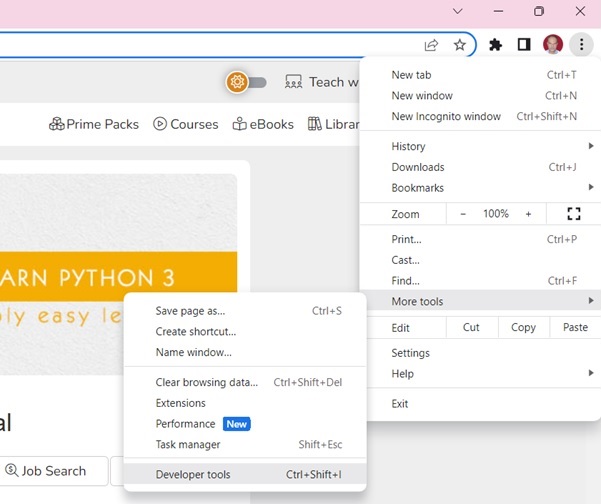
使用开发者工具,您可以探索站点的文档对象模型 (DOM) 以更好地理解您的源代码。在开发者工具中选择“元素”选项卡。您将看到一个带有可点击 HTML 元素的结构。
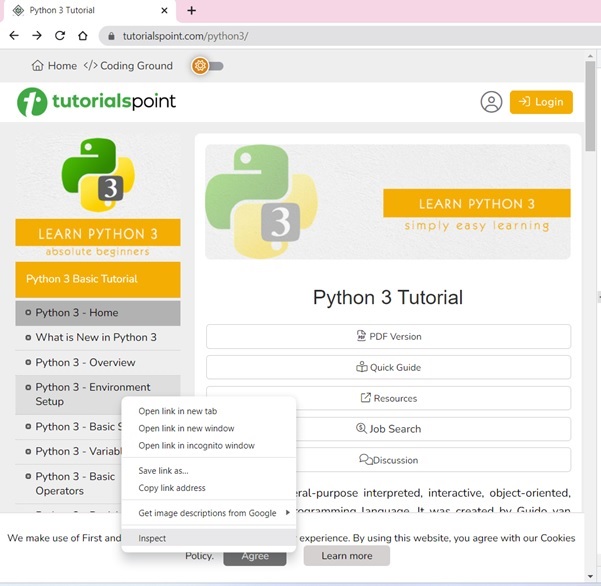
教程页面在左侧边栏中显示了目录。右键单击任意章节,然后选择“检查”选项。
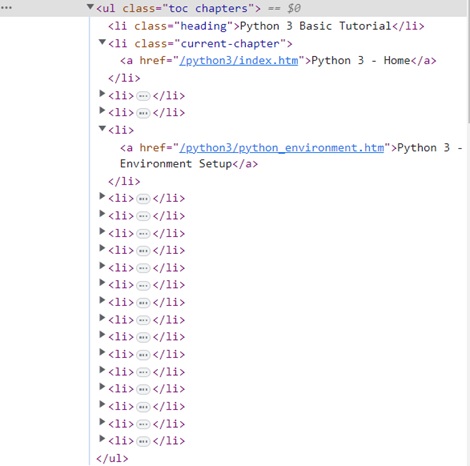
对于“元素”选项卡,找到与 TOC 列表对应的标签,如下图所示 -
右键单击 HTML 元素,复制 HTML 元素,并将其粘贴到任何编辑器中。
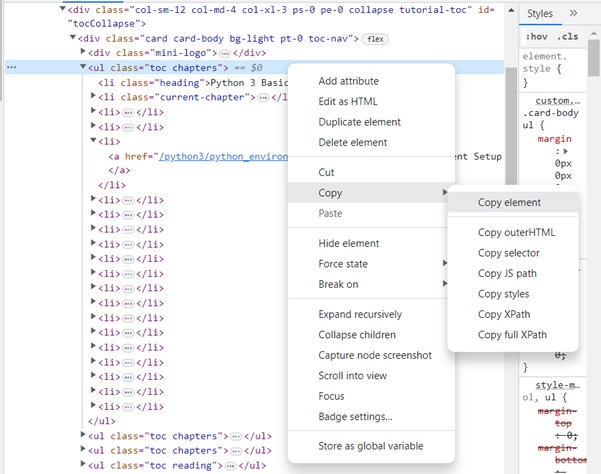
<ul>..</ul> 元素的 HTML 脚本现已获得。
<ul class="toc chapters">
   <li class="heading">Python 3 Basic Tutorial</li>
   <li class="current-chapter"><a href="/python3/index.htm">Python 3 - Home</a></li>
   <li><a href="/python3/python3_whatisnew.htm">What is New in Python 3</a></li>
   <li><a href="/python3/python_overview.htm">Python 3 - Overview</a></li>
   <li><a href="/python3/python_environment.htm">Python 3 - Environment Setup</a></li>
   <li><a href="/python3/python_basic_syntax.htm">Python 3 - Basic Syntax</a></li>
   <li><a href="/python3/python_variable_types.htm">Python 3 - Variable Types</a></li>
   <li><a href="/python3/python_basic_operators.htm">Python 3 - Basic Operators</a></li>
   <li><a href="/python3/python_decision_making.htm">Python 3 - Decision Making</a></li>
   <li><a href="/python3/python_loops.htm">Python 3 - Loops</a></li>
   <li><a href="/python3/python_numbers.htm">Python 3 - Numbers</a></li>
   <li><a href="/python3/python_strings.htm">Python 3 - Strings</a></li>
   <li><a href="/python3/python_lists.htm">Python 3 - Lists</a></li>
   <li><a href="/python3/python_tuples.htm">Python 3 - Tuples</a></li>
   <li><a href="/python3/python_dictionary.htm">Python 3 - Dictionary</a></li>
   <li><a href="/python3/python_date_time.htm">Python 3 - Date & Time</a></li>
   <li><a href="/python3/python_functions.htm">Python 3 - Functions</a></li>
   <li><a href="/python3/python_modules.htm">Python 3 - Modules</a></li>
   <li><a href="/python3/python_files_io.htm">Python 3 - Files I/O</a></li>
   <li><a href="/python3/python_exceptions.htm">Python 3 - Exceptions</a></li>
</ul>
我们现在可以将此脚本加载到 BeautifulSoup 对象中以解析文档树。
广告