
 数据结构
数据结构 网络技术
网络技术 关系型数据库管理系统
 操作系统
操作系统 Java
Java MS Excel
 iOS
iOS HTML
HTML CSS
CSS Android
 Python
 C 语言编程
 C++
C++ C#
C# MongoDB
 MySQL
MySQL Javascript
 PHP
PHP 物理
物理 化学
化学 生物
生物 数学
数学 英语
英语 经济学
经济学 心理学
心理学 社会研究
社会研究 时装研究
时装研究 法律研究
法律研究如何在 JavaFX 中为文本添加描边和颜色?
由于 JavaFX 中的 **javafx.scene.text.Text** 类继承自 Shape 类,因而它继承了该类的所有成员。你可以通过为 Text 类继承的描边、描边宽度和填充属性设置值,来修改文本节点的描边和颜色。
**描边宽度** − 描边宽度属性指定/定义了形状的边框线的宽度。你可以使用 Shape 类的 **setWidth()** 方法,设置边框线的宽度。
**填充** − 填充属性指定/定义了用于填充形状内部区域的颜色。你可以使用 Shape 类的 **fill()** 方法,使用所需颜色填充特定形状。
**描边** − 描边属性指定/定义了形状边框的颜色。你可以使用 javafx.scene.shape.Shape 类的 **setStroke()** 方法,设置边框线颜色。
示例
import java.io.FileNotFoundException;
import javafx.application.Application;
import javafx.scene.Group;
import javafx.scene.Scene;
import javafx.scene.paint.Color;
import javafx.stage.Stage;
import javafx.scene.text.Font;
import javafx.scene.text.FontPosture;
import javafx.scene.text.FontWeight;
import javafx.scene.text.Text;
public class SettingStroke_Color extends Application {
   public void start(Stage stage) throws FileNotFoundException {
      //Creating a text object
      String str = "Welcome to Tutorialspoint";
      Text text = new Text(30.0, 80.0, str);
      //Setting the font
      Font font = Font.font("Brush Script MT", FontWeight.BOLD, FontPosture.REGULAR, 65);
      text.setFont(font);
      //Setting the color of the text
      text.setFill(Color.BROWN);
      //Setting the width
      text.setStrokeWidth(2);
      //Setting the stroke color
      text.setStroke(Color.BLUE);
      //Setting the stage
      Group root = new Group(text);
      Scene scene = new Scene(root, 595, 150, Color.BEIGE);
      stage.setTitle("Stroke And Color");
      stage.setScene(scene);
      stage.show();
   }
   public static void main(String args[]){
      launch(args);
   }
}
输出
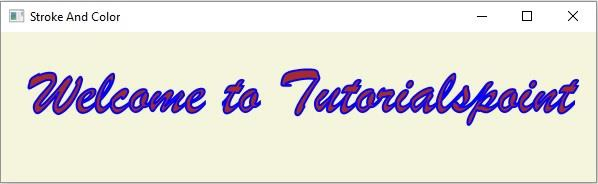

更新于: 14-Apr-2020
2 千+ 次浏览

广告