
 数据结构
数据结构 网络
网络 RDBMS
RDBMS 操作系统
操作系统 Java
Java MS Excel
 iOS
iOS HTML
HTML CSS
CSS 安卓
安卓 Python
 C编程
C编程 C++
C++ C#
C# MongoDB
 MySQL
MySQL Javascript
 PHP
PHP 物理
物理 化学
化学 生物
生物 数学
数学 英语
英语 经济学
经济学 心理学
心理学 社会学
社会学 时尚研究
时尚研究 法律研究
法律研究如何清除tkinter中的ttk.Combobox文本字段部分?
Combobox小部件是tkinter中一种百搭小部件,用于创建包含某些值的下拉列表。您可以从下拉列表中选择一个值,该值将替换为组合框小部件的默认值。您可以通过初始化构造函数Combobox(root, width, text)小部件来创建一个组合框小部件。
考虑这样一种情况,如果用户希望清除组合框小部件中选定的值,那么唯一的方法是使用set (' ')方法将组合框小部件的值设置为NULL。以下示例展示了如何执行此操作。
示例
# Import the required libraries
from tkinter import *
from tkinter import ttk

# Create an instance of tkinter frame or window
win = Tk()

# Set the size of the window
win.geometry("700x350")

# Create a function to clear the combobox
def clear_cb():
   cb.set('')

# Define Days Tuple
days= ('Sun','Mon','Tue','Wed','Thu','Fri','Sat')

# Create a combobox widget
var= StringVar()
cb= ttk.Combobox(win, textvariable= var)
cb['values']= days
cb['state']= 'readonly'
cb.pack(fill='x',padx= 5, pady=5)

# Create a button to clear the selected combobox text value
button = Button(win, text= "Clear", command= clear_cb)
button.pack()

win.mainloop()
输出
运行以上代码将显示一个带有组合框小部件的窗口和一个按钮“清除”以清除组合框小部件中选定的值。
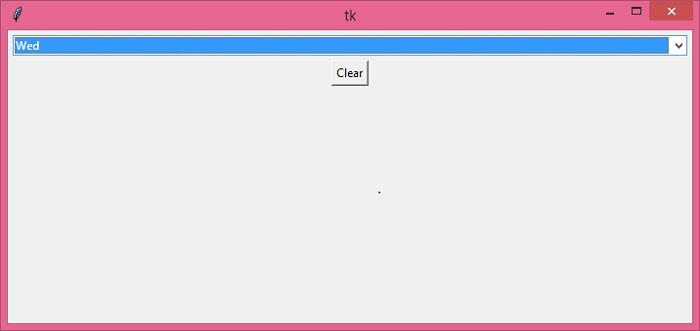
现在点击“清除”按钮以清除组合框小部件中选定的值。


更新于:16-12-2021
4K+浏览量

广告