
 数据结构
数据结构 网络
网络 关系数据库管理系统 (RDBMS)
 操作系统
操作系统 Java
Java MS Excel
 iOS
iOS HTML
HTML CSS
CSS Android
 Python
 C 语言编程
 C++
C++ C#
C# MongoDB
 MySQL
MySQL Javascript
 PHP
PHP 物理学
物理学 化学
化学 生物学
生物学 数学
数学 英语
英语 经济学
经济学 心理学
心理学 社会学
社会学 时尚研究
时尚研究 法律研究
法律研究如何在 Ubuntu 16.04 上配置和安装 Ghost
在这篇文章中,我们将学习如何在 Ubuntu 16.04 上安装和配置 Ghost。Ghost 是一个轻量级且开源的博客程序,易于使用且可定制,并提供许多主题。
先决条件
此安装需要以下条件:
- 已安装 Ubuntu 16.04 的服务器。
- 具有 Sudo 权限的非 root 用户。
- 在服务器上安装了 Nginx 网络服务器。
在 Ubuntu 16.04 上安装 Ghost
我们将使用 Ghost 官方 GitHub 仓库来安装 Ghost。
首先,我们将使用以下命令获取 Ghost 的最新版本。(此处应补充具体命令)
$ wget https://ghost.org/zip/ghost-latest.zip
Output:
   --2017-05-18 12:06:25-- https://ghost.org/zip/ghost-latest.zip
Resolving ghost.org (ghost.org)... 104.16.32.191, 104.16.34.191, 104.16.33.191, ...
Connecting to ghost.org (ghost.org)|104.16.32.191|:443... connected.
HTTP request sent, awaiting response... 301 Moved Permanently
Location: /zip/ghost-latest.zip/ [following]
   --2017-05-18 12:06:27-- https://ghost.org/zip/ghost-latest.zip/
Reusing existing connection to ghost.or
g:443.
HTTP request sent, awaiting response... 302 Found
Location: https://github.com/TryGhost/Ghost/releases/download/0.11.9/Ghost-0.11.9.zip [following]
   --2017-05-18 12:06:28-- https://github.com/TryGhost/Ghost/releases/download/0.11.9/Ghost-0.11.9.zip
Resolving github.com (github.com)... 192.30.253.113, 192.30.253.112
Connecting to github.com (github.com)|192.30.253.113|:443... connected.
HTTP request sent, awaiting response... 302 Found
Location: https://github-cloud.s3.amazonaws.com/releases/9852918/d047ce0e-3a8d-1 1e7-937c-58bc76a5c547.zip?X-Amz-Algorithm=AWS4-HMAC-SHA256&X-Amz-Credential=AKIA ISTNZFOVBIJMK3TQ%2F20170518%2Fus-east-1%2Fs3%2Faws4_request&X-Amz-Date=20170518T       063630Z&X-Amz-Expires=300&X-Amz-Signature=495ca36c4d81720b86bef7f49c9a99720aab30 cdcd8f7e0c62350e48a7a417cb&X-Amz-SignedHeaders=host&actor_id=0&response-content- disposition=attachment%3B%20filename%3DGhost-0.11.9.zip&response-content-type=ap       plication%2Foctet-stream [following]
   --2017-05-18 12:06:31-- https://github-cloud.s3.amazonaws.com/releases/9852918/ d047ce0e-3a8d-11e7-937c-58bc76a5c547.zip?X-Amz-Algorithm=AWS4-HMAC-SHA256&X-Amz- Credential=AKIAISTNZFOVBIJMK3TQ%2F20170518%2Fus-east-1%2Fs3%2Faws4_request&X-Amz -         Date=20170518T063630Z&X-Amz-Expires=300&X-Amz-Signature=495ca36c4d81720b86bef7f 49c9a99720aab30cdcd8f7e0c62350e48a7a417cb&X-Amz-SignedHeaders=host&actor_id=0&re sponse-content-disposition=attachment%3B%20filename%3DGhost-0.11.9.zip&response-       content-type=application%2Foctet-stream
Resolving github-cloud.s3.amazonaws.com (github-cloud.s3.amazonaws.com)... 52.21       6.65.72
Connecting to github-cloud.s3.amazonaws.com (github-cloud.s3.amazonaws.com)|52.2       16.65.72|:443... connected.
HTTP request sent, awaiting response... 200 OK
Length: 4219850 (4.0M) [application/octet-stream]
Saving to: ‘ghost-latest.zip’
ghost-latest.zip.1          100%[======================================>] 4.02M 1.26MB/s    in 3.2s
2017-05-18 12:10:14 (1.26 MB/s) - ‘ghost-latest.zip’ saved [4219850/4219850]
下载软件包后,我们将使用以下命令将下载的文件解压缩到服务器上的 /var/www/ghost 文件夹。(此处应补充具体命令)
$ sudo unzip -d /var/www/ghost ghost-latest.zip
从软件包文件中解压缩文件后,我们将切换到 /var/www/ghost 文件夹,并使用 npm 命令行工具安装生产环境所需的 Ghost 依赖项。
以下是安装 Ghost 及生产环境所需依赖项的命令。(此处应补充具体命令)
$ sudo npm install --production
Output:
[ ...............] | cloneCurrentTree: sill cloneCurrentTree Finishing
npm WARN lifecycle ghost@0.11.9~preinstall: cannot run in wd %s %s (wd=%s) ghost@0.11.9 node core/server/utils/npm/preinstall.js /var/www/ghost
> dtrace-provider@0.8.1 install /var/www/ghost/node_modules/gscan/node_modules/ghost-ignition/node_modules/bunyan/node_modules/dtrace-provider
> node scripts/install.js
> sqlite3@3.1.8 install /var/www/ghost/node_modules/sqlite3
> node-pre-gyp install --fallback-to-build
[sqlite3] Success: "/var/www/ghost/node_modules/sqlite3/lib/binding/node-v48-linux-x64/node_sqlite3.node" is installed via remote
> jsonpath@0.2.11 postinstall /var/www/ghost/node_modules/jsonpath
> node lib/aesprim.js > generated/aesprim-browser.js
ghost@0.11.9 /var/www/ghost
….
….
   | | `-- ms@0.7.3
   | +-- form-data@2.1.4
   | | +-- asynckit@0.4.0
   | | +-- combined-stream@1.0.5
   | | | `-- delayed-stream@1.0.0
   | | `-- mime-types@2.1.15
   | | `-- mime-db@1.27.0
   | +-- formidable@1.1.1
   | +-- methods@1.1.2
   | +-- mime@1.3.6
   | `-- readable-stream@2.2.9
   | +-- buffer-shims@1.0.0
   | +-- core-util-is@1.0.2
   | +-- inherits@2.0.3
   | +-- isarray@1.0.0
   | +-- process-nextick-args@1.0.7
   | +-- string_decoder@1.0.0
   | `-- util-deprecate@1.0.2
   +-- unidecode@0.1.8
   +-- uuid@3.0.0
   +-- validator@6.3.0
   +-- vary@1.1.1
   +-- xml@1.0.1
   `-- xtend@4.0.1
配置 Ghost
安装依赖项后,我们需要修改位于 /var/www/ghost 的 Ghost 配置文件。配置文件并不直接存在,但 Ghost 安装包包含一个名为 config.example.js 的配置文件,我们将暂时使用它进行配置。
首先,我们将文件复制到 /var/www/ghost 文件夹并命名为 config.js,以下是如何复制配置文件的命令。(此处应补充具体命令)
$ sudo cp config.example.js config.js
将示例文件复制到 config.js 后,我们将根据我们的环境编辑配置文件。
$ sudo vi config.js
在这里,我们将编辑 Ghost 服务器的 URL 配置。如果不更改 URL,博客上的链接将指向默认 URL my-ghost-blog.com。因此,我们需要更改“url”的值,可以使用域名或服务器的 IP 地址,在本演示中我们只使用 IP 地址,实际应用中将使用博客的域名。
Output:
// # Ghost Configuration
// Setup your Ghost install for various [environments](http://support.ghost.org/config/#about-environments).
// Ghost runs in `development` mode by default. Full documentation can be found at http://support.ghost.org/config/var path = require('path'),config;
config = {
   // ### Production
   // When running Ghost in the wild, use the production environment.
   // Configure your URL and mail settings here
   production: {
      url: 'http://192.168.1.123',
      mail: {
         transport: 'SMTP',
         options: {
            service: 'Gmail',
            auth: {
               user: 'youremail@gmail.com',
               pass: 'yourpassword'
            }
         }
      },
   database: {
      client: 'sqlite3',
      connection: {
         filename: path.join(__dirname, '/content/data/ghost.db')
      },
      debug: false
   },
   server: {
      host: '127.0.0.1',
      port: '2368'
   }
},
…
…
我的本地设置使用了我的机器的 IP 地址。
接下来,我们将配置电子邮件通知,这对于 Ghost 用户的密码恢复或任何用户更新通知是必要的。保存配置文件并退出 vi 编辑器。
使用以下命令启动 Ghost(此处应补充具体命令)
$ sudo npm start –production
Output:
> ghost@0.11.9 start /var/www/ghost
> node index
WARNING: Ghost is attempting to use a direct method to send an email.It is recommended that you explicitly configure an email service.
Help and documentation can be found at http://support.ghost.org/mail.
Migrations: Creating tables...
Migrations: Creating table: posts
Migrations: Creating table: users
Migrations: Creating table: roles
Migrations: Creating table: roles_users
Migrations: Creating table: permissions
Migrations: Creating table: permissions_users
Migrations: Creating table: permissions_roles
Migrations: Creating table: permissions_apps
Migrations: Creating table: settings
Migrations: Creating table: tags
Migrations: Creating table: posts_tags
Migrations: Creating table: apps
Migrations: Creating table: app_settings
Migrations: Creating table: app_fields
Migrations: Creating table: clients
Migrations: Creating table: client_trusted_domains
Migrations: Creating table: accesstokens
Migrations: Creating table: refreshtokens
Migrations: Creating table: subscribers
Migrations: Running fixture populations
Migrations: Creating owner
Ghost is running in production...
Your blog is now available on http://192.168.1.123
Ctrl+C to shut down
配置 Nginx 将 Web 请求代理到 Ghost
默认情况下,Ghost 将在端口 2368 上运行,我们需要配置 Nginx 以允许在端口 80 上连接,并在不向域名或 IP 地址添加 2368 的情况下访问 Ghost。
按 CTRL+C 停止 Ghost。
现在更改目录到 /etc/nginx。
$ cd /etc/nginx.
删除 sites-enabled/default 中的默认 Nginx 配置。
$ sudo rm sites-enabled/default
在 /etc/nginx/sites-available/ 中创建一个名为 ghost 的新配置文件。
$ sudo nano /etc/nginx/sites-available/ghost
粘贴以下配置并更改 your-domain-name。(此处应补充具体Nginx配置)
$ vi /etc/nginx/sites-available/ghost
server {
   listen 80;
   server_name 192.168.1.123; # Your-IP-Address
   location / {
      proxy_set_header HOST $host;
      proxy_set_header X-Forwarded-Proto $scheme;
      proxy_set_header X-Real-IP $remote_addr;
      proxy_set_header X-Forwarded-For $proxy_add_x_forwarded_for;
      proxy_pass http://127.0.0.1:2368;
   }
}
保存文件并退出编辑器。
我们需要通过在 /etc/nginx/sites-enabled 文件夹中创建 ghost 文件的符号链接来启用此配置。(此处应补充具体命令)
$ sudo ln -s /etc/nginx/sites-available/ghost /etc/nginx/sites-enabled/ghost
现在重新启动 Nginx 以应用更改。(此处应补充具体命令)
$ sudo service nginx restart
重新启动 Nginx 后,我们将访问博客站点进行初始设置。
我们可以通过访问服务器的 http://your_ip_address 来访问博客,但对于初始设置,我们需要使用以下 URL 访问博客:http://your_ip_address/ghost。
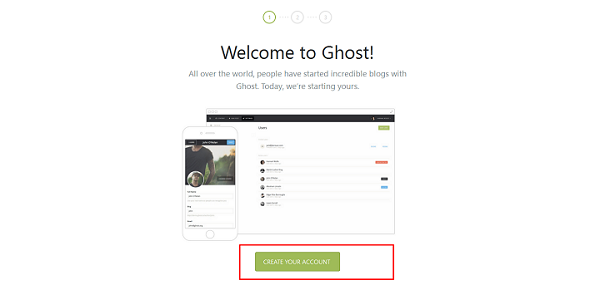
作为博客管理员,我们需要在博客上创建一个帐户,以便管理并邀请用户加入博客。点击“创建您的帐户”。
在下一页,我们将提供管理员电子邮件 ID、全名、密码和博客标题。
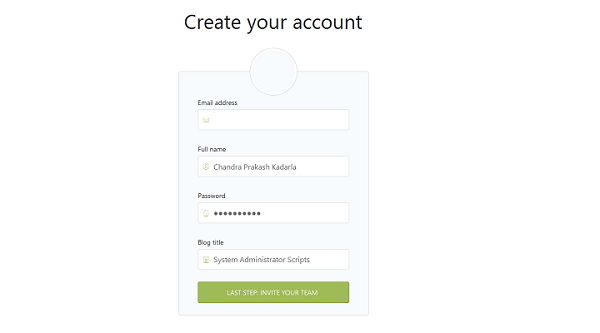
接下来,我们将邀请一些人加入博客。
欢迎屏幕如下所示。(此处应补充图片)
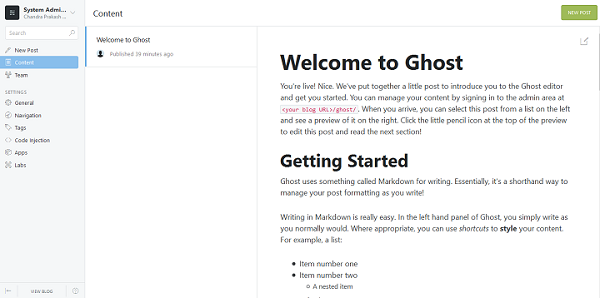
现在,我们将通过点击“新建博客”,然后点击“新建文章”来撰写博客。
编辑文章后,我们将通过点击“保存草稿”列表然后点击“发布”来发布文章。
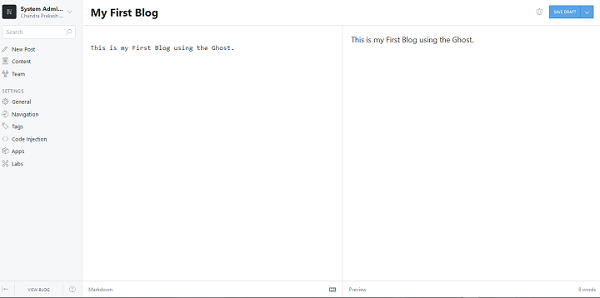
我们现在可以使用 URL http://your_ip_address 访问博客。
Ghost 博客如下所示。(此处应补充图片)

在这篇文章中,我们学习了如何安装和配置 Ghost。Ghost 是一个非常易于使用的博客站点应用程序,我们还学习了如何使用 Ghost 博客软件创建我们的第一个博客,请探索更多选项,因为 Ghost 可以做很多事情。

276 次查看
