
 数据结构
数据结构 网络
网络 关系型数据库管理系统
 操作系统
操作系统 Java
Java MS Excel
 iOS
iOS HTML
HTML CSS
CSS Android
 Python
 C 编程
C 编程 C++
C++ C#
C# MongoDB
 MySQL
MySQL Javascript
 PHP
PHP 物理学
物理学 化学
化学 生物学
生物学 数学
数学 英语
英语 经济学
经济学 心理学
心理学 社会学
社会学 时尚研究
时尚研究 法律研究
法律研究如何在 Ubuntu 16.04 上安装和设置 Cacti
Cacti 是一款网络监控设备,可以创建服务器效率的个性化图表。可以通过在线入口-终点进行访问和管理。本文介绍了如何在 Ubuntu 上安装和设置 Cacti。
先决条件
- LAMP
- SNMP、SNMPD 和 RRDtools
要安装 LAMP,请添加以下存储库,如下所示:
$ sudo add-apt-repository 'deb http://archive.ubuntu.com/ubuntu trusty universe'
要更新软件包,请使用以下命令:
$ sudo apt-get update
要安装 LAMP,请使用以下命令:
$ sudo apt-get install apache2 mysql-server-5.6 php libapache2-mod-php
示例输出应如下所示:
Reading package lists... Done
Building dependency tree
Reading state information... Done
libapache2-mod-php is already the newest version (1:7.0+35ubuntu6).
php is already the newest version (1:7.0+35ubuntu6).
apache2 is already the newest version (2.4.18-2ubuntu3.1).
The following packages were automatically installed and are no longer required:
   libevent-core-2.0-5 linux-headers-4.4.0-31 linux-headers-4.4.0-31-generic
   linux-image-4.4.0-31-generic linux-image-extra-4.4.0-31-generic
   linux-signed-image-4.4.0-31-generic
Use 'sudo apt autoremove' to remove them.
The following additional packages will be installed:
   libdbd-mysql-perl libdbi-perl libmysqlclient20 libterm-readkey-perl
   mysql-client-5.6 mysql-client-core-5.6 mysql-server-core-5.6
Suggested packages:
   libmldbm-perl libnet-daemon-perl libsql-statement-perl mailx tinyca
The following packages will be REMOVED:
........................................................................
安装过程中,将提示您设置 MySQL 服务器 root 密码,如下所示:

要安装 SNMP、SNMPD 和 RRDtools,请使用以下命令:
$ sudo apt-get install snmp snmpd rrdtool
示例输出应如下所示:
Building dependency tree
Reading state information... Done
The following packages were automatically installed and are no longer required:
   libaio1 libdbd-mysql-perl libdbi-perl libevent-core-2.0-5 libmysqlclient20
   libterm-readkey-perl linux-headers-4.4.0-31 linux-headers-4.4.0-31-generic
   linux-image-4.4.0-31-generic linux-image-extra-4.4.0-31-generic
   linux-signed-image-4.4.0-31-generic mysql-client-5.6 mysql-client-core-5.6
   mysql-server-core-5.6
Use 'sudo apt autoremove' to remove them.
The following additional packages will be installed:
   libdbi1 librrd4
Suggested packages:
   librrds-perl snmptrapd
The following NEW packages will be installed:
   libdbi1 librrd4 rrdtool snmp snmpd
0 upgraded, 5 newly installed, 0 to remove and 19 not upgraded.
7 not fully installed or removed.
Need to get 775 kB of archives.
After this operation, 2,464 kB of additional disk space will be used.
Do you want to continue? [Y/n] y
Get:1 http://in.archive.ubuntu.com/ubuntu xenial/main amd64 libdbi1 amd64 0.9.0-4 [27.8 kB]
Get:2 http://in.archive.ubuntu.com/ubuntu xenial/main amd64 librrd4 amd64 1.5.5-4 [180 kB]
Get:3 http://in.archive.ubuntu.com/ubuntu xenial/main amd64 snmp amd64 5.7.3+dfsg-1ubuntu4 [154 kB]
Get:4 http://in.archive.ubuntu.com/ubuntu xenial/main amd64 snmpd amd64 5.7.3+dfsg-1ubuntu4 [57.1 kB]
Get:5 http://in.archive.ubuntu.com/ubuntu xenial/main amd64 rrdtool amd64 1.5.5-4 [356 kB]
.....................................................................................
要安装 Cacti,请使用以下命令:
$sudo apt-get install snmpd cacti cacti-spine
在安装过程中,将提示您设置 Web 服务器,如下面的屏幕截图所示。

选择 Apache2 并通过按 Enter 键单击确定按钮。要配置数据库配置,它将显示如下屏幕。
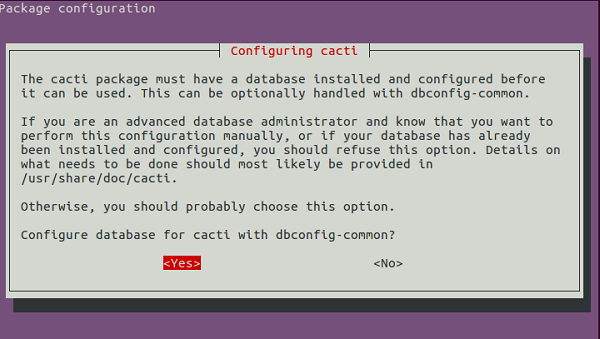
单击“是”按钮后,它将提示您输入数据库密码,如下所示。
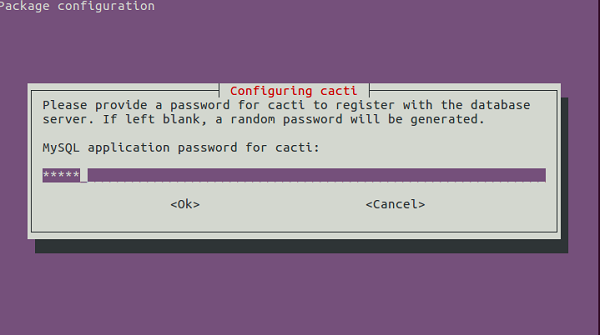
输入您在安装 LAMP 时提供的先前数据库密码,然后单击“确定”按钮。现在打开您喜欢的浏览器并输入以下 URL,如下所示。
https:///cacti/install/
示例输出应如下所示。

单击“下一步”按钮,继续进行 **cacti** 安装。接下来的步骤应如下所示

如果您是新安装程序,请单击“下一步”按钮,否则更改配置并单击“下一步”按钮。接下来的步骤应如下所示。
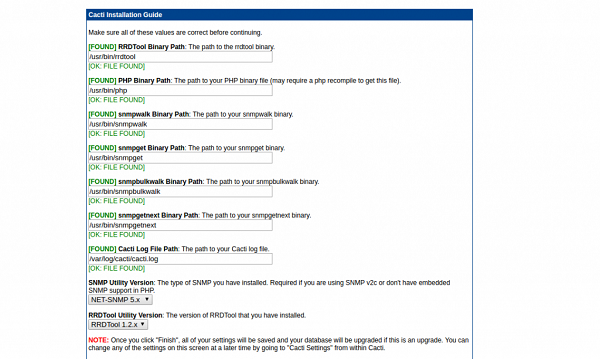
在上述步骤中,它包含有关文件路径的信息。现在单击“完成”按钮。接下来的步骤应如下所示。

现在输入默认用户名和密码,如下所示
User name :admin
Password: admin
现在单击登录按钮,然后它将提示您更改密码,如下所示:

现在输入新密码并单击保存按钮。以下是作为下一步出现的屏幕截图,看起来如下所示:

要创建图表,请单击“新建图表”按钮,如下所示:
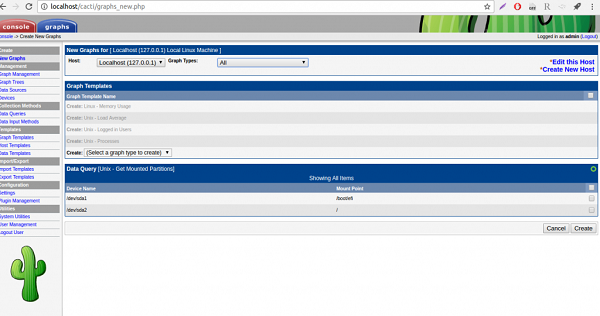
根据需求选择选项并单击“创建”按钮。
在本文中,我们学习了如何在 Ubuntu 16.04 上安装和设置 Cacti,我们将推出更多基于 Linux 的技巧和提示。请继续关注!

319 次浏览
