
 数据结构
数据结构 网络
网络 RDBMS
RDBMS 操作系统
操作系统 Java
Java MS Excel
 iOS
iOS HTML
HTML CSS
CSS Android
 Python
 C 编程
C 编程 C++
C++ C#
C# MongoDB
 MySQL
MySQL Javascript
 PHP
PHP 物理
物理 化学
化学 生物
生物 数学
数学 英语
英语 经济学
经济学 心理学
心理学 社会学
社会学 时尚研究
时尚研究 法律研究
法律研究如何在 Java 中创建左右拆分窗格?
要创建左右拆分窗格,我们将创建两个组件并拆分它们 −
JComponent one = new JLabel("Left Split");
one.setBorder(BorderFactory.createLineBorder(Color.MAGENTA));
JComponent two = new JLabel("Right Split");
two.setBorder(BorderFactory.createLineBorder(Color.ORANGE));
现在,我们将拆分它们。这两个组件将使用 HORIZONTAL_PANE 常量拆分,一个在另一个的左边 −
JSplitPane splitPane = new JSplitPane(JSplitPane.HORIZONTAL_SPLIT, one, two);
以下是一个在 Java 中创建左右拆分窗格的示例 −
示例
package my;
import java.awt.Color;
import javax.swing.BorderFactory;
import javax.swing.JComponent;
import javax.swing.JFrame;
import javax.swing.JLabel;
import javax.swing.JSplitPane;
public class SwingDemo {
   public static void main(String[] a) {
      JFrame frame = new JFrame("SplitPane Demo");
      frame.setDefaultCloseOperation(JFrame.EXIT_ON_CLOSE);
      JComponent one = new JLabel("Left Split");
      one.setBorder(BorderFactory.createLineBorder(Color.MAGENTA));
      JComponent two = new JLabel("Right Split");
      two.setBorder(BorderFactory.createLineBorder(Color.ORANGE));
      JSplitPane splitPane = new JSplitPane(JSplitPane.HORIZONTAL_SPLIT, one, two);
      frame.add(splitPane);
      frame.setSize(550, 250);
      frame.setVisible(true);
   }
}
这会产生以下输出 −
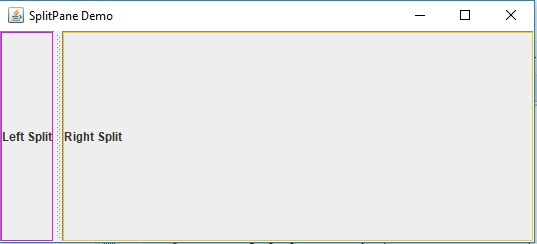

更新日期:2019 年 7 月 30 日
231 次查看

广告