
 数据结构
数据结构 网络连接
网络连接 RDBMS
RDBMS 操作系统
操作系统 Java
Java MS Excel
 iOS
iOS HTML
HTML CSS
CSS Android
 Python
 C 程序设计
 C++
C++ C#
C# MongoDB
 MySQL
MySQL JavaScript
 PHP
PHP 物理
物理 化学
化学 生物
生物 数学
数学 英语
英语 经济学
经济学 心理学
心理学 社会学
社会学 时尚学
时尚学 法学
法学如何使用 Java OpenCV 库创建一个镜像图像?
创建镜像图像
使用 ImageIO.read() 方法读取所需图像。
获取图像的高度和宽度。
创建一个空的缓冲图像来存储结果
使用嵌套的 for 循环遍历图像中的每个像素。
从右到左遍历图像的宽度。
使用 getRGB() 方法获取像素值。
通过替换新的宽度值,使用 setRGB() 方法将像素值设置到结果图像对象。
示例
import java.io.File;
import java.io.IOException;
import java.awt.image.BufferedImage;
import javax.imageio.ImageIO;
public class MirrorImage {
   public static void main(String args[])throws IOException {
      //Reading the image
      File file= new File("D:\Images\tree.jpg");
      BufferedImage img = ImageIO.read(file);
      //Getting the height and with of the read image.
      int height = img.getHeight();
      int width = img.getWidth();
      //Creating Buffered Image to store the output
      BufferedImage res = new BufferedImage(width, height, BufferedImage.TYPE_INT_ARGB);
      for(int j = 0; j < height; j++){
         for(int i = 0, w = width - 1; i < width; i++, w--){
            int p = img.getRGB(i, j);
            //set mirror image pixel value - both left and right
            res.setRGB(w, j, p);
         }
      }
      //Saving the modified image
      file = new File("D:\Images\mirror_image.jpg");
      ImageIO.write(res, "jpg", file);
      System.out.println("Done...");
   }
}
输入
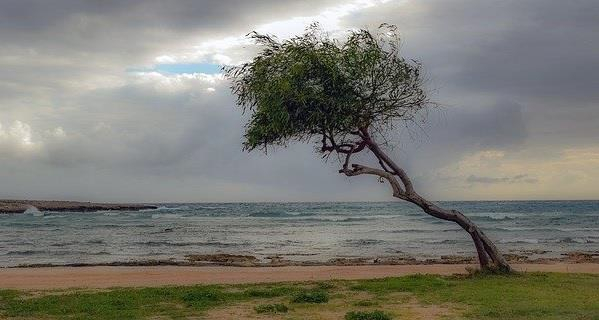
输出
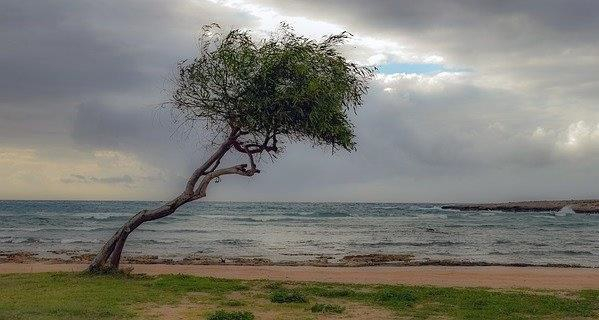

更新日期: 2020 年 4 月 9 日
612 次浏览

广告