
 数据结构
数据结构 网络
网络 关系数据库管理系统 (RDBMS)
 操作系统
操作系统 Java
Java MS Excel
 iOS
iOS HTML
HTML CSS
CSS Android
 Python
 C 语言编程
 C++
C++ C#
C# MongoDB
 MySQL
MySQL Javascript
 PHP
PHP 物理学
物理学 化学
化学 生物学
生物学 数学
数学 英语
英语 经济学
经济学 心理学
心理学 社会学
社会学 服装设计
服装设计 法学
法学如何在 ReactJS 中创建密码检查列表?
如今,应用程序使用一次性密码或魔法链接进行身份验证,但我们不能忽略使用用户名和密码的身份验证。
每当我们允许用户使用用户名和密码注册时,我们应该确保用户输入的密码足够强大,这样黑客就无法破解。
在本教程中,我们将学习如何在 ReactJS 中验证密码的安全级别。
创建自定义验证算法
我们可以创建一个自定义验证算法来检查密码是强还是弱。我们可以为小写字母、大写字母和数字创建正则表达式。
之后,我们可以使用 match() 方法将密码字符串与正则表达式匹配。如果任何密码字符串与任何正则表达式都不匹配,我们可以显示密码较弱的消息。
语法
用户可以按照以下语法使用正则表达式通过创建自定义算法来验证密码。
var lowerCase = /[a-z]/g;
var upperCase = /[A-Z]/g;
var numbers = /[0-9]/g;
let bool = new_pass.match(regex)
在上面的语法中,我们有不同的正则表达式。我们对每个正则表达式都使用了 match() 方法,并在 bool 变量中获得了结果。
算法
步骤 1 – 创建小写字母、大写字母和数字的正则表达式。
步骤 2 – 使用 match() 方法将密码与小写正则表达式匹配。如果 match() 方法返回 false,则设置错误消息。
步骤 3 – 将数字和大写正则表达式与密码匹配,并根据其返回的布尔值设置错误消息。
步骤 4 – 接下来,最后检查密码的长度。如果长度小于 10,也设置错误消息。
示例 1
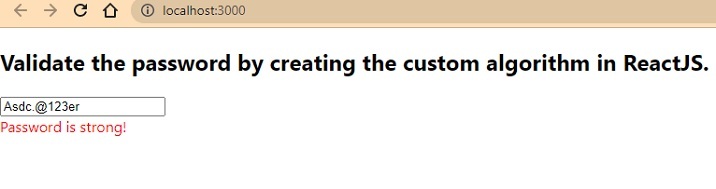
在下面的示例中,我们创建了密码输入。每当用户更改密码值时,它都会调用 handlePassword() 函数。在 handlePassword() 函数中,我们创建了各种正则表达式,并使用 match() 方法将它们与密码字符串匹配。
在输出中,用户可以看到,如果密码不符合任何条件,它将相应地显示错误消息。
import React, { useState } from "react";
const App = () => {
   const [password, setPassword] = useState("Abc.@678");
   const [errorMessage, setErrorMessage] = useState("");
   function handlePassword(event) {
      let new_pass = event.target.value;
      setPassword(new_pass);

      // regular expressions to validate password
      var lowerCase = /[a-z]/g;
      var upperCase = /[A-Z]/g;
      var numbers = /[0-9]/g;
      if (!new_pass.match(lowerCase)) {
         setErrorMessage("Password should contains lowercase letters!");
      } else if (!new_pass.match(upperCase)) {
         setErrorMessage("Password should contain uppercase letters!");
      } else if (!new_pass.match(numbers)) {
         setErrorMessage("Password should contains numbers also!");
      } else if (new_pass.length < 10) {
         setErrorMessage("Password length should be more than 10.");
      } else {
         setErrorMessage("Password is strong!");
      }
   }
   return (
      <div>
         <h2>
            {" "}
            Validate the password by creating the custom algorithm in ReactJS.{" "}
         </h2>
         <input type = "text" value = {password} onChange = {handlePassword} />
         <div style = {{ color: "red" }}> {errorMessage} </div>
      </div>
   );
};
export default App;
输出
使用 React 密码检查列表 NPM 包
ReactJS 最好的一点是它包含各种库;我们可以通过安装它直接在我们的应用程序中使用它。react-password-checklist 库允许我们根据各种条件检查密码的强度。
例如,它验证密码的最小和最大长度、大写字母、数字等。开发人员需要在 PasswordChecklist 组件中传递 props,它将相应地验证密码。
执行以下命令以在我们的应用程序中安装 react-password-checklist。
npm i react-password-checklist
语法
用户可以按照以下语法使用 react-password-checklist NPM 包来验证密码。
<PasswordChecklist
   rules={["capital", "match", "specialChar", "minLength", "number"]}
   minLength={8}
   value={password}
   valueAgain={matchPassword}
/>
在上面的语法中,我们使用了 PasswordChecklist 组件并传递了 props 来验证密码。
示例 2
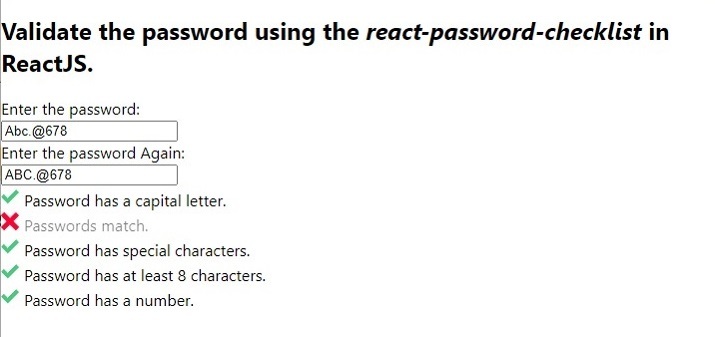
在下面的示例中,我们导入了 react-password-checklist 库并将其用作组件。我们以数组格式将规则作为 prop 传递以验证密码。此外,我们将密码绑定到 value,并将 passwordMatch 绑定到 PasswordCheckList 组件中的 valueAgain。
在输出中,用户可以观察到消息之前的交叉符号,该规则不符合密码字符串。
import React, { useState } from "react";
import PasswordChecklist from "react-password-checklist";
const App = () => {
   const [password, setPassword] = useState("Abc.@678");
   const [matchPassword, setMatchPassword] = useState("ABC.@678");
   const [errorMessage, setErrorMessage] = useState("");
   function handleSetPassword(event) {
      setPassword(event.target.value);
   }
   function handleSetMatchPassword(event) {
      setMatchPassword(event.target.value);
   }
   return (
      <div>
         <h2>
            {" "}
            Validate the password using the <i> react-password-checklist </i> in ReactJS.{" "}
         </h2>
         <div> Enter the password: </div>
         <input type = "text" value = {password} onChange = {handleSetPassword} />
         <div> Enter the password Again: </div>
         <input
            type = "text"
            value = {matchPassword}
            onChange = {handleSetMatchPassword}
         />
         <PasswordChecklist
            rules = {["capital", "match", "specialChar", "minLength", "number"]}
            minLength = {8}
            value = {password}
            valueAgain = {matchPassword}
         />
      </div>
   );
};
export default App;
输出
示例 3
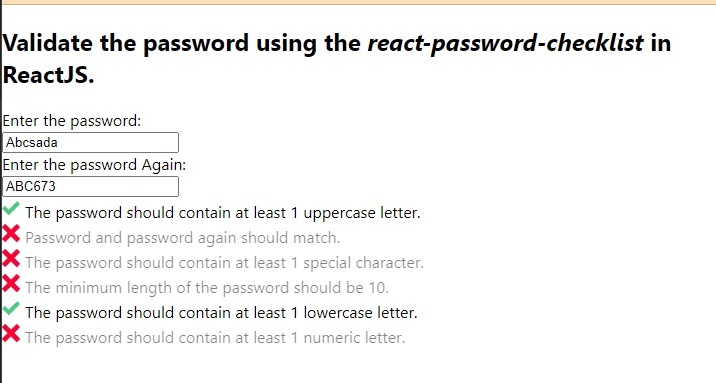
在下面的示例中,我们为每个密码检查规则设置了自定义验证消息。用户可以看到我们如何将消息对象作为 PasswordChecklist 组件的 prop 传递。在消息对象中,我们使用规则作为键,消息作为其值。
import React, { useState } from "react";
import PasswordChecklist from "react-password-checklist";
const App = () => {
   const [password, setPassword] = useState("Abc.@678");
   const [matchPassword, setMatchPassword] = useState("ABC.@678");
   const [errorMessage, setErrorMessage] = useState("");
   function handleSetPassword(event) {
      setPassword(event.target.value);
   }
   function handleSetMatchPassword(event) {
      setMatchPassword(event.target.value);
   }
   return (
      <div>
         <h2>
            {" "}
            Validate the password using the <i> react-password-checklist </i> in ReactJS.{" "}
         </h2>
         <div> Enter the password: </div>
         <input type = "text" value = {password} onChange = {handleSetPassword} />
         <div> Enter the password Again: </div>
         <input
            type = "text"
            value = {matchPassword}
            onChange = {handleSetMatchPassword}
         />
         <PasswordChecklist
            rules = {[
               "capital",
               "match",
               "specialChar",
               "minLength",
               "lowercase",
               "number",
            ]}
            minLength = {10}
            value = {password}
            valueAgain = {matchPassword}
            messages = {{
               minLength: "The minimum length of the password should be 10.",
               specialChar:
               "The password should contain at least one special character.",
               number: "The password should contain at least one numeric letter.",
               capital: "The password should contain at least one uppercase letter.",
               match: "Password and password again should match.",
               lowercase: "The password should contain at least one lowercase letter.",
            }}
         />
      </div>
   );
};
export default App;
输出

6000+ 次浏览
