
 数据结构
数据结构 网络
网络 关系数据库管理系统
 操作系统
操作系统 Java
Java Microsoft Excel
 iOS
iOS HTML
HTML CSS
CSS Android
 Python
 C 编程
C 编程 C++
C++ C#
C# MongoDB
 MySQL
MySQL JavaScript
 PHP
PHP 物理
物理 化学
化学 生物
生物 数学
数学 英语
英语 经济学
经济学 心理学
心理学 社会科学
社会科学 时尚研究
时尚研究 法律研究
法律研究如何使用 JavaFX 创建进度条?
进度条是一个事件(一系列步骤)推进的指示器。通过实例化 javafx.scene.control.ProgressBar 类可以创建一个进度条。
示例
以下示例演示了 ProgressBar 的创建。
import javafx.application.Application;
import javafx.geometry.Insets;
import javafx.scene.Group;
import javafx.scene.Scene;
import javafx.scene.control.ProgressBar;
import javafx.scene.control.ProgressIndicator;
import javafx.scene.layout.HBox;
import javafx.scene.paint.Color;
import javafx.stage.Stage;
public class ProgressBarExample extends Application {
   public void start(Stage stage) {
      //Creating a progress bar
      ProgressBar progress = new ProgressBar();
      //Setting value to the progress bar
      progress.setProgress(0.5);
      //Creating a progress indicator
      ProgressIndicator indicator = new ProgressIndicator(0.6);
      //Setting the size of the progress bar
      progress.setPrefSize(300, 30);
      //Creating a hbox to hold the progress bar and progress indicator
      HBox hbox = new HBox(20);
      hbox.setSpacing(5);
      hbox.setPadding(new Insets(75, 150, 50, 60));
      hbox.getChildren().addAll(progress, indicator);
      //Setting the stage
      Group root = new Group(hbox);
      Scene scene = new Scene(root, 595, 200, Color.BEIGE);
      stage.setTitle("Progress Bar Example");
      stage.setScene(scene);
      stage.show();
   }
   public static void main(String args[]){
      launch(args);
   }
}
输出
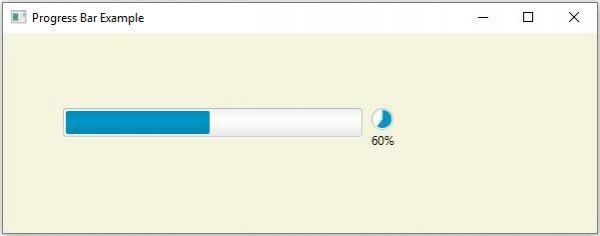

更新于:18-5-2020
866 次浏览

广告