
 数据结构
数据结构 网络
网络 RDBMS
RDBMS 操作系统
操作系统 Java
Java MS Excel
 iOS
iOS HTML
HTML CSS
CSS Android
 Python
 C 编程
C 编程 C++
C++ C#
C# MongoDB
 MySQL
MySQL Javascript
 PHP
PHP 物理学
物理学 化学
化学 生物学
生物学 数学
数学 英语
英语 经济学
经济学 心理学
心理学 社会学
社会学 时装研究
时装研究 法律研究
法律研究如何在 JavaFX 中创建 SplitPane?
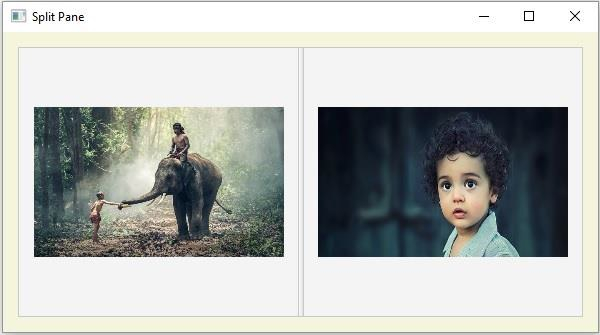
SplitPane 是一个 UI 组件,包含两个或多个面,中间有一个分隔符。此分隔符可移动;你可以使用它来减少/增加一面的区域。你可以通过实例化 javafx.scene.control.SplitPane 类来创建分割窗格。
SplitPane 的边可以水平或垂直排列。默认情况下,创建的 SplitPane 是水平的,你可以使用 setOrientation() 方法来更改其方向。
示例
以下示例演示了如何创建 SplitPane。
import java.io.FileInputStream;
import java.io.FileNotFoundException;
import javafx.application.Application;
import javafx.scene.Scene;
import javafx.scene.control.SplitPane;
import javafx.scene.image.Image;
import javafx.scene.image.ImageView;
import javafx.scene.layout.AnchorPane;
import javafx.scene.layout.StackPane;
import javafx.stage.Stage;
public class SplitPaneExample extends Application {
   public void start(Stage stage) throws FileNotFoundException {
      //Creating ImageView object1
      Image img1 = new Image(new FileInputStream("D:\images\elephant.jpg"));
      ImageView view1 = new ImageView(img1);
      view1.setFitWidth(250);
      view1.setFitHeight(150);
      //Creating ImageView object2
      Image img2 = new Image(new FileInputStream("D:\images\boy.jpg"));
      ImageView view2 = new ImageView(img2);
      view2.setFitWidth(250);
      view2.setFitHeight(150);
      //Creating a SplitPane
      SplitPane splitPane = new SplitPane();
      //Creating stack panes holding the ImageView objects
      StackPane stackPane1 = new StackPane(view1);
      StackPane stackPane2 = new StackPane(view2);
      //Adding the stackpanes to the splitpane
      splitPane.getItems().addAll(stackPane1, stackPane2);
      //Setting anchor pane as the layout
      AnchorPane pane = new AnchorPane();
      AnchorPane.setTopAnchor(splitPane, 15.0);
      AnchorPane.setRightAnchor(splitPane, 15.0);
      AnchorPane.setBottomAnchor(splitPane, 15.0);
      AnchorPane.setLeftAnchor(splitPane, 15.0);
      pane.getChildren().addAll(splitPane);
      pane.setStyle("-fx-background-color: BEIGE");
      //Setting the stage
      Scene scene = new Scene(pane, 595, 300);
      stage.setTitle("Split Pane");
      stage.setScene(scene);
      stage.show();
   }
   public static void main(String args[]){
      launch(args);
   }
}
输出

更新时间:2020 年 5 月 20 日
659 次浏览

广告