
 数据结构
数据结构 网络
网络 关系数据库管理系统
 操作系统
操作系统 Java
Java MS Excel
 iOS
iOS HTML
HTML CSS
CSS Android
 Python
 C 编程
C 编程 C++
C++ C#
C# MongoDB
 MySQL
MySQL Javascript
 PHP
PHP 物理学
物理学 化学
化学 生物学
生物学 数学
数学 英语
英语 经济学
经济学 心理学
心理学 社会学
社会学 服装设计
服装设计 法律研究
法律研究如何在 Android 中使用 Kotlin 创建分页文本?
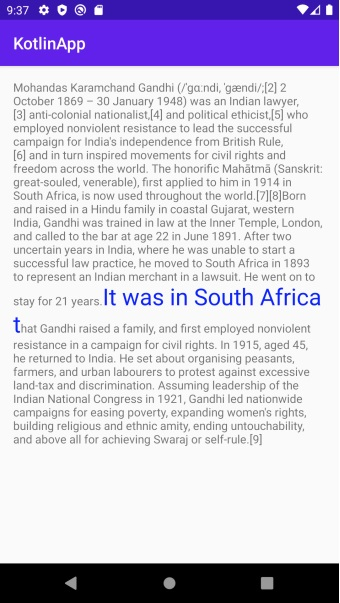
此示例演示了如何在 Android 中使用 Kotlin 创建分页文本。
步骤 1 − 在 Android Studio 中创建一个新项目,转到文件 ⇒ 新建项目,并填写所有必要信息以创建新项目。
步骤 2 − 将以下代码添加到 res/layout/activity_main.xml。
<?xml version="1.0" encoding="utf-8"?>
<RelativeLayout xmlns:android="http://schemas.android.com/apk/res/android"
   android:layout_width="match_parent"
   android:layout_height="match_parent"
   android:paddingLeft="16dp"
   android:paddingTop="16dp"
   android:paddingRight="16dp"
   android:paddingBottom="16dp">
   <LinearLayout
      android:layout_width="match_parent"
      android:layout_height="match_parent">
   <Button
      android:id="@+id/buttonBack"
      style="?android:attr/buttonBarButtonStyle"
      android:layout_width="0dp"
      android:layout_height="match_parent"
      android:layout_weight="1"
      android:background="@android:color/transparent" />
   <Button
      android:id="@+id/buttonForward"
      style="?android:attr/buttonBarButtonStyle"
      android:layout_width="0dp"
      android:layout_height="match_parent"
      android:layout_weight="1"
      android:background="@android:color/transparent" />
   </LinearLayout>
   <TextView
      android:id="@+id/tv"
      android:layout_width="match_parent"
      android:layout_height="match_parent" />
</RelativeLayout>
步骤 3 − 将以下代码添加到 src/MainActivity.kt
import android.graphics.Color
import android.graphics.Typeface
import android.os.Bundle
import android.text.Html
import android.text.Spannable
import android.text.SpannableString
import android.text.TextUtils
import android.text.style.ForegroundColorSpan
import android.text.style.RelativeSizeSpan
import android.text.style.StyleSpan
import android.view.ViewTreeObserver
import android.widget.Button
import android.widget.TextView
import androidx.appcompat.app.AppCompatActivity
class MainActivity : AppCompatActivity() {
   lateinit var buttonBack: Button
   lateinit var buttonForward: Button
   private lateinit var textView: TextView
   private var pagination: Pagination? = null
   private lateinit var charSequence: CharSequence
   private var currentIndex = 0
   override fun onCreate(savedInstanceState: Bundle?) {
      super.onCreate(savedInstanceState)
      setContentView(R.layout.activity_main)
      title = "KotlinApp"
      buttonBack = findViewById(R.id.buttonBack)
      buttonForward = findViewById(R.id.buttonForward)
      textView = findViewById(R.id.tv)
      val htmlString = Html.fromHtml(getString(R.string.html_string))
      val spanString = SpannableString(getString(R.string.long_string))
      spanString.setSpan(ForegroundColorSpan(Color.BLUE), 0, 24, Spannable.SPAN_EXCLUSIVE_EXCLUSIVE)
      spanString.setSpan(RelativeSizeSpan(2f), 0, 24, Spannable.SPAN_EXCLUSIVE_EXCLUSIVE)
      spanString.setSpan(StyleSpan(Typeface.MONOSPACE.style), 0, 24, Spannable.SPAN_EXCLUSIVE_EXCLUSIVE)
      spanString.setSpan(ForegroundColorSpan(Color.BLUE), 536, spanString.length,
Spannable.SPAN_EXCLUSIVE_EXCLUSIVE)
      spanString.setSpan(RelativeSizeSpan(2f), 536, spanString.length, Spannable.SPAN_EXCLUSIVE_EXCLUSIVE)
      spanString.setSpan(StyleSpan(Typeface.MONOSPACE.style), 536, spanString.length,
Spannable.SPAN_EXCLUSIVE_EXCLUSIVE)
      charSequence = TextUtils.concat(htmlString, spanString)
      textView.viewTreeObserver.addOnGlobalLayoutListener(object : ViewTreeObserver.OnGlobalLayoutListener {
         override fun onGlobalLayout() {
            // Removing layout listener to avoid multiple calls
            textView.viewTreeObserver.removeOnGlobalLayoutListener(this)
            pagination = Pagination(
               charSequence, textView.width,
               textView.height,
               textView.paint,
               textView.lineSpacingMultiplier,
               textView.lineSpacingExtra,
               textView.includeFontPadding
            )
            update()
         }
      })
      buttonBack.setOnClickListener {
         currentIndex = if ((currentIndex > 0)) currentIndex - 1 else 0
         update()
      }
      buttonForward.setOnClickListener {
         currentIndex = if ((currentIndex <pagination!!.size() - 1)) currentIndex + 1 else pagination!!.size() - 1
         update()
      }
   }
   private fun update() {
      val text = pagination!![currentIndex]
      if (text != null) textView.text = text
   }
}
步骤 4 − 创建一个 Kotlin 类并添加以下代码 -
import android.graphics.Color
import android.graphics.Typeface
import android.os.Bundle
import android.text.Html
import android.text.Spannable
import android.text.SpannableString
import android.text.TextUtils
import android.text.style.ForegroundColorSpan
import android.text.style.RelativeSizeSpan
import android.text.style.StyleSpan
import android.view.ViewTreeObserver
import android.widget.Button
import android.widget.TextView
import androidx.appcompat.app.AppCompatActivity
class MainActivity : AppCompatActivity() {
   lateinit var buttonBack: Button
   lateinit var buttonForward: Button
   private lateinit var textView: TextView
   private var pagination: Pagination? = null
   private lateinit var charSequence: CharSequence
   private var currentIndex = 0
   override fun onCreate(savedInstanceState: Bundle?) {
      super.onCreate(savedInstanceState)
      setContentView(R.layout.activity_main)
      title = "KotlinApp"
      buttonBack = findViewById(R.id.buttonBack)
      buttonForward = findViewById(R.id.buttonForward)
      textView = findViewById(R.id.tv)
      val htmlString = Html.fromHtml(getString(R.string.html_string))
      val spanString = SpannableString(getString(R.string.long_string))
      spanString.setSpan(ForegroundColorSpan(Color.BLUE), 0, 24, Spannable.SPAN_EXCLUSIVE_EXCLUSIVE)
      spanString.setSpan(RelativeSizeSpan(2f), 0, 24, Spannable.SPAN_EXCLUSIVE_EXCLUSIVE)
      spanString.setSpan(StyleSpan(Typeface.MONOSPACE.style), 0, 24,
Spannable.SPAN_EXCLUSIVE_EXCLUSIVE)
      spanString.setSpan(ForegroundColorSpan(Color.BLUE), 536, spanString.length,
Spannable.SPAN_EXCLUSIVE_EXCLUSIVE)
      spanString.setSpan(RelativeSizeSpan(2f), 536, spanString.length, Spannable.SPAN_EXCLUSIVE_EXCLUSIVE)
      spanString.setSpan(StyleSpan(Typeface.MONOSPACE.style), 536, spanString.length,
Spannable.SPAN_EXCLUSIVE_EXCLUSIVE)
      charSequence = TextUtils.concat(htmlString, spanString)
      textView.viewTreeObserver.addOnGlobalLayoutListener(object : ViewTreeObserver.OnGlobalLayoutListener {
         override fun onGlobalLayout() {
            // Removing layout listener to avoid multiple calls
            textView.viewTreeObserver.removeOnGlobalLayoutListener(this)
            pagination = Pagination(
               charSequence, textView.width,
               textView.height,
               textView.paint,
               textView.lineSpacingMultiplier,
               textView.lineSpacingExtra,
               textView.includeFontPadding
            )
            update()
         }
      })
      buttonBack.setOnClickListener {
         currentIndex = if ((currentIndex > 0)) currentIndex - 1 else 0
         update()
      }
      buttonForward.setOnClickListener {
         currentIndex = if ((currentIndex < pagination!!.size() - 1)) currentIndex + 1 else       pagination!!.size() - 1
         update()
      }
   }
   private fun update() {
      val text = pagination!![currentIndex]
      if (text != null) textView.text = text
   }
}
步骤 5 − 将以下代码添加到 androidManifest.xml
<?xml version="1.0" encoding="utf-8"?>
<manifest xmlns:android="http://schemas.android.com/apk/res/android"
   package="com.example.q11">
   <application
      android:allowBackup="true"
      android:icon="@mipmap/ic_launcher"
      android:label="@string/app_name"
      android:roundIcon="@mipmap/ic_launcher_round"
      android:supportsRtl="true"
      android:theme="@style/AppTheme">
      <activity android:name=".MainActivity">
         <intent-filter>
            <action android:name="android.intent.action.MAIN" />
            <category android:name="android.intent.category.LAUNCHER" />
         </intent-filter>
      </activity>
   </application>
</manifest>
让我们尝试运行您的应用程序。我假设您已将您的实际 Android 移动设备连接到您的计算机。要从 Android Studio 运行应用程序,请打开您项目中的一个活动文件,然后单击工具栏中的运行  图标。选择您的移动设备作为选项,然后检查您的移动设备,它将显示您的默认屏幕。

更新于: 2020年8月18日
276 次查看

广告