
 数据结构
数据结构 网络
网络 RDBMS
RDBMS 操作系统
操作系统 Java
Java MS Excel
 iOS
iOS HTML
HTML CSS
CSS Android
 Python
 C编程
C编程 C++
C++ C#
C# MongoDB
 MySQL
MySQL Javascript
 PHP
PHP 物理
物理 化学
化学 生物
生物 数学
数学 英语
英语 经济学
经济学 心理学
心理学 社会研究
社会研究 时装研究
时装研究 法律研究
法律研究如何使用C++在OpenCV中检测眼睛?
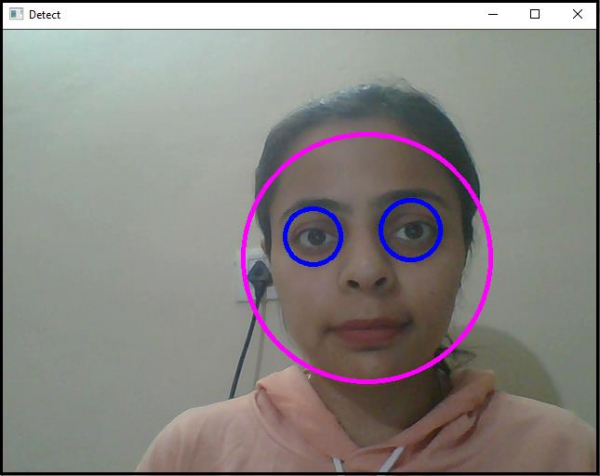
本文介绍如何在 OpenCV 中检测眼睛。我们使用位于“C:/opencv/sources/data/haarcascades”中的haarcascade_eye.xml分类器来检测眼睛。为检测眼睛,我们需要添加这些头文件。
第一个头文件是<iostream>,它是C++编程语言的头文件。在“highgui”头文件中定义了读取写入图像和用户界面功能。我们需添加“imgproc”头文件来增强图像质量,我们还使用“objdetect”头文件来检测人脸和眼睛。
以下程序演示了如何在 OpenCV 中检测和跟踪眼睛。
实例
#include<iostream>
#include<opencv2/highgui/highgui.hpp>
#include<opencv2/imgproc/imgproc.hpp>
#include<opencv2/objdetect/objdetect.hpp>
using namespace cv;
using namespace std;
int main() {
   Mat frame;//declaring a matrix to video frame in it//
   namedWindow("Detect");//Declaring a window to show our work//
   VideoCapture image(0);//capturing video from default camera//
   if (!image.isOpened()){ //Error message if video source is not found//
      cout << "Couldn't load video from the source.Make sure your camera is working properly." << endl;
      system("pause");
      return 0;
   }
   double height = image.set(CAP_PROP_FRAME_HEIGHT, 480);//setting up height of each frame//
   double width = image.set(CAP_PROP_FRAME_WIDTH, 640);//setting up width of each frame//
   CascadeClassifier face_cascade, eyes_cascade;//declaring a CascadeClassifier object//
   face_cascade.load("C:/opencv/sources/data/haarcascades/haarcascade_frontalface_alt.xml");//loading the cascade classifier//
   eyes_cascade.load("C:/opencv/sources/data/haarcascades/haarcascade_eye.xml");
   while (true) {
      bool temp = image.read(frame);//loading video frames from source to our matrix named frame//
      vector<Rect>faces;//Declaring a vector named faces//
      face_cascade.detectMultiScale(frame, faces, 1.1, 2, 0 | CASCADE_SCALE_IMAGE, Size(100, 100));//detecting the face
      for (int i = 0; i < faces.size(); i++){ //for locating the face
         Point center(faces[i].x + faces[i].width * 0.5, faces[i].y + faces[i].height * 0.5);//getting the center of the face//
         ellipse(frame, center, Size(faces[i].width * 0.5, faces[i].height * 0.5), 0, 0, 360, Scalar(255, 0, 255), 4, 8, 0);//draw an ellipse on the face//
         Mat faceROI = frame(faces[i]);//Taking area of the face as Region of Interest for eyes//
         vectoreyes;//declaring a vector named eyes//
         eyes_cascade.detectMultiScale(faceROI, eyes, 1.1, 2, 0 | CASCADE_SCALE_IMAGE, Size(5, 5));//detect eyes in every face//
         for (size_t j = 0; j < eyes.size(); j++){ //for locating eyes//
            Point center(faces[i].x + eyes[j].x + eyes[j].width * 0.5, faces[i].y + eyes[j].y + eyes[j].height * 0.5);//getting the centers of both eyes//
            int radius = cvRound((eyes[j].width + eyes[j].height) * 0.25);//declaring radius of the eye enclosing circles//
            circle(frame, center, radius, Scalar(255, 0, 0), 4, 8, 0);//drawing circle around both eyes//
         }
      }
      imshow("Detect", frame);//showing result in window named 'Detect'//
      if (waitKey(30) == 27){ //wait time for each frame is 30 milliseconds//
         break;
      }
   }
   return 0;
}
输出

更新时间:2021 年 3 月 10 日
989 次浏览

广告