
 数据结构
数据结构 网络
网络 关系型数据库管理系统
 操作系统
操作系统 Java
Java MS Excel
 iOS
iOS HTML
HTML CSS
CSS Android
 Python
 C语言编程
C语言编程 C++
C++ C#
C# MongoDB
 MySQL
MySQL Javascript
 PHP
PHP 物理学
物理学 化学
化学 生物学
生物学 数学
数学 英语
英语 经济学
经济学 心理学
心理学 社会学
社会学 时尚研究
时尚研究 法律研究
法律研究如何在Android中检测触摸及其在Google地图上的位置?
此示例演示了如何在Android中检测触摸及其在Google地图上的位置。
步骤1 - 在Android Studio中创建一个新项目,转到文件⇒新建Google地图项目,并填写所有必需的详细信息以创建新项目。
步骤2 - 将以下代码添加到res/layout/activity_main.xml。
<?xml version="1.0" encoding="utf-8"?>
<fragment xmlns:android="http://schemas.android.com/apk/res/android"
   xmlns:tools="http://schemas.android.com/tools"
   android:id="@+id/map"
   android:name="com.google.android.gms.maps.SupportMapFragment"
   android:layout_width="match_parent"
   android:layout_height="match_parent"
   tools:context=".MapsActivity" />
步骤3 - 将以下代码添加到src/MainActivity.java
import androidx.fragment.app.FragmentActivity;
import android.os.Bundle;
import android.widget.Toast;
import com.google.android.gms.maps.CameraUpdateFactory;
import com.google.android.gms.maps.GoogleMap;
import com.google.android.gms.maps.OnMapReadyCallback;
import com.google.android.gms.maps.SupportMapFragment;
import com.google.android.gms.maps.model.LatLng;
import com.google.android.gms.maps.model.MarkerOptions;
public class MapsActivity extends FragmentActivity implements
OnMapReadyCallback, GoogleMap.OnCameraMoveStartedListener,
   GoogleMap.OnCameraMoveListener,
   GoogleMap.OnCameraMoveCanceledListener,
   GoogleMap.OnCameraIdleListener {

   private GoogleMap mMap;
   @Override
   protected void onCreate(Bundle savedInstanceState) {
      super.onCreate(savedInstanceState);
      setContentView(R.layout.activity_maps);
      // Obtain the SupportMapFragment and get notified when the map is ready to be used.
      SupportMapFragment mapFragment = (SupportMapFragment)
         getSupportFragmentManager().findFragmentById(R.id.map);
      mapFragment.getMapAsync(this);
   }
   @Override
   public void onMapReady(GoogleMap googleMap) {
      mMap = googleMap;
      // Add a marker in Sydney and move the camera LatLng sydney = new LatLng(-34, 151);
      mMap.addMarker(new MarkerOptions().position(sydney).title("Marker in Sydney"));
      mMap.moveCamera(CameraUpdateFactory.newLatLng(sydney));
      mMap.setOnCameraIdleListener(this);
      mMap.setOnCameraMoveStartedListener(this);
      mMap.setOnCameraMoveListener(this);
      mMap.setOnCameraMoveCanceledListener(this);
   }
   @Override
   public void onCameraMoveStarted(int reason) {
      if (reason == GoogleMap.OnCameraMoveStartedListener.REASON_GESTURE) {
         Toast.makeText(this, "The user gestured on the map.", Toast.LENGTH_SHORT).show();
      }
      else if (reason == GoogleMap.OnCameraMoveStartedListener.REASON_API_ANIMATION) {
         Toast.makeText(this, "The user tapped something on the map.", Toast.LENGTH_SHORT).show();
      }
      else if (reason == GoogleMap.OnCameraMoveStartedListener.REASON_DEVELOPER_ANIMATION) {
         Toast.makeText(this, "The app moved the camera.", Toast.LENGTH_SHORT).show();
      }
   }
   @Override
   public void onCameraMove() {
      Toast.makeText(this, "The camera is moving.", Toast.LENGTH_SHORT).show();
   }
   @Override
   public void onCameraMoveCanceled() {
      Toast.makeText(this, "Camera movement canceled.", Toast.LENGTH_SHORT).show();
   }
   @Override
   public void onCameraIdle() {
      Toast.makeText(this, "The camera has stopped moving.", Toast.LENGTH_SHORT).show();
   }
}
步骤4 - 在google_maps_api.xml中添加ma密钥
<resources>
   <string name="google_maps_key" templateMergeStrategy="preserve" translatable="false">YOUR MAP KEY</string>
</resources>
步骤5 - 将以下代码添加到androidManifest.xml
<?xml version="1.0" encoding="utf-8"?>
<manifest xmlns:android="http://schemas.android.com/apk/res/android" package="app.com.myapplication">
   <application
      android:allowBackup="true"
      android:icon="@mipmap/ic_launcher"
      android:label="@string/app_name"
      android:roundIcon="@mipmap/ic_launcher_round"
      android:supportsRtl="true"
      android:theme="@style/AppTheme">
      <activity
         android:name=".MapsActivity"
         android:label="@string/title_activity_maps">
         <intent-filter>
            <action android:name="android.intent.action.MAIN" />
            <category android:name="android.intent.category.LAUNCHER" />
         </intent-filter>
      </activity>
      <meta-data
         android:name="com.google.android.geo.API_KEY"
         android:value="@string/google_maps_key" />
   </application>
   <uses-permission android:name="android.permission.ACCESS_FINE_LOCATION" />
</manifest>
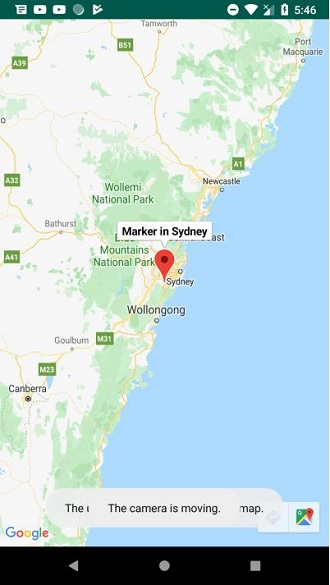
让我们尝试运行您的应用程序。我假设您已将您的实际Android移动设备连接到您的计算机。要从Android Studio运行应用程序,请打开您的项目之一的活动文件,然后单击运行 工具栏中的图标。选择您的移动设备作为选项,然后检查您的移动设备,它将显示您的默认屏幕 -
点击这里下载项目代码。

更新于: 2019年11月22日
687 次浏览

广告