
 数据结构
数据结构 网络
网络 关系数据库管理系统 (RDBMS)
 操作系统
操作系统 Java
Java MS Excel
 iOS
iOS HTML
HTML CSS
CSS Android
 Python
 C语言编程
C语言编程 C++
C++ C#
C# MongoDB
 MySQL
MySQL Javascript
 PHP
PHP 物理学
物理学 化学
化学 生物学
生物学 数学
数学 英语
英语 经济学
经济学 心理学
心理学 社会学
社会学 时尚研究
时尚研究 法律研究
法律研究如何在Tkinter列表框中直接修改特定项目?
Tkinter是一个基于Python的GUI应用程序开发库,通常用于构建有用的功能性桌面应用程序。Listbox小部件是另一个Tkinter小部件,用作容器,以列表框的形式显示项目列表。
要在Listbox小部件中定义项目列表,需要创建一个**Listbox(root, width, height, **options)**构造函数。您可以插入任意数量的项目以在列表框中显示。
假设您想修改Tkinter Listbox中的特定项目,您可以先创建一个按钮来选择要修改的列表中的项目,然后调用**delete()**方法删除其中的任何现有值。删除值后,您可以将新项目**insert()**到列表框中。让我们来看一个例子来了解它是如何工作的。
示例
# Import the required libraries
from tkinter import *
from tkinter import ttk

# Create an instance of tkinter frame or window
win = Tk()

# Set the size of the window
win.geometry("700x350")

# Create a Listbox widget
lb = Listbox(win, width=100, height=10, background="purple3", foreground="white", font=('Times 13'), selectbackground="white")

lb.pack()

# Select the list item and delete the item first
# Once the list item is deleted,
# we can insert a new item in the listbox
def edit_current():
   for item in lb.curselection():
      lb.delete(item)
      lb.insert("end", "foo")

# Add items in the Listbox
lb.insert("end", "item1", "item2", "item3", "item4", "item5")

# Add a Button To Edit and Delete the Listbox Item
ttk.Button(win, text="Edit", command=edit_current).pack()

win.mainloop()
在这个例子中,我们使用Listbox小部件创建了一个项目列表。我们创建了一个名为“编辑”的按钮,它基本上修改了所选列表项目的现有值。使用此方法,您可以替换/修改Listbox小部件中列表中任何项目的 value。
输出
执行后,它将生成以下输出窗口:
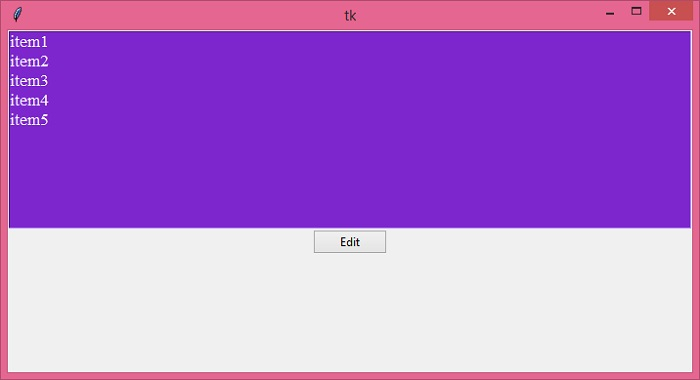
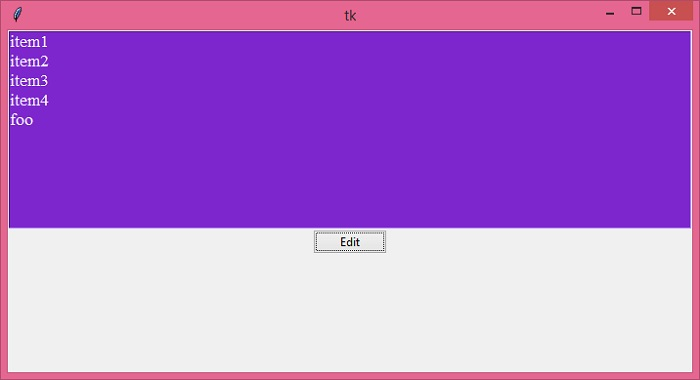
现在,从列表中选择一个项目并单击“编辑”按钮。假设您选择“item5”并单击“编辑”,则该特定条目将被“foo”替换。

更新于:2021年12月22日
浏览量 1K+

广告