
 数据结构
数据结构 网络
网络 关系数据库管理系统 (RDBMS)
 操作系统
操作系统 Java
Java MS Excel
 iOS
iOS HTML
HTML CSS
CSS Android
 Python
 C语言编程
C语言编程 C++
C++ C#
C# MongoDB
 MySQL
MySQL Javascript
 PHP
PHP 物理学
物理学 化学
化学 生物学
生物学 数学
数学 英语
英语 经济学
经济学 心理学
心理学 社会学
社会学 时尚研究
时尚研究 法学研究
法学研究如何使用Tkinter从列表输入生成列表框?
Tkinter是一个强大的库,用于在Python中创建图形用户界面(GUI)。其重要组成部分之一是Listbox小部件,它允许用户显示项目列表。虽然使用静态数据填充Listbox很简单,但从列表输入动态生成它提供了更灵活和可扩展的解决方案。在本教程中,我们将探讨如何允许Tkinter从列表输入生成Listbox。
理解Tkinter Listbox
在深入研究动态Listbox生成之前,了解Tkinter Listbox的基本结构至关重要。Listbox是一个小部件,它在一个可滚动的框中显示项目列表。列表中的每个项目都分配一个索引,从0开始。您可以与Listbox交互,根据其索引选择和操作这些项目。
静态Listbox填充
让我们从创建一个带有静态Listbox的简单Tkinter应用程序开始。
示例
import tkinter as tk

# Create the main Tkinter window
root = tk.Tk()
root.title("Static Listbox Example")
root.geometry("720x250")

# Sample list data
items = ["Python", "Java", "Javascript", "Artificial Intelligence", "Tutorialspoint.com"]

# Creating a Listbox and populating it with static data
listbox = tk.Listbox(root)
for item in items:
   listbox.insert(tk.END, item)

# Pack the Listbox to make it visible
listbox.pack()

# Run the Tkinter main loop
root.mainloop()
输出
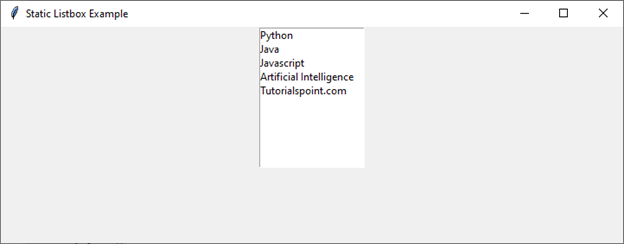
这段代码创建了一个基本Tkinter窗口,其中包含一个包含静态项目的Listbox。
现在,让我们继续从列表输入动态生成Listbox。
动态Listbox生成
要从列表输入动态生成Listbox,我们需要创建一个可重用的函数,该函数接受一个列表并相应地创建Listbox。我们还将包括其他功能,例如滚动条,以实现更好的导航。
示例
import tkinter as tk

# Defining the generate_listbox() function
def generate_listbox(root, items):
   listbox = tk.Listbox(root)
   for item in items:
      listbox.insert(tk.END, item)
   return listbox

# Defining the main function
def main():
   root = tk.Tk()
   root.title("Dynamic Listbox Example")
   root.geometry("720x250")

   # Sample list data
   dynamic_items = ["Python", "Java", "Javascript", "Artificial Intelligence", "Tutorialspoint.com"]

   # Generating a dynamic Listbox
   dynamic_listbox = generate_listbox(root, dynamic_items)
   dynamic_listbox.pack()
   # Run the Tkinter main loop
   root.mainloop()

if __name__ == "__main__":
   main()
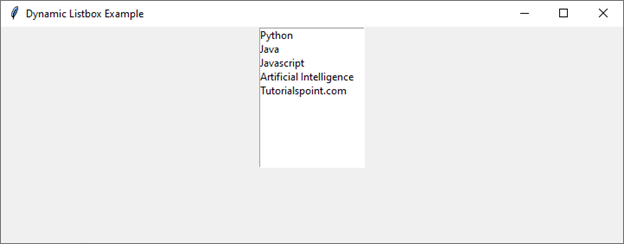
在这个例子中,`generate_listbox`函数接受Tkinter根窗口和项目列表作为参数。它创建一个Listbox,用给定的项目填充它,并返回Listbox小部件。然后,主函数使用此函数生成动态Listbox并在Tkinter窗口中显示它。
输出
运行代码后,您将获得以下输出窗口:
增强功能:添加滚动条
为了改善用户体验,尤其是在处理长列表时,向Listbox添加滚动条至关重要。让我们修改`generate_listbox`函数以包含垂直和水平滚动条。
示例
import tkinter as tk

# Defining the generate_listbox() function
def generate_listbox(root, items):
   frame = tk.Frame(root)

   scrollbar_y = tk.Scrollbar(frame, orient=tk.VERTICAL)
   scrollbar_x = tk.Scrollbar(frame, orient=tk.HORIZONTAL)

   listbox = tk.Listbox(frame, yscrollcommand=scrollbar_y.set, xscrollcommand=scrollbar_x.set)

   for item in items:
      listbox.insert(tk.END, item)

   scrollbar_y.config(command=listbox.yview)
   scrollbar_x.config(command=listbox.xview)

   scrollbar_y.pack(side=tk.RIGHT, fill=tk.Y)
   scrollbar_x.pack(side=tk.BOTTOM, fill=tk.X)
   listbox.pack(side=tk.LEFT, fill=tk.BOTH, expand=True)
   return frame

# Defining the main function
def main():
   root = tk.Tk()
   root.title("Dynamic Listbox with Scrollbars")
   root.geometry("720x250")

   # Sample list data
   dynamic_items = ["Python", "Java", "Javascript", "Artificial Intelligence", "Tutorialspoint.com"] * 10

   # Generating a dynamic Listbox with scrollbars
   dynamic_listbox = generate_listbox(root, dynamic_items)
   dynamic_listbox.pack(fill=tk.BOTH, expand=True)

   # Run the Tkinter main loop
   root.mainloop()

if __name__ == "__main__":
   main()
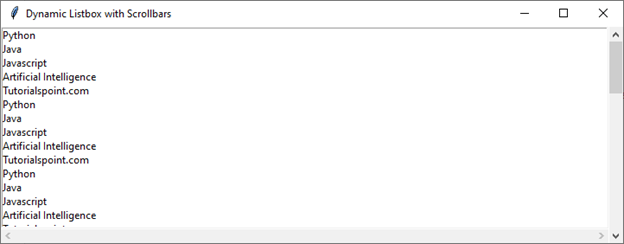
在这个增强版本中,我们将Listbox和滚动条封装在一个框架中。`yscrollcommand`和`xscrollcommand`参数用于将滚动条链接到Listbox,`config`方法用于建立此连接。然后,滚动条将位于Listbox的右侧(对于垂直滚动条)和底部(对于水平滚动条)。
输出
运行代码后,您将获得以下输出窗口:
结论
通过引入可重用的函数,我们能够创建动态Listbox,无缝地适应变化的数据需求。加入滚动条进一步完善了用户体验,尤其是在处理大量列表时。

浏览量:329
