
 数据结构
数据结构 网络
网络 关系型数据库管理系统
 操作系统
操作系统 Java
Java MS Excel
 iOS
iOS HTML
HTML CSS
CSS 安卓
安卓 Python
 C 编程
C 编程 C++
C++ C#
C# MongoDB
 MySQL
MySQL JavaScript
 PHP
PHP 物理学
物理学 化学
化学 生物学
生物学 数学
数学 英语
英语 经济学
经济学 心理学
心理学 社会学
社会学 时尚研究
时尚研究 法律研究
法律研究即使不必要,始终显示垂直和水平滚动条的方法
即使不必要,始终显示垂直和水平滚动条,可使用 JScrollBar 中的下列常量来实现 −
scrollPane.setHorizontalScrollBarPolicy(JScrollPane.HORIZONTAL_SCROLLBAR_ALWAYS);
scrollPane.setVerticalScrollBarPolicy(JScrollPane.VERTICAL_SCROLLBAR_ALWAYS);
以下是一个示例,即使不必要,始终显示垂直和水平滚动条 −
示例
package my;
import java.awt.BorderLayout;
import java.awt.Dimension;
import javax.swing.Box;
import javax.swing.JButton;
import javax.swing.JFrame;
import javax.swing.JScrollPane;
public class SwingDemo {
   public static void main(String args[]) {
      JFrame frame = new JFrame("Demo");
      frame.setDefaultCloseOperation(JFrame.EXIT_ON_CLOSE);
      JButton button1 = new JButton("Questions and Answers");
      JButton button2 = new JButton("Videos");
      JButton button3 = new JButton("Tools");
      JButton button4 = new JButton("Tutorials");
      JButton button5 = new JButton("Online Compiler");
      JButton button6 = new JButton("Quiz");
      Box box = Box.createVerticalBox();
      box.setPreferredSize(new Dimension(900,900));
      box.add(button1);
      box.add(button2);
      box.add(button3);
      box.add(button4);
      box.add(button5);
      box.add(button6);
      JScrollPane scrollPane = new JScrollPane();
      scrollPane.setViewportView(box);
      scrollPane.setHorizontalScrollBarPolicy(JScrollPane.HORIZONTAL_SCROLLBAR_ALWAYS);
      scrollPane.setVerticalScrollBarPolicy(JScrollPane.VERTICAL_SCROLLBAR_ALWAYS);
      frame.add(scrollPane, BorderLayout.CENTER);
      frame.setSize(550, 250);
      frame.setVisible(true);
   }
}
输出
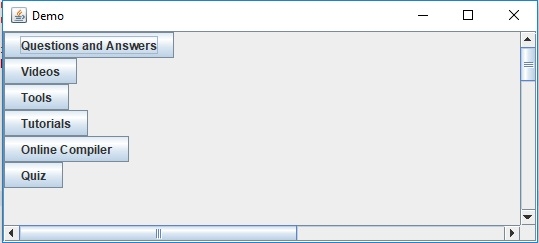

更新于: 30-Jul-2019
82 次浏览

广告