
 数据结构
数据结构 网络
网络 关系数据库管理系统 (RDBMS)
 操作系统
操作系统 Java
Java MS Excel
 iOS
iOS HTML
HTML CSS
CSS Android
 Python
 C语言编程
C语言编程 C++
C++ C#
C# MongoDB
 MySQL
MySQL Javascript
 PHP
PHP 物理学
物理学 化学
化学 生物学
生物学 数学
数学 英语
英语 经济学
经济学 心理学
心理学 社会学
社会学 服装学
服装学 法学
法学如何在Pandas数据框中将列名转换为小写?
本文将介绍如何在Pandas数据框中将列名转换为小写。通过三个不同的例子,讲解了将数据框列转换为小写的方法。这些例子都使用了Kaggle上提供的Zomato数据集。Kaggle数据集以CSV(逗号分隔值)格式提供,因此首先下载该文件,然后使用pandas将其转换为数据框。
在第一个例子中,Python程序使用`str.lower()`函数将列值转换为小写。在第二个例子中,使用`map(str.lower)`函数将数据框列转换为小写。第三个例子分为两部分。首先,介绍了使用`apply(lambda x: x.lower())`函数将列内容转换为小写的方法,然后介绍了使用`map(str.lower, dataframe.columns)`函数将列标题转换为小写的方法。
保存数据分析所需的数据文件/csv文件
在这些例子中,我们将使用Kaggle上提供的数据。登录Kaggle并从此链接下载csv文件https://www.kaggle.com/datasets/shrutimehta/zomato-restaurants-data
数据集以CSV文件形式提供。
使用的Zomato.CSV文件
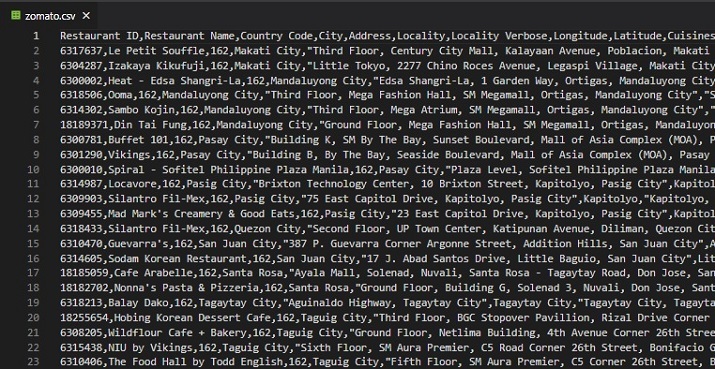
图:此csv文件包含9551行和21列。
示例1:使用`str.lower()`函数在数据框列上将内容转换为小写
设计步骤和代码
步骤1 − 首先导入pandas。现在读取zomato.csv文件,因为这里给出的数据集将用于将其加载到数据框中。
步骤2 − 创建一个名为dff1的数据框,并使用pandas中的`read_table`函数读取CSV文件。现在类似地创建另一个名为dff2的数据框,但是使用餐厅名称作为索引列。
步骤3 − 为这些使用`delimiter=','`和zomato.csv的路径。使用`head`函数打印此数据框中的一些行和列。
步骤4 − 从dff2中选择一些需要转换为小写的列。这个新的数据框是dff3。在dff3的一列上应用`str.lower()`,并将其转换为小写。
步骤5 − 运行程序并检查结果。
在python文件中编写以下代码
import pandas as pdd
dff1 = pdd.read_table("C:/Users/saba2/Desktop/article/articles_py/tsv/zomato.csv",delimiter=',', encoding='utf-8')
print("\n The complete dataset: ")
print(dff1.head())

dff2 = pdd.read_table('C:/Users/saba2/Desktop/article/articles_py/tsv/zomato.csv', delimiter=',',encoding='utf-8',index_col=1)
#print(" \nThe complete dataset with specified index : ")
#print(dff2.head())
dff3=dff2[["Rating color", "Rating text"]]
print("\nPrinting Shape for Rating color and Rating text of Restaurants : ")
print(dff3.shape)
print("\nPrinting Rating color and Rating text of Restaurants : ")
print(dff3.head())

print("\nConverting Rating color Column in lowercase : ")
print(dff3['Rating color'].str.lower())
输出
在命令窗口中运行python文件
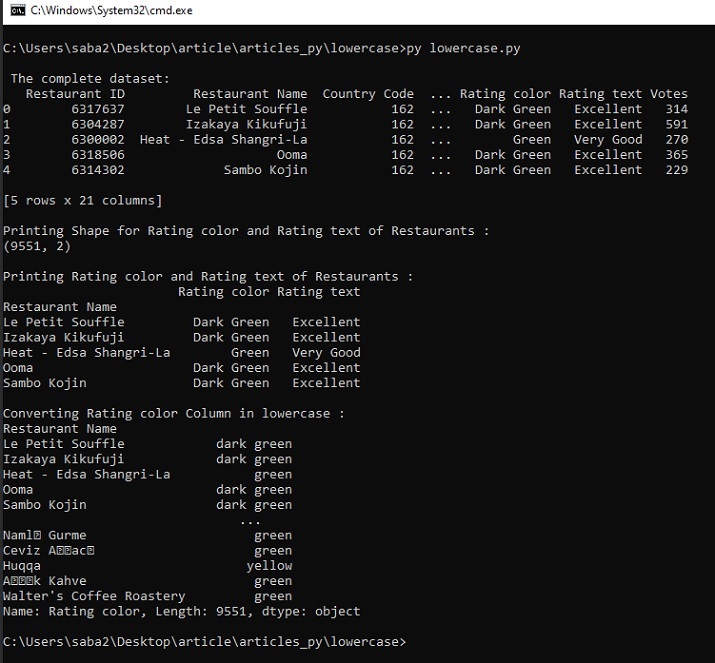
图1:使用cmd窗口显示结果。
示例2:使用`map(str.lower)`函数在数据框列上将内容转换为小写
设计步骤和代码
步骤1 − 首先导入pandas。现在读取zomato.csv文件,因为这里给出的数据集将用于将其加载到数据框中。
步骤2 − 创建一个名为dff2的数据框,并使用pandas中的`read_csv`函数读取CSV文件。只需使用`usecols`选择两列,“餐厅名称”和“评分文本”。
步骤3 − 为这些使用`delimiter=','`和zomato.csv的路径。使用`head`函数打印此数据框中的一些行和列。
步骤4 − 在dff2的一列上应用`map(str.lower)`,并将其转换为小写。
步骤5 − 运行程序并检查结果。
在python文件中编写以下代码
import pandas as pdd

dff2 = pdd.read_csv('C:/Users/saba2/Desktop/article/articles_py/tsv/zomato.csv', sep=',',usecols=['Restaurant Name', 'Rating text'])

print("\nPrinting Restaurant Name and Rating text of Restaurants : ")
print(dff2.head())

print("\nPrinting Shape of the dataframe : ")
print(dff2.shape)

print("\nConverting Rating text Column in lowercase : ")
dff2["Lowercase Rating text"]= dff2['Rating text'].map(str.lower)

print("\nPrinting Shape of the dataframe after adding the Lowercase Rating text column : ")
print(dff2.shape)
print("\nPrinting the new added column with lowercase values : ")
print(dff2.head())
输出
在命令窗口中运行python文件
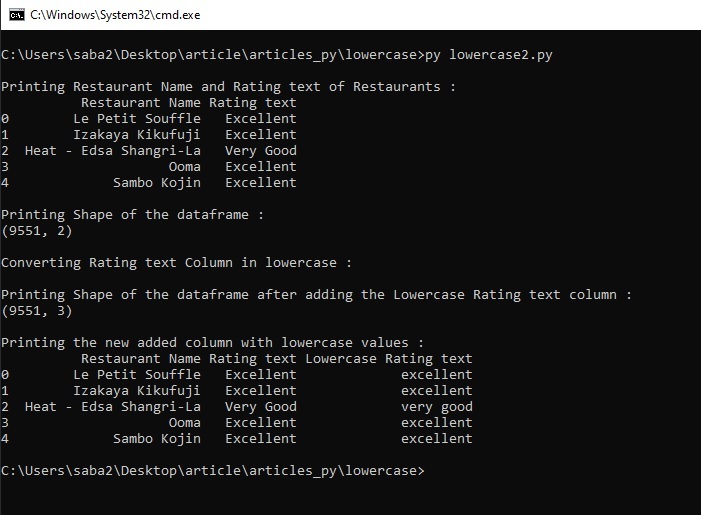
图2:使用cmd窗口显示结果。
示例3:将列标题和内容更改为小写
设计步骤和代码
步骤1 − 首先导入pandas。现在读取zomato.csv文件,因为这里给出的数据集将用于将其加载到数据框中。
步骤2 − 创建一个名为dff2的数据框,并使用pandas中的`read_csv`函数读取CSV文件。使用`usecols`选择三列,“餐厅名称”、“评分文本”和“评分颜色”。
步骤3 − 为这些使用`delimiter=','`和zomato.csv的路径。使用`head`函数打印此数据框中的一些行和列。
步骤4 − 在dff2的“评分文本”上使用`apply(lambda x: x.lower())`将其转换为小写。将这个小写列添加到数据框。
步骤5 − 现在对“评分颜色”列使用步骤4。
步骤6 − 在数据框列上应用`map(str.lower, dataframe.columns)`函数,将列标题转换为小写。
步骤7 − 运行程序并检查结果。
在python文件中编写以下代码
import pandas as pdd

dff2 = pdd.read_csv('C:/Users/saba2/Desktop/article/articles_py/tsv/zomato.csv', sep=',',usecols=['Restaurant Name', 'Rating color', 'Rating text'])

print("\nPrinting Restaurant Name, Rating Color and Rating text of Restaurants : ")
print(dff2.head())

print("\nPrinting Shape of the dataframe : ")
print(dff2.shape)

print("\nConverting Rating text Column in lowercase")
dff2["Lowercase Rating text"]= dff2['Rating text'].apply(lambda x: x.lower())
print("\nPrinting Shape of the dataframe after adding the Lowercase Rating text column : ")
print(dff2.shape)

print("\nConverting Rating color Column in lowercase")
dff2["Lowercase Rating color"]= dff2['Rating color'].apply(lambda x: x.lower())
print("\nPrinting Shape of the dataframe after adding the Lowercase Rating color column : ")
print(dff2.shape)

print("\nPrinting the new added columns with lowercase values : ")
print(dff2.head())

print("\nConverting the Column Headers in lowercase")
dff2.columns = map(str.lower, dff2.columns)
print("\nPrinting the columns Headers in lowercase now: ")
print(dff2)
输出
在命令窗口中运行Python文件。
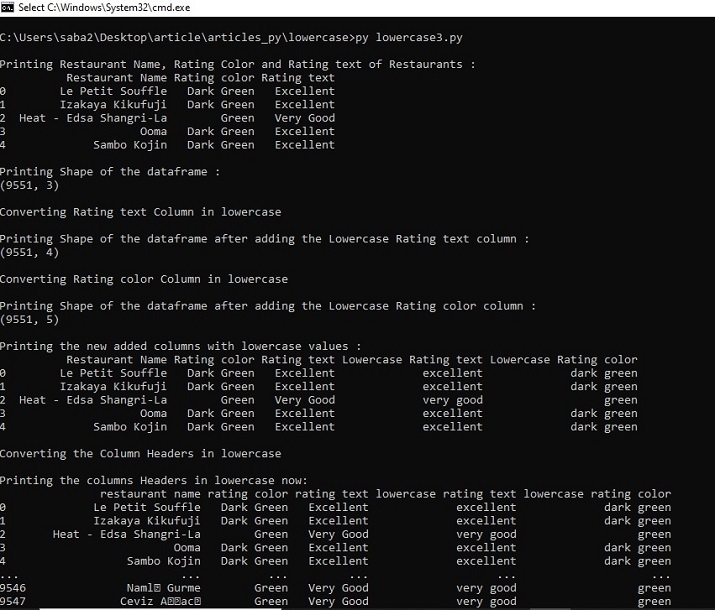
图3:使用cmd窗口显示结果
结论
在这篇Python和Pandas文章中,我们使用三个不同的例子来演示如何将数据框列的值转换为小写。在所有三个例子中都使用了不同的函数。在第三个例子中,还介绍了将列标题更改为小写的方法。

5000+ 次浏览
