
 数据结构
数据结构 网络
网络 关系型数据库管理系统
 操作系统
操作系统 Java
Java MS Excel
 iOS
iOS HTML
HTML CSS
CSS Android
 Python
 C 编程
C 编程 C++
C++ C#
C# MongoDB
 MySQL
MySQL Javascript
 PHP
PHP 物理学
物理学 化学
化学 生物学
生物学 数学
数学 英语
英语 经济学
经济学 心理学
心理学 社会学
社会学 服装设计
服装设计 法律研究
法律研究如何在 Python 中绘制图形?
可以使用 Matplotlib 库在 Python 中绘制图形。 Matplotlib 库 主要用于图形绘制。
在使用 Matplotlib 绘制图形之前,您需要安装 matplotlib。Matplotlib 用于绘制简单的线条、条形图、直方图和饼图。Matplotlib 库中提供了绘制各种图形的内置函数。
在图形中绘制一条线
我们将使用 matplotlib 在图形中绘制一条简单的线。绘制线条涉及以下步骤。
导入 matplotlib
指定线的 x 坐标和 y 坐标
使用特定函数(使用 .plot() 函数)绘制指定的点
使用 .xlabel() 和 .ylabel() 函数命名 x 轴和 y 轴
使用 .title() 函数为图形添加标题(可选)
使用 .show() 函数显示图形
这些是在使用 matplotlib 绘制线条时涉及的简单步骤。
示例
import matplotlib.pyplot as plt

x=[1,3,5,7]
y=[2,4,6,1]
plt.plot(x,y)
plt.xlabel('X-axis')
plt.ylabel('Y-axis')
plt.title("A simple line graph")
plt.show()
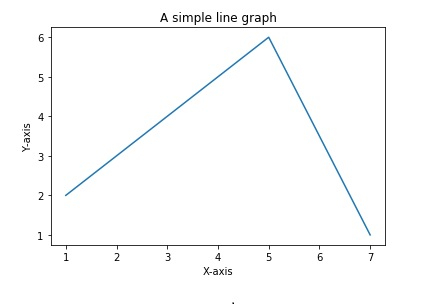
以上代码绘制了点 (1,2)、(3,4)、(5,6)、(7,1) 并用线连接这些点,显示为图形。
输出
绘制条形图
条形图是以不同高度的矩形在 x 轴上的特定位置表示数据的方式。
绘制条形图涉及以下步骤:
导入 matplotlib
指定矩形左下角所在的 x 坐标。
指定条形或矩形的高度。
指定条形的标签
使用 .bar() 函数绘制条形图
为 x 轴和 y 轴添加标签
为图形添加标题
使用 .show() 函数显示图形。
示例
import matplotlib.pyplot as plt

left_coordinates=[1,2,3,4,5]
heights=[10,20,30,15,40]
bar_labels=['One','Two','Three','Four','Five']
plt.bar(left_coordinates,heights,tick_label=bar_labels,width=0.6,color=['re
d','black'])
plt.xlabel('X-axis')
plt.ylabel('Y-axis')
plt.title("A simple bar graph")
plt.show()
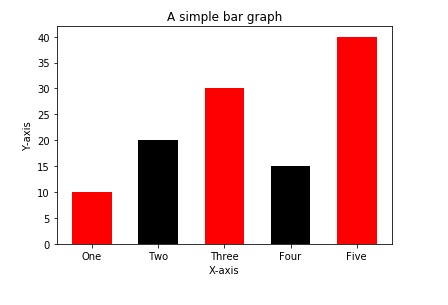
plt.bar() 中的 width 参数指定每个条形的宽度。颜色列表指定条形的颜色。
输出

更新于: 2023-08-23
59K+ 浏览量

广告