
 数据结构
数据结构 网络
网络 关系型数据库管理系统
 操作系统
操作系统 Java
Java MS Excel
 iOS
iOS HTML
HTML CSS
CSS Android
 Python
 C 编程
C 编程 C++
C++ C#
C# MongoDB
 MySQL
MySQL Javascript
 PHP
PHP 物理
物理 化学
化学 生物
生物 数学
数学 英语
英语 经济学
经济学 心理学
心理学 社会学
社会学 时尚研究
时尚研究 法律研究
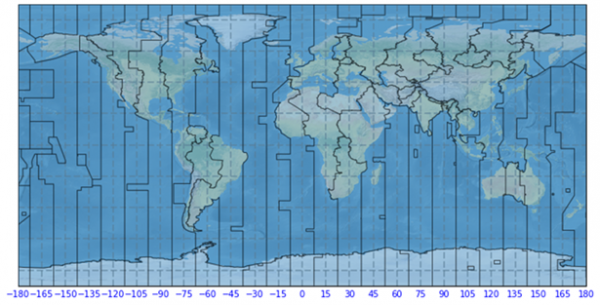
法律研究如何在 Matplotlib 中的地图上绘制时区
让我们考虑一下必须处理实际时间的数据。为了在地图上绘制时区,我们可以在 Python 中使用“cartopy”或“metPy”包。但是,我们可以使用命令在 Anaconda 环境中安装“cartopy”包:
conda install -c conda-forge cartopy
或者
conda install -c conda-forge metpy
现在,让我们看看如何使用 Matplotlib 在地图中绘制时区。
示例
import numpy as np
import cartopy.crs as ccrs
import matplotlib.animation as animation
import matplotlib.pyplot as plt

#Defining the plot size and axes
plt.figure(figsize=(10, 9))
ax = plt.axes(projection=ccrs.PlateCarree())

#Apply the color for the natural Earth sourced from cartopy package
ax.stock_img()
ax.coastlines(zorder=1)

#Reading the timezone using ShapelyFeature of Cartopy
shape_feature = ShapelyFeature(Reader('ne_10m_time_zones.shp').geometries(),
   ccrs.PlateCarree(), edgecolor='black')

# Plot the feature on the map
ax.add_feature(shape_feature, alpha=0.4, zorder=5, lw=1)
gl = ax.gridlines(crs=ccrs.PlateCarree(), draw_labels=True,
   linewidth=2, color='gray', alpha=0.5, linestyle='--')

#Apply the gridlines to separate the timezones
gl = ax.gridlines(crs=ccrs.PlateCarree(), draw_labels=True,
   linewidth=2, color='black', alpha=0.5, linestyle='--')

#Turn off all the axes excluding bottom
gl.xlabels_top = False
gl.ylabels_left = False
gl.ylabels_right = False

#Apply fixed locations with the tickable objects
gl.xlocator = mticker.FixedLocator(np.linspace(-180, 180, 25))
gl.xlabel_style = {'size': 10, 'color': 'blue'}
ax.set_title('Global Time Zones', size=15, color='g')

#Display the plots
plt.show()
输出
运行以上代码片段将生成输出,如下所示:

更新于: 2021 年 2 月 23 日
340 次浏览

广告