
 数据结构
数据结构 网络
网络 关系数据库管理系统 (RDBMS)
 操作系统
操作系统 Java
Java MS Excel
 iOS
iOS HTML
HTML CSS
CSS Android
 Python
 C语言编程
C语言编程 C++
C++ C#
C# MongoDB
 MySQL
MySQL Javascript
 PHP
PHP 物理学
物理学 化学
化学 生物学
生物学 数学
数学 英语
英语 经济学
经济学 心理学
心理学 社会学
社会学 服装设计
服装设计 法学
法学如何在Python中将HTML表格数据保存到CSV
问题
对于数据科学家来说,收集数据是最具挑战性的任务之一。事实上,网络上有很多数据可用,只是需要通过自动化来提取这些数据。
简介…
我想从https://tutorialspoint.com/python/python_basic_operators.htm中提取嵌入在HTML表格中的基本操作数据。
嗯,数据分散在许多HTML表格中,如果只有一个HTML表格,我显然可以使用复制粘贴到.csv文件。
但是,如果一个页面中有超过5个表格,那显然很痛苦。不是吗?
怎么做…
1. 如果你想创建一个csv文件,我会快速向你展示如何轻松地创建一个csv文件。
import csv
# Open File in Write mode , if not found it will create one
File = open('test.csv', 'w+')
Data = csv.writer(File)

# My Header
Data.writerow(('Column1', 'Column2', 'Column3'))

# Write data
for i in range(20):
Data.writerow((i, i+1, i+2))

# close my file
File.close()
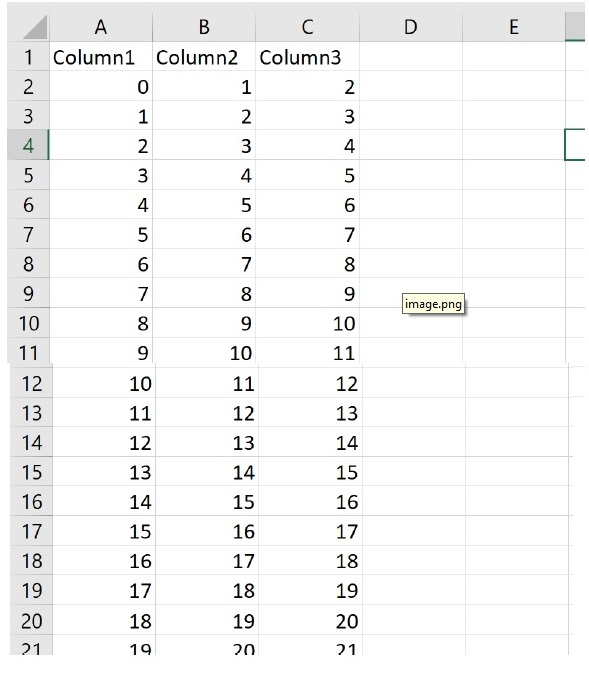
输出
执行上述代码后,将在与代码相同的目录中生成一个test.csv文件。
2. 现在让我们从https://tutorialspoint.com/python/python_dictionary.htm检索HTML表格并将其写入CSV文件。
第一步是导入。
import csv
from urllib.request import urlopen
from bs4 import BeautifulSoup
url = 'https://tutorialspoint.com/python/python_dictionary.htm'
打开HTML文件,并使用urlopen将其存储在html对象中。
输出
html = urlopen(url)
soup = BeautifulSoup(html, 'html.parser')
查找html表格内的表格,让我们提取表格数据。为了演示,我将只提取第一个表格[0]。
输出
table = soup.find_all('table')[0]
rows = table.find_all('tr')
输出
print(rows)
输出
[<tr>
<th style='text-align:center;width:5%'>Sr.No.</th>
<th style='text-align:center;width:95%'>Function with Description</th>
</tr>,
<tr>
<td class='ts'>1</td>
<td><a href='/python/dictionary_cmp.htm'>cmp(dict1, dict2)</a>
<p>Compares elements of both dict.</p></td>
</tr>, <tr>
<td class='ts'>2</td>
<td><a href='/python/dictionary_len.htm'>len(dict)</a>
<p>Gives the total length of the dictionary. This would be equal to the number of items in the dictionary.</p></td>
</tr>,
<tr>
<td class='ts'>3</td>
<td><a href='/python/dictionary_str.htm'>str(dict)</a>
<p>Produces a printable string representation of a dictionary</p></td>
</tr>,
<tr>
<td class='ts'>4</td>
<td><a href='/python/dictionary_type.htm'>type(variable)</a>
<p>Returns the type of the passed variable. If passed variable is dictionary, then it would return a dictionary type.</p></td>
</tr>]
5. 现在我们将数据写入csv文件。
示例
File = open('my_html_data_to_csv.csv', 'wt+')
Data = csv.writer(File)
try:
for row in rows:
FilteredRow = []
for cell in row.find_all(['td', 'th']):
FilteredRow.append(cell.get_text())
Data.writerow(FilteredRow)
finally:
File.close()
6. 结果现在已保存到my_html_data_to_csv.csv文件中。
示例
我们将把上面解释的所有内容放在一起。
示例
import csv
from urllib.request import urlopen
from bs4 import BeautifulSoup

# set the url..
url = 'https://tutorialspoint.com/python/python_basic_syntax.htm'

# Open the url and parse the html
html = urlopen(url)
soup = BeautifulSoup(html, 'html.parser')

# extract the first table
table = soup.find_all('table')[0]
rows = table.find_all('tr')

# write the content to the file
File = open('my_html_data_to_csv.csv', 'wt+')
Data = csv.writer(File)
try:
for row in rows:
FilteredRow = []
for cell in row.find_all(['td', 'th']):
FilteredRow.append(cell.get_text())
Data.writerow(FilteredRow)
finally:
File.close()
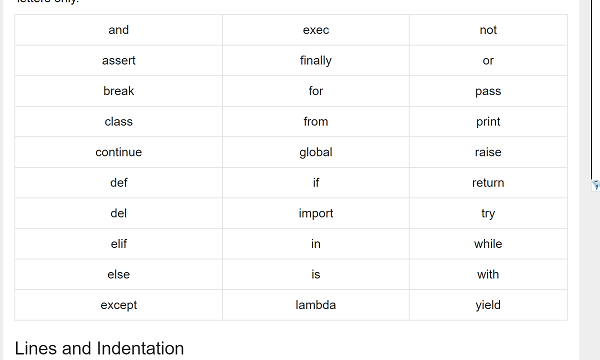
html页面中的表格。

更新于: 2020年11月10日
2K+ 次浏览

广告