
 数据结构
数据结构 网络
网络 RDBMS
RDBMS 操作系统
操作系统 Java
Java MS Excel
 iOS
iOS HTML
HTML CSS
CSS Android
 Python
 C 编程
C 编程 C++
C++ C#
C# MongoDB
 MySQL
MySQL Javascript
 PHP
PHP 物理
物理 化学
化学 生物
生物 数学
数学 英语
英语 经济学
经济学 心理学
心理学 社会学
社会学 时尚学
时尚学 法律学
法律学如何使用 selenium 为 web 元素的“value”赋值?
我们可以使用 Selenium webdriver 来为输入 web 元素赋值。我们可以借助 sendKeys 方法来向输入字段输入文本。要输入的值作为参数传递给该方法。
语法
driver.findElement(By.id("txtSearchText")).sendKeys("Selenium");我们还可以使用 Selenium 中的 Javascript 执行器来执行输入编辑框文本之类的 web 操作。我们将使用 executeScript 方法,并将 参数 index.value='<要输入的值>' 和 webelement 作为参数传递给该方法。
语法
WebElement i = driver.findElement(By.id("id"));
JavascriptExecutor j = (JavascriptExecutor)driver;
j.executeScript("arguments[0].value='Selenium';", i);
示例
代码实现
import org.openqa.selenium.WebDriver;
import org.openqa.selenium.chrome.ChromeDriver;
import org.openqa.selenium.WebElement;
import org.openqa.selenium.By;
import java.util.concurrent.TimeUnit;
public class SetValue{
   public static void main(String[] args) {
      System.setProperty("webdriver.chrome.driver", "C:\Users\ghs6kor\Desktop\Java\chromedriver.exe");
      WebDriver driver = new ChromeDriver();
      driver.manage().timeouts().implicitlyWait(5, TimeUnit.SECONDS);
      driver.get("https://tutorialspoint.com/about/about_careers.htm");
      // identify element
      WebElement l=driver.findElement(By.cssSelector("input[id*='id']"));
      l.sendKeys("Selenium");
      // obtain the value entered with getAttribute method
      System.out.println("Value entered is: " +l.getAttribute("value"));
      driver.close();
   }
}
示例
使用 Javascript 执行器的代码实现。
import org.openqa.selenium.WebDriver;
import org.openqa.selenium.chrome.ChromeDriver;
import org.openqa.selenium.WebElement;
import org.openqa.selenium.By;
import java.util.concurrent.TimeUnit;
import org.openqa.selenium.JavascriptExecutor;
public class SetValueJS{
   public static void main(String[] args) {
      System.setProperty("webdriver.chrome.driver", "C:\Users\ghs6kor\Desktop\Java\chromedriver.exe");
      WebDriver driver = new ChromeDriver();
      driver.manage().timeouts().implicitlyWait(5, TimeUnit.SECONDS);
      driver.get("https://tutorialspoint.com/about/about_careers.htm");
      // identify element
      WebElement l=driver.findElement(By.cssSelector("input[id*='id']"));
      // Javascript Executor class with executeScript method
      JavascriptExecutor j = (JavascriptExecutor)driver;
      j.executeScript("arguments[0].value='Selenium';", l);
      System.out.println("Value entered is: " +l.getAttribute("value"));
      driver.close();
   }
}
输出
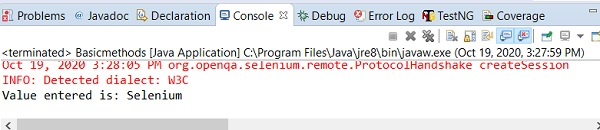

更新日期:26-Oct-2020
14K+ 浏览

广告