
 数据结构
数据结构 网络
网络 RDBMS
RDBMS 操作系统
操作系统 Java
Java MS Excel
 iOS
iOS HTML
HTML CSS
CSS Android
 Python
 C 编程
C 编程 C++
C++ C#
C# MongoDB
 MySQL
MySQL Javascript
 PHP
PHP 物理
物理 化学
化学 生物
生物 数学
数学 英语
英语 经济学
经济学 心理学
心理学 社会学
社会学 时尚研究
时尚研究 法律研究
法律研究如何使用 Selenium 获取 Web 元素的属性值(使用 Java 或 Python)?
我们可以使用 getAttribute 方法以及 Selenium webdriver 获取 Web 元素的属性值,然后将我们要获取其值的属性作为参数传递给该方法。
在 html 代码中,一个元素被定义为具有键值对的属性及其值。让我们尝试获取页面的以下元素的 class - heading −
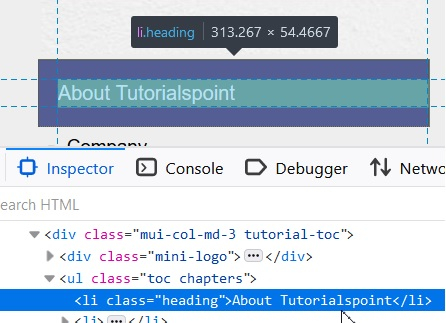
语法
WebElement t =driver.findElement(By.xpath("//li[text()='About Tutorialspoint']"));
String s = t.getAttribute("class");
示例
import org.openqa.selenium.By;
import org.openqa.selenium.WebDriver;
import org.openqa.selenium.WebElement;
import org.openqa.selenium.firefox.FirefoxDriver;
import java.util.concurrent.TimeUnit;
public class AttribtValue{
   public static void main(String[] args) {
      System.setProperty("webdriver.gecko.driver",
         "C:\Users\ghs6kor\Desktop\Java\geckodriver.exe");
      WebDriver driver = new FirefoxDriver();
      //implicit wait
      driver.manage().timeouts().implicitlyWait(5, TimeUnit.SECONDS);
      //URL launch
      driver.get("https://tutorialspoint.com/about/about_careers.htm");
      // identify element with xpath
      WebElement t =driver.
      findElement(By.xpath("//li[text()='About Tutorialspoint']"));
      //get value of class attribute
      String s = t.getAttribute("class");
      System.out.println("Class attribute value is : " + s);
      driver.close();
   }
}
输出


更新时间: 06-4-2021
2K+ 浏览量

广告