
 数据结构
数据结构 网络
网络 关系型数据库管理系统
 操作系统
操作系统 Java
Java MS Excel
 iOS
iOS HTML
HTML CSS
CSS Android
 Python
 C 程序设计
 C++
C++ C#
C# MongoDB
 MySQL
MySQL Javascript
 PHP
PHP 物理
物理 化学
化学 生物
生物 数学
数学 英语
英语 经济学
经济学 心理学
心理学 社会学
社会学 服装设计学
服装设计学 法学
法学HTML DOM touchstart 事件
当触摸屏被触摸时,触发 HTML DOM touchstart 事件。
注意 − 此事件仅适用于触控设备。
以下是语法 −
在 HTML 中触发 touchstart 事件 −
ontouchstart = "eventFunction()"
在 JavaScript 中触发 touchstart 事件 −
eventObject.ontouchstart = eventFunction
注意 − 我们在通过移动设备或拥有触控功能的系统访问的在线 HTML 编辑器中运行了触控事件示例。这样做是为了我们可以执行诸如在屏幕上触摸 2 秒钟之类的触控操作。
让我们看一个touchstart 事件属性的示例 −
示例
<!DOCTYPE html>
<html>
<head>
<title>HTML DOM touchstart event</title>
<style>
   form {
      width:70%;
      margin: 0 auto;
      text-align: center;
   }
   * {
      padding: 2px;
      margin:5px;
   }
   input[type="button"] {
      border-radius: 50%;
      font-size: 20px;
      padding: 20px;
      border: 5px solid rgb(220, 53, 69);
      background: rgba(220, 53, 69, 0.5);
      color: #fefefe;
   }
</style>
</head>
<body>
   <form>
      <fieldset>
         <legend>HTML-DOM-touchstart-event</legend>
         <label for="textSelect">Game Time</label>
         <input type="button" id="gameSelect" value="Hold On">
         <div id="divDisplay">Hold On for 1 - sec to Win</div>
      </fieldset>
   </form>
<script>
   var divDisplay = document.getElementById("divDisplay");
   var gameSelect = document.getElementById("gameSelect");
   var duration = 1000;
   var timer;
   gameSelect.ontouchstart = startEventAction;
   function startEventAction() {
      timer = setTimeout(victory, duration);
   }
   gameSelect.ontouchend = endEventAction;
   function endEventAction(){
      if(timer)
         clearTimeout(timer);
   }
   function victory(){
      divDisplay.textContent = "You Win"
   }
</script>
</body>
</html>
输出
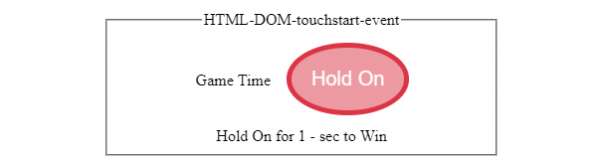
在触摸“Hold On”按钮之前 −
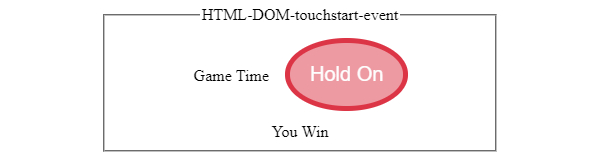
在触摸屏幕“Hold On”按钮之后 −

更新于: 2020 年 7 月 8 日
377 次浏览

广告