
 数据结构
数据结构 网络
网络 关系数据库管理系统
 操作系统
操作系统 Java
Java Microsoft Excel
 iOS
iOS HTML
HTML CSS
CSS Android
 Python
 C 编程
C 编程 C++
C++ C#
C# MongoDB
 MySQL
MySQL Javascript
 PHP
PHP 物理学
物理学 化学
化学 生物学
生物学 数学
数学 英语
英语 经济学
经济学 心理学
心理学 社会学
社会学 时尚学
时尚学 法律学
法律学HTMLplaceholder 属性
<input> 元素的 placeholder 属性用于设置输入项的提示,简要描述在该特定输入项中预期输入的内容。此属性适用于以下类型的输入:text、url、search、email、password 和 tel。它在 HTML5 中引入。
以下是语法 −
<input placeholder="placeholder_text">
在这里,placeholder_text 是简要的提示,即占位符,当用户访问该网页时,它们会看到此占位符。
现在让我们看一个示例以实现 <input> 元素的 placeholder 属性 −
示例
<!DOCTYPE html>
<html>
<body>
<h2>Register</h2>
<form action="" method="get">
   Id − <input type="text" name="id" placeholder="Enter UserId here..."><br>
   Password − <input type="password" name="pwd" placeholder="Enter password here..."><br>
   DOB − <input type="date" name="dob"><br>
   Telephone − <input type="tel" name="tel" placeholder="Enter mobile number here..."><br>
   Email − <input type="email" name="email" placeholder="Enter email here..."><br><br>
   <button type="submit" value="Submit">Submit</button>
</form>
</body>
</html>
输出
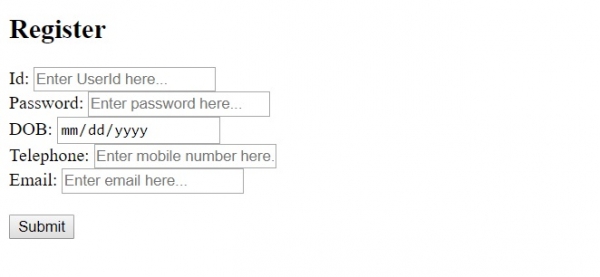
在上面的示例中,我们提供了一个带有一些字段的表单 −
<form action="" method="get">
   Id − <input type="text" name="id" placeholder="Enter UserId here..."><br>
   Password − <input type="password" name="pwd" placeholder="Enter password here..."><br>
   DOB − <input type="date" name="dob"><br>
   Telephone − <input type="tel" name="tel" placeholder="Enter mobile number here..."><br>
   Email − <input type="email" name="email" placeholder="Enter email here..."><br><br>
   <button type="submit" value="Submit">Submit</button>
</form>
所有字段均设置了占位符,如下所示 −
<input type="password" name="pwd" placeholder="Enter password here...">
只需使用 placeholder 属性并设置简要提示 −
placeholder="Enter password here..."

更新于: 30-Jul-2019
367 次浏览

广告